Your Agents Are Invisible (Part 2): Connecting Third-Party and Custom Agents with the Agent 365 SDK

Stencil art of a row of robot agents

Your Agents Are Invisible (Part 2):
Connecting Third-Party and Custom Agents with the Agent 365 SDK

Part 1 covered onboarding Microsoft-native agents and SaaS AI platforms — the paths that need configuration, not code. This part covers everything else: connecting agents that have no native integration — third-party frameworks and agents you build or run yourself.

The decision rule from Part 1: if an agent is missing from the M365 admin center inventory after the native-onboarding settings are in place, it needs the Microsoft Agent 365 SDK. That includes custom agents on Azure, developer and CLI agents on workstations, and any vendor framework without a native connector.

This post is lessons learned from lab work — a custom Claude-powered agent built, registered, and monitored end to end against the live Agent 365 backend — not a comprehensive guide. See the official Agent 365 SDK documentation for the complete setup.

What this part covers: the SDK identity model (the Entra objects you’ll be asked to consent to), one-time tenant enablement, registering an agent, two worked use cases (a Teams AI teammate powered by Claude, and a Claude usage collector feeding Sentinel), the telemetry format Agent 365 enforces, validating the result, and a security review checklist.

DAVID BROGGY  ·  2026-06-11  ·  PART 2 OF 2  ·  LAB-VERIFIED AGAINST THE LIVE AGENT 365 BACKEND
01
01 /

The SDK Identity Model

Before running any tooling, know what objects it creates — every one of them is an Entra object a security or identity administrator will govern later:

ObjectWhat it isWhy it matters to the admin
“Agent 365 CLI” appA well-known public client application the Agent 365 CLI authenticates throughOne per tenant; created and admin-consented during enablement. Its presence = the tenant is enabled.
BlueprintAn application object — the parent definition an agent is created fromPermissions granted here are inherited by every agent created from it. Least-privilege review starts at the blueprint.
Agent identityA service principal of type ServiceIdentity — the agent’s directory identityThis is what appears in Entra ID > Agents, holds the observability permission, and is the target for Conditional Access.
RegistrationThe record that lists the agent in the M365 admin center inventoryRegistration alone produces no activity data — it is inventory presence only.
Instance (optional)A running copy of an AI-teammate agent that users chat withCreated only after admin approval; instance invocations populate the sessions and active-user counts.
📷 SCREENSHOT TO ADD: a simple object-relationship diagram — Agent 365 CLI app (tenant-level) → blueprint → agent identity → registration → instance — with one line on which portal each appears in.
📷 SCREENSHOT TO ADD: Entra admin center showing the objects after a registration run (the blueprint under App registrations, and the agent identity under Entra ID > Agents).
02
02 /

One-Time Tenant Enablement

Before the SDK can register with the M365 admin center, the Azure tenant must be enabled for Agent 365. This is a separate prerequisite from licensing — a licensed tenant is not automatically an enabled one — and it is done once by the admin:

  • The Agent 365 CLI authenticates through the “Agent 365 CLI” public client app, which must exist in the tenant with admin consent for its Graph scopes (agent blueprint, identity, and registration permissions). a365 setup requirements creates and consents it.
  • Registration creates standard Entra objects — a blueprint application, an agent identity (a service principal of type ServiceIdentity), and the registration record. The agent’s observability permission is an app role on the Agent 365 observability resource and needs admin consent like any other application permission.
📷 SCREENSHOT TO ADD: a365 setup requirements output showing the requirements checks passing (or the Entra consent prompt for the Agent 365 CLI app).
03
03 /

Registering an Agent with the SDK

The Agent 365 SDK provides two separate capabilities, plus an optional third:

01
Register
Creates the agent’s directory objects in Entra: a blueprint (the parent definition), an agent identity, and a registration that lists the agent in the M365 admin center inventory. Registration alone produces no activity data.
02
Observability
SDK scopes wrap the agent’s work and emit the gen_ai span tree: an invoke_agent root per run, chat spans with model name and token counts, execute_tool spans per tool action.
03
AI teammate (optional)
Publishing the agent as a teammate lists it in the Teams agent store, where users can request an instance (their own running copy of the agent to chat with). Two tenant conditions apply: the tenant must be enrolled in Microsoft’s Frontier early-access program (M365 admin center > Copilot > Settings), and each instance request needs admin approval (M365 admin center > Agents > Requested). Approved-instance invocations are what populate the sessions and active-user columns in the admin center.

The SDK’s observability package is vendor-neutral. Microsoft also ships vendor-specific tooling extensions — including one for Anthropic’s Claude (npm: @microsoft/agents-a365-tooling-extensions-claude; Claude Enterprise only, standalone Claude accounts are not supported) — that handle the agent’s tool/MCP integration; telemetry itself comes from the shared observability package.

Notes from the lab build:

  • The agent ran on a local machine behind a dev tunnel, with no Azure compute. Registration and identity live in Entra; the runtime only needs a reachable messaging endpoint.
  • The tenant settings from Part 1 apply unchanged: an SDK-instrumented agent in an unlicensed tenant, or behind a disconnected Security-for-AI connector, shows nothing.

For new agent code, the Microsoft OpenTelemetry Distro emits the convention by default, and the get-started guide covers the CLI-driven setup.

📷 SCREENSHOT TO ADD: the registered custom agent appearing in M365 admin center > Agents > All agents after a365 setup completes.
📷 SCREENSHOT TO ADD: the agent listed in the Teams agent store (“Agents for your team”) after AI-teammate publishing, and/or the Agents > Requested approval queue.
04
04 /

Use Case 1: A Teams AI Teammate Powered by Claude

The SDK does not connect a Claude subscription to Agent 365 by itself. What gets built is one concrete artifact: a small web service — in the lab, a Node.js app of a few hundred lines — that exposes a messaging endpoint. That service is the agent as far as the tenant is concerned: the registration points at its endpoint, Teams delivers user messages to it, and its replies and telemetry come back from it.

Each incoming message follows the same loop: receive the message → authenticate as the agent → call Claude → reply to the user → emit the spans.
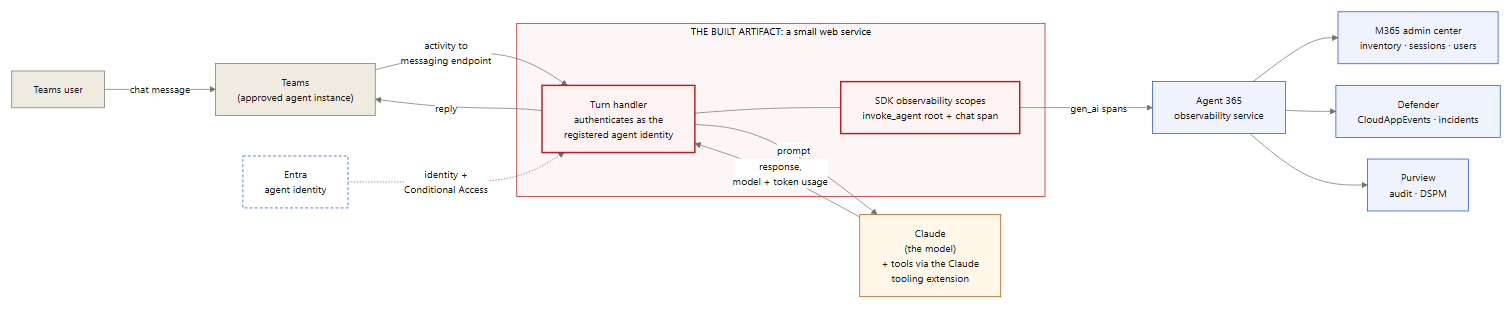
Use case 1 — Teams AI teammate powered by Claude

Use case 1 — a Teams user chats with the agent instance; the built web service authenticates as the registered agent identity, calls Claude, replies, and emits gen_ai spans to Agent 365.

The building blocks inside that service:

01
The wrapper app holds the agent identity
Registered via the CLI, it authenticates as the agent and receives invocations at its messaging endpoint.
02
Claude is the model inside
Per invocation, the app calls Claude and returns the response — the model name and token counts in the telemetry come from Claude itself.
03
SDK scopes produce the telemetry
The app wraps each Claude call in observability scopes: an invoke_agent root per run, with a chat span carrying the actual Claude model and token usage.
04
The Claude tooling extension handles tools, not telemetry
@microsoft/agents-a365-tooling-extensions-claude registers the agent’s tools/MCP servers with Claude (Claude Enterprise only).

The service can run anywhere its endpoint is reachable; in the lab it ran on a local machine behind a dev tunnel. This is the pattern the lab verified end to end.

05
05 /

Use Case 2: Monitoring Claude Usage on Windows Endpoints

The same SDK pattern supports a different job: a collector agent that watches what users do in the Claude application on their Windows devices and feeds that activity into the Microsoft security stack. Here the SDK-built service has no chat surface at all — its input is the local Claude usage/audit logs, and it emits two outputs:

01
Raw events to Microsoft Sentinel
The collector forwards parsed log events to a Sentinel custom table via the Logs Ingestion API, where analytics rules drive monitoring and alerting. (Agent 365 ingests traces only — raw log lines belong in Sentinel, not in the Agent 365 pipeline.)
02
User-attributed gen_ai spans to Agent 365
The collector represents observed Claude sessions as spans under its registered agent identity, attributed to the user via delegated identity — making the activity huntable in Defender with full user context. This attribution pattern is lab-verified.
Use case 2 — Claude log collector to Sentinel and Agent 365

Use case 2 — the collector reads local Claude logs and emits raw events to Sentinel (alerting) and user-attributed gen_ai spans to Agent 365 (inventory, hunting, audit).

How each service uses the telemetry:

ServiceWhat it receivesHow it’s used
Microsoft SentinelRaw Claude usage events (custom table), plus CloudAppEvents via the Defender XDR connectorAnalytics rules, alerting, incident correlation
M365 admin centerThe collector’s registration and activityInventory presence, session counts
Defender XDRThe user-attributed spans as CloudAppEvents rowsAdvanced hunting, custom detections on agent ActionTypes
Entra IDThe collector’s agent identityOwnership, Conditional Access, risk scoring — the collector is governed like any agent
PurviewThe collector’s interactions via the audit pipelineDSPM discovery, audit search

Caveats: what the local Claude application logs (and where) depends on the edition and version deployed — confirm log availability on a reference device before building. And the general rule from Part 1 applies: validate each leg at its destination (a Sentinel query for the custom table, the CloudAppEvents query for the spans), not from send-side success.

📷 SCREENSHOT TO ADD: Sentinel showing the custom table populated with Claude usage events (Logs > custom table query), and/or an analytics rule alerting on a seeded test event.
06
06 /

Agent 365 SDK Telemetry Requirements

The Format Rule

Agent 365 ingests OpenTelemetry traces only — no metrics, no logs. Every span must follow Microsoft’s gen_ai semantic convention. Spans in any other format are dropped individually, and the request still returns HTTP 200.

A trace is a tree of timed operations called spans. The gen_ai convention defines four span operation types: invoke_agent, chat, execute_tool, and output_messages. The first three cover most agent activity, and each maps to a Defender CloudAppEvents ActionType:

Span operationMeaningCloudAppEvents ActionType
invoke_agentOne agent run. The required root span — a run without it does not appear in the admin center.InvokeAgent
chatOne LLM call, carrying the model name and input/output token counts.InferenceCall
execute_toolOne tool action (a file read, a command, an API call), carrying the tool name and arguments.ExecuteToolBySDK / ByGateway / ByMCPServer

Ingestion enforces three rules:

01
Convention attributes on every span
Each span must carry a valid operation name, the agent identity, and the tenant ID. Spans that don’t are dropped individually, with no error.
02
A root invoke_agent span per run
Required for the run to surface in the admin center. Child spans without a root are only reachable through Defender advanced hunting.
03
Agent ID match in three places
The ingestion URL, the auth token, and every span must carry the same agent ID. A mismatch returns 403.

A note on the obvious shortcut: some tools (Claude Code among them) can emit OpenTelemetry natively, and pointing that output directly at Agent 365 appears to work — the request returns HTTP 200. Every span is rejected individually, because the names and attributes follow the vendor’s convention, not gen_ai. The direct OpenTelemetry integration path is for code you instrument yourself to emit the convention; it does not accept other formats.

The full wire specification is in the observability concepts documentation; read it before writing any integration.

07
07 /

Operational Use: Validating the Custom Agent

Validate in this order — each step depends on the one before it:

01
Inventory
The agent appears in M365 admin center > Agents > All agents (the Register capability worked).
02
Telemetry accepted
Spans are not rejected — then confirmed at the destination, never assumed from the HTTP response.
03
Hunting rows
CloudAppEvents shows the agent’s activity, attributed to both the agent and the invoking user (query below).
04
Sessions and users
If published as an AI teammate, the instance approval flow works (Agents > Requested) and instance chats populate the sessions/active-user columns after the ingestion lag (minutes to hours).
KQL — Validate Custom Agent Activity (Defender / CloudAppEvents)
CloudAppEvents | where Timestamp > ago(1d) | where ActionType in ("InvokeAgent", "InferenceCall", "ExecuteToolBySDK", "ExecuteToolByGateway", "ExecuteToolByMCPServer") | extend d = parse_json(RawEventData) | where tostring(d.TargetAgentId) == "<your-agent-id>" or tostring(d.AgentId) == "<your-agent-id>" | project Timestamp, ActionType, UserId = tostring(d.UserId), AgentId = tostring(d.AgentId), TargetAgentId = tostring(d.TargetAgentId), ConversationId = tostring(d.ConversationId)

Remember the field semantics from Part 1: AgentId is the caller (all-zeros for human-initiated runs); the invoked agent is in TargetAgentId; filter on both.

If the hunting query returns zero rows a day after setup, work backward: was the agent invoked; is the license assigned; is the Security-for-AI “Microsoft 365” connector connected; and is the telemetry actually in the gen_ai format.

📷 SCREENSHOT TO ADD: Defender > Advanced hunting showing the custom agent’s rows — InvokeAgent and InferenceCall ActionTypes with the user attribution visible.
08
08 /

Security Review Checklist for SDK Agents

Before an SDK-onboarded agent goes into production use, review it the way any new workload identity would be reviewed:

  • ☐ The agent identity has a named owner and sponsor (Entra ID > Agents).
  • ☐ The blueprint grants enumerated, least-privilege scopes — permissions granted at the blueprint are inherited by every agent created from it.
  • ☐ The observability app role consent is reviewed and recorded like any other application permission grant.
  • Conditional Access covers agent identities (Part 1, Entra section) — including this one.
  • ☐ Instance requests route through the admin approval queue, with an assigned approver.
  • ☐ The agent’s tool access is restricted to what its job requires — execute_tool telemetry only shows the tools the agent has, and tool access is also its attack surface.
09
09 /

Key Takeaways

Summary
Know the identity model before you run the tooling
The SDK creates real Entra objects — blueprint, agent identity, registration — and each one is something the identity team governs afterward.
Tenant enablement is one-time and separate from licensing
The “Agent 365 CLI” app with admin consent is the marker of an enabled tenant.
Registration and observability are separate capabilities
Inventory presence produces no activity data; both are required for monitoring.
The telemetry format is strict
Traces only, gen_ai convention, root invoke_agent span, agent ID matching in URL, token, and span — anything else is silently dropped with HTTP 200.
Validate in order
Inventory → telemetry accepted → hunting rows → sessions. The CloudAppEvents query is the proof; dashboards lag.
One SDK, multiple use cases
A Teams teammate and an endpoint log collector follow the same identity + telemetry pattern — only the input changes. Raw logs go to Sentinel; spans go to Agent 365.
Review SDK agents like workload identities
Owner, sponsor, least-privilege blueprint, consent records, Conditional Access coverage, and tool restriction.

Previous: Part 1 — the building blocks, onboarding Microsoft-native agents and SaaS AI platforms, and verifying agents in Defender.

/ REFERENCES

References

PART 2 OF 2  ·  LAB-VERIFIED FIELD NOTES  ·  IDENTIFIERS ANONYMIZED  ·  SIMPLE-SECURITY.CA

US National Cybersecurity Strategy

Based on the recent publication of the US National Cybersecurity Strategy, here are some practical suggestions for implementing cybersecurity solutions that loosely map to its guidelines:

  1. Defend Critical Infrastructure by:
  • Expanding the use of minimum cybersecurity requirements in critical sectors to ensure national security and public safety and harmonizing regulations to reduce the burden of compliance

Recommendation: Perform a gap analysis on your cybersecurity defenses. Start with a ‘master list of all recommended defenses and compare that to your organization’s tools’ Prioritize the implementation of any required defenses. Consider consolidation of security solutions under a single vendor’s licence agreement to save on costs. Create good architecture diagrams to describe your infrastructure from a cybersecurity perspective.

  • Enabling public-private collaboration at the speed and scale necessary to defend critical infrastructure and essential services

Recommendation: Create an inventory of all critical assets. If you’re a small org then a manual inventory is fine, otherwise consider a mature asset collection tool to help with this (google ‘asset inventory cybersecurity’ and you’ll get plenty of hits). Use your asset inventory to categorize critical assets and use this information in your SIEM to help with better correlations.

  • Defending and modernizing Federal networks and updating Federal incident response policy.

Recommendation: Review/create incident response policies and procedures. Consider creating specific response procedures that map to your SIEM incidents to improve clarity and incident response times.

  1. Disrupt and Dismantle Threat Actors by:
  • Using all instruments of national power, making malicious cyber actors incapable of threatening the national security or public safety of the United States
  • Strategically employing all tools of national power to disrupt adversaries
  • Engaging the private sector in disruption activities through scalable mechanisms
  • Addressing the ransomware threat through a comprehensive Federal approach and in lockstep with international partners.

Recommendation: Have a clear understanding of the ‘kill chains‘ that may affect your organization. Use Mitre ATT&CK  and your favorite security sites to help research threat actor groups. Identify security tools needed to detect/block attackers. Test/validate the effectiveness of those tools using Red/Blue/Purple team events.

  1. Shape Market Forces to Drive Security and Resilience by:
  • Placing responsibility on those within the digital ecosystem that are best positioned to reduce risk and shift the consequences of poor cybersecurity away from the most vulnerable in order to make the digital ecosystem more trustworthy
  • Promoting privacy and the security of personal data

Recommendation: Move data to the cloud and implement a data protection solution that not only tags and categorizes your data but locks out access if it’s stolen.

  • Shifting liability for software products and services to promote secure development practices
  • Ensuring that Federal grant programs promote investments in new infrastructure that are secure and resilient.
  1. Invest in a Resilient Future by: 
  • Reducing systemic technical vulnerabilities in the foundation of the Internet and across the digital ecosystem while making it more resilient against transnational digital repression

Recommendation: Implement a robust vulnerability assessment solution. Note that moving all your assets to the cloud can make this far easier to manage and can greatly benefit the effectiveness of your CSPM and SIEM.

  • Prioritizing cybersecurity R&D for next-generation technologies such as postquantum encryption, digital identity solutions, and clean energy infrastructure and developing a diverse and robust national cyber workforce.
  1. Forge International Partnerships to Pursue Shared Goals by:
  • Leveraging international coalitions and partnerships among like-minded nations to counter threats to the digital ecosystem through joint preparedness, response, and cost imposition
  • Increasing the capacity of partners to defend themselves against cyber threats, both in peacetime and in crisis; and working with allies and partners to make secure, reliable, and trustworthy global supply chains for information and communications technology and operational technology products and services.

Recommendation: Although many are reluctant to go back to the IBM days of putting all your security solutions into a single basket, cloud vendors and MSSPs have made great progress in the past 5+ years to provide a long list of services under one roof. When looking for one security product it’s very important to think broader and understand the interconnected values between all of your other security tools (XDR!). Security decision makers will often find that re-shuffling several of their security solutions makes more sense than just adding them one brick at a time.

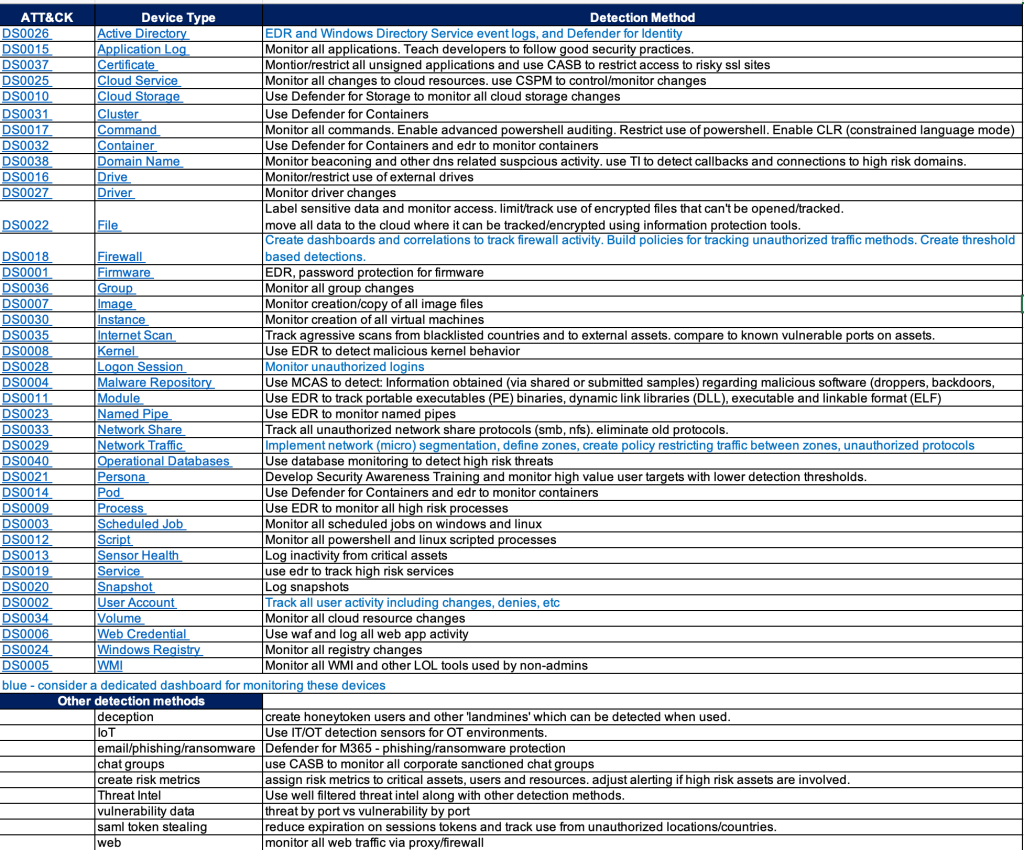
Mapping Cyber Defense Use Cases to Mitre ATT&CK Data Sources

Mitre ATT&CK provides so many ways to quantitatively think about approaches for defending against attackers.

However it can be challenging to map the ATT&CK matrix to to real-world defense methods.

One approach is to look at the ATT&CK data sources and research detections that would map to those data sources.

This still requires some experience and a bit of guessing since there doesn’t appear to be an easy button way to map data sources to detection tools.

Endpoint Detection vendors have done a pretty good job mapping detections to ATT&CK techniques but few of them share their mappings in a simple spreadsheet – that would greatly help validate your detection gaps.

SIEM products like Microsoft Sentinel have done a good job mapping detection rules AND log sources to ATT&CK.

The chart below is an example of an easy way to provide a path forward on where to focus efforts for detections. It also provides a gap analysis for any obvious security tools that may be missing in your environment.

And hopefully my short detection method recommendations will give you some ideas or at least stir conversation.

I’m a Microsoft Recognized Community Hero!

I’m very excited to have been recognized by Microsoft as an Azure Community Hero!

Having worked with (not employed by..) Microsoft for several years as a Security Solutions Advisor/Developer, in 2021/22 I began taking on more of a volunteer role finding ways to give back to the community in any ways I could find.

After several months of contributing on the Microsoft Q&A sites I was very surprised to receive this badge(r) of recognition which they title ‘Microsoft Azure Community Hero’.

So I hope you don’t mind me sharing in my happiness for this honor.

Isn’t it cute?

https://jumpnet.enjinx.io/eth/asset/68c0000000000065/183?source=EnjinWallet-1.15.1

Installing the Azure Arc Agent for Windows Event Collection(and more)

If your SIEM is Microsoft Sentinel, then you likely need to collect Windows security events.
If you’ve never heard of ‘Arc’ then you’re likely collecting Windows logs using the legacy ‘Log Analytics Agent (Microsoft Monitoring Agent)’.
Microsoft recommends using the Azure Arc agent, along with the Azure Monitoring Agent, which will get push out automatically once configured in Arc, or Azure Monitor, or Sentinel.

The Arc agent extends the security controls you normally only get from cloud servers to your on-prem servers, and simplifies the number of agents needed for on-prem servers to work with Azure.

A discussion about Arc/CSPM/Azure Policy/Defender for Cloud/Asset Inventory/Attack Surface is out of the scope of this article, but trust me, you want to use Arc for all your on-prem windows and linux servers.

Prerequisites for Arc:

  • Local admin access to the on-prem windows/linux server
  • Global Admin access to Azure
  • On-prem server must have Internet access or a direct connection to Azure.
  • Sentinel Log Analytics Workspace

ARC agent installation:

Azure Monitor Agent (AMA) Installation

  • You actually don’t need to install AMA.
  • You configure a ‘Data Collection Rule’ in Sentinel or Azure Monitor with the preferred parameters, and this will enable the AMA as an ‘Arc Extension’

Sentinel Connector AMA Setup

  • Since most of the topics in this blog are around Sentinel, that will be the configuration discussed here.
    • You can also configure this in Azure Monitor and in Azure Arc, but the data might not then be accessible as easily in Sentinel (it may get stored in the Events table vs the SecurityEvents table – see references below)
  • In Sentinel go to: Connectors > “Windows Security Events via AMA”
  • Create a ‘Data Connection Rule (DCR)’:
    • Add your servers
    • Select the ‘Common’ filter – this is the best choice for all of the Security Events.
  • After a few minutes you should see your on-prem security events in the SecurityEvents table.

References:

https://docs.microsoft.com/en-us/azure/azure-monitor/faq#azure-monitor-agent

https://docs.microsoft.com/en-us/azure/azure-monitor/agents/azure-monitor-agent-windows-client

O365 and Azure Security Portal Reference Links

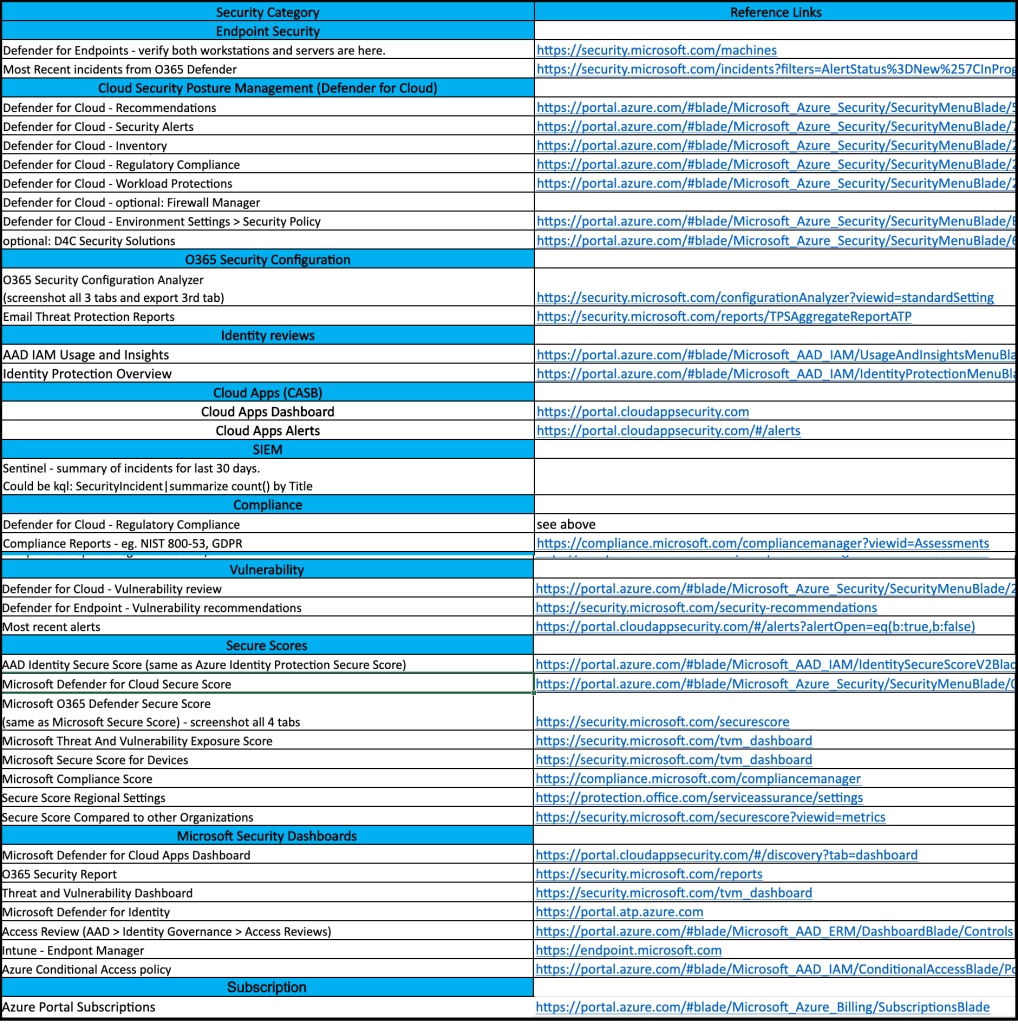
If you’re frequently involved with Microsoft security, it may be useful to maintain a list of the most common links.

If you’re a SOC analyst, some of these links will make good dashboards for your wall of 4k monitors.

If you’re a security engineer, this can be one of your checklists for walking around all things security related in the Microsoft cloud.

Since I don’t have any spreadsheet formatting plugins, the web links in the screenshot are listed below.

(This isn’t a comprehensive list of security related links, but something to grow on)

Reference Links

https://security.microsoft.com/machines https://security.microsoft.com/incidents?filters=AlertStatus%3DNew%257CInProgress https://portal.azure.com/#blade/Microsoft_Azure_Security/SecurityMenuBlade/5 https://portal.azure.com/#blade/Microsoft_Azure_Security/SecurityMenuBlade/7 https://portal.azure.com/#blade/Microsoft_Azure_Security/SecurityMenuBlade/25 https://portal.azure.com/#blade/Microsoft_Azure_Security/SecurityMenuBlade/22 https://portal.azure.com/#blade/Microsoft_Azure_Security/SecurityMenuBlade/26 https://portal.azure.com/#blade/Microsoft_Azure_Security/SecurityMenuBlade/EnvironmentSettings https://portal.azure.com/#blade/Microsoft_Azure_Security/SecurityMenuBlade/6 https://security.microsoft.com/configurationAnalyzer?viewid=standardSetting https://security.microsoft.com/reports/TPSAggregateReportATP https://portal.azure.com/#blade/Microsoft_AAD_IAM/UsageAndInsightsMenuBlade/Azure%20AD%20application%20activity https://portal.azure.com/#blade/Microsoft_AAD_IAM/IdentityProtectionMenuBlade/Overview https://portal.cloudappsecurity.com https://portal.cloudappsecurity.com/#/alerts https://compliance.microsoft.com/compliancemanager?viewid=Assessments https://portal.azure.com/#blade/Microsoft_Azure_Security/SecurityMenuBlade/26 https://security.microsoft.com/security-recommendations https://portal.cloudappsecurity.com/#/alerts?alertOpen=eq(b:true,b:false) https://portal.azure.com/#blade/Microsoft_AAD_IAM/IdentitySecureScoreV2Blade https://portal.azure.com/#blade/Microsoft_Azure_Security/SecurityMenuBlade/0 https://security.microsoft.com/securescore https://security.microsoft.com/tvm_dashboard https://compliance.microsoft.com/compliancemanager https://protection.office.com/serviceassurance/settings https://security.microsoft.com/securescore?viewid=metrics https://portal.cloudappsecurity.com/#/discovery?tab=dashboard https://security.microsoft.com/reports https://security.microsoft.com/tvm_dashboard https://portal.atp.azure.com https://portal.azure.com/#blade/Microsoft_AAD_ERM/DashboardBlade/Controls https://endpoint.microsoft.com https://portal.azure.com/#blade/Microsoft_AAD_IAM/ConditionalAccessBlade/Policies https://portal.azure.com/#blade/Microsoft_Azure_Billing/SubscriptionsBlade

KQL Challenge Solutions

Challenge #1; Create a query that uses a watchlist

let attack=_GetWatchlist(‘attack’);
SecurityAlert
|extend Severity = “T1040”
|join attack on $left.Severity == $right.Tactic
|distinct Defense

Challenge #2: Create a timechart based query

Event
| where Source == “Microsoft-Windows-Sysmon”
|where EventID <> 255
| where TimeGenerated >= ago(180d)
| summarize count() by bin(TimeGenerated, 1d)
|render columnchart

Chalenge #3: use mv-expand to view the entities fields

SecurityAlert
| extend Entities = iff(isempty(Entities), todynamic(‘[{“dummy” : “”}]’), todynamic(Entities))
|mv-expand Entities
|extend HostName_ = tostring(Entities.HostName)
|where HostName_ <> “”
|where HostName_ contains “{Hostname}”
|project HostName_

Bonus challenge: use GeoIP to map to country

“let IP_Data = external_data(network:string,geoname_id:long,continent_code:string,continent_name:string ,country_iso_code:string,country_name:string,is_anonymous_proxy:bool,is_satellite_provider:bool)
[‘https://raw.githubusercontent.com/datasets/geoip2-ipv4/master/data/geoip2-ipv4.csv’%5D;
let IPs =
CommonSecurityLog
|where DeviceVendor == “”Fortinet””
//filter out private networks
|where not(ipv4_is_private(SourceIP)) and not(ipv4_is_private(DestinationIP))
|summarize by SourceIP
;
IPs
| evaluate ipv4_lookup(IP_Data, SourceIP, network, return_unmatched = true)”

Learning KQL for Azure Sentinel

One of the first skills to acquire when learning a SIEM is it’s query language.

Microsoft Sentinel (and many of Microsoft’s tools) use KQL – Kusto Query Language.

If you want to learn more about what KQL is, go here.

This blog is simply a super quick reference for getting started.

  • Step #1: Open the lab link below
  • Step #2: Watch the 3 tutorials listed below
  • Step #3: Practice! 3 kql challenges are provided. One possible solution to these challenges will be provided on another blog page.

https://aka.ms/lademo

Azure Sentinel webinar: Learn the KQL you need for Azure Sentinel (Part 1 of 3)

Azure Sentinel webinar: KQL part 2 of 3 – KQL hands-on lab exercises

Azure Sentinel webinar: KQL part 3 of 3 – Optimizing Azure Sentinel KQL queries performance

KQL Query Challenges

Challenge #1; Create a query that uses a watchlist

Challenge #2: Create a timechart based query

Challenge #3: use mv-expand to view the entities fields

Bonus challenge: use GeoIP to map to country

Solutions are here

Simple Guide to Cyber Resiliency in Azure/O365

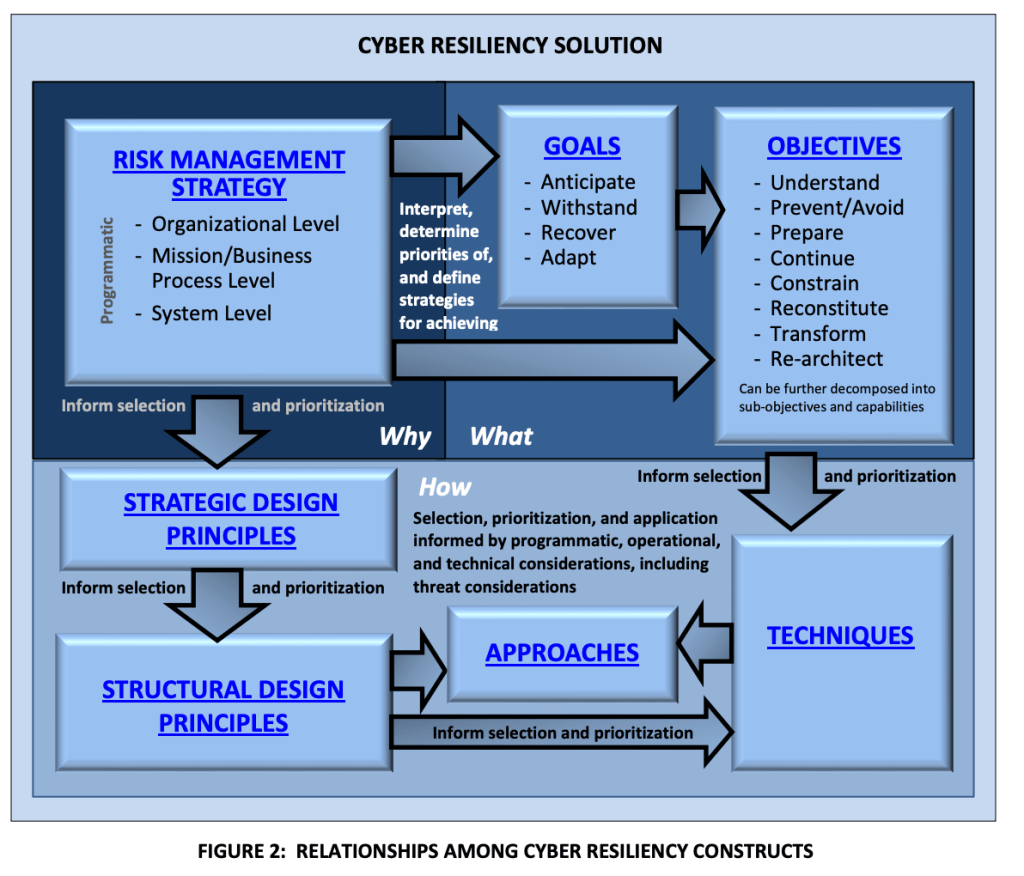
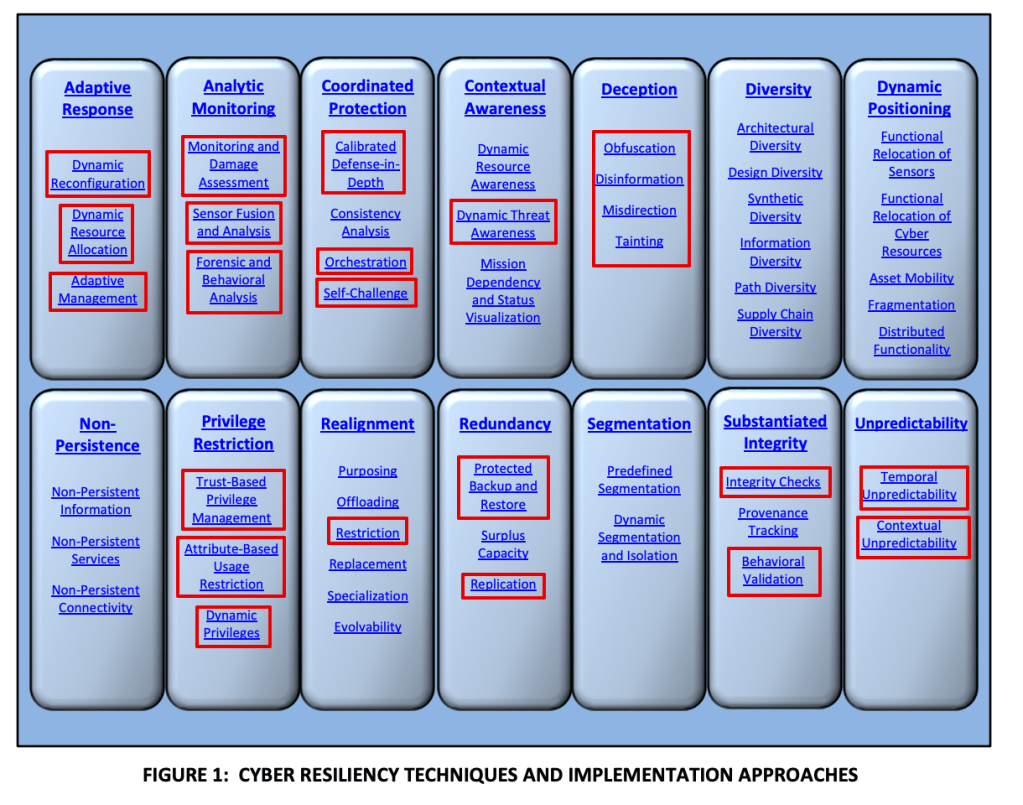
So I skimmed NIST 800-160 V2 – it’s all about ‘Cyber Resiliency’.

What is cyber resiliency?

“The ability to deliver an intended outcome, despite adverse cyber events”

My thoughts on NIST 800-160 vol 2:

Once you understand the basics you might consider these points as a starting approach:

Perform a ‘cyber resilience maturity audit’

Using 800-160 V2 create a checklist to discuss and better understand your organization’s maturity around cyber resiliency.

Identify security tools to enable and improve on your cyber resiliency, eg:

Microsoft Defender for Cloud – Use the built in NIST regulatory standsards to enforce configuration of resources with resilience – eg. don’t allow VMs without backups enabled and redundancy features configured.

O365 Compliance Manager – Create assessments using the NIST templates to identify misconfigurations.

Microsoft Secure Scores – use the several available Secure Scores in O365 and Azure to improve security posture.

Sentinel – Configure alerts to monitor resiliency related issues.

Some more references

High level objectives:

Areas in red can be monitored using Sentinel and Defender for Cloud (and possibly more, just what I know about):

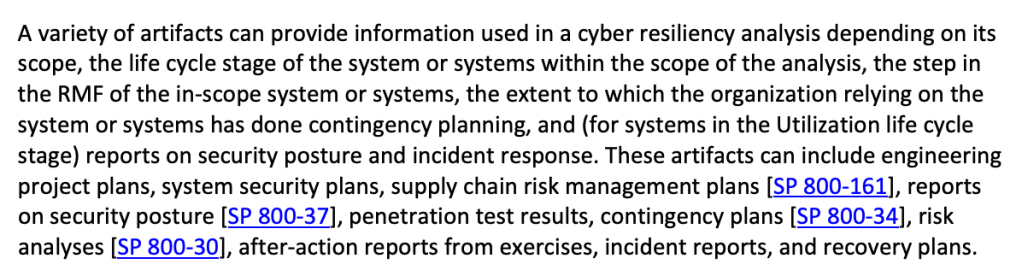
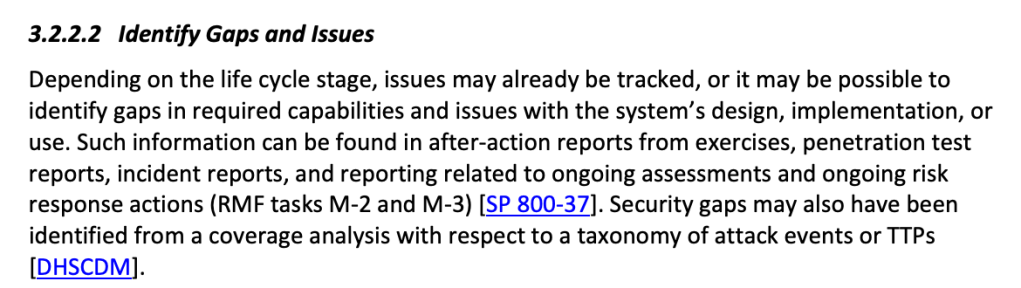
Here is where 800-160 refers to other NIST controls, some of which are templates within Defender for cloud and O365 Compliance Manager (800-70 and 800-37 are premium templates so extra $$):

References

CSF – general cyber security framework

https://www.nist.gov/cyberframework/framework

800-53 – Security and Privacy Controls for Federal Information Systems and Organizations

800-171 – information protection

800-160 – Cyber Resiliency

Troubleshooting CEF syslog feeding up to Microsoft Sentinel

There are some excellent tips on testing CEF logs here.

https://techcommunity.microsoft.com/t5/microsoft-sentinel-blog/ingest-sample-cef-data-into-azure-sentinel/ba-p/1064158

I’d suggest:

Run this command as a validation test:

logger -p local4.warn -t CEF “CEF:0|Microsoft|ATA|1.9.0.0|AbnormalSensitiveGroupMembershipChangeSuspiciousActivity|Abnormal modification of sensitive groups|5|start=2018-12-12T18:52:58.0000000Z app=GroupMembershipChangeEvent suser=krbtgt msg=krbtgt has uncharacteristically modified sensitive group memberships. externalId=2024 cs1Label=url cs1=https://192.168.0.220/suspiciousActivity/5c113d028ca1ec1250ca0491

Then replace the sample log with your own and see if it also gets through.

Also verify that if you remove your rsyslog CEF filter that the logs at least get to syslog. If they do, then it’s possible this is an unsupported CEF format. Which isn’t terrible because you can still parse the logs using KQL.

To check if your logs are event getting to your syslog server use tcpdump eg:
tcpdump -i any port syslog -A -s0 -nn

And note that you could be seeing your logs with the above tcpdump command but they’re still not getting to Sentinel. In that case check if the local firewall rules are blocking syslog.

If you find out it’s an unsupported CEF format it’s still possible to fix but it likely involves regex changes to the rsyslog configuration in security_events.conf or elsewhere. (see reference below).

Reference:
https://docs.microsoft.com/en-us/azure/sentinel/troubleshooting-cef-syslog?tabs=rsyslog