

Your Agents Are Invisible (Part 2):
Connecting Third-Party and Custom Agents with the Agent 365 SDK
Part 1 covered onboarding Microsoft-native agents and SaaS AI platforms — the paths that need configuration, not code. This part covers everything else: connecting agents that have no native integration — third-party frameworks and agents you build or run yourself.
The decision rule from Part 1: if an agent is missing from the M365 admin center inventory after the native-onboarding settings are in place, it needs the Microsoft Agent 365 SDK. That includes custom agents on Azure, developer and CLI agents on workstations, and any vendor framework without a native connector.
This post is lessons learned from lab work — a custom Claude-powered agent built, registered, and monitored end to end against the live Agent 365 backend — not a comprehensive guide. See the official Agent 365 SDK documentation for the complete setup.
What this part covers: the SDK identity model (the Entra objects you’ll be asked to consent to), one-time tenant enablement, registering an agent, two worked use cases (a Teams AI teammate powered by Claude, and a Claude usage collector feeding Sentinel), the telemetry format Agent 365 enforces, validating the result, and a security review checklist.
The SDK Identity Model
Before running any tooling, know what objects it creates — every one of them is an Entra object a security or identity administrator will govern later:
| Object | What it is | Why it matters to the admin |
|---|---|---|
| “Agent 365 CLI” app | A well-known public client application the Agent 365 CLI authenticates through | One per tenant; created and admin-consented during enablement. Its presence = the tenant is enabled. |
| Blueprint | An application object — the parent definition an agent is created from | Permissions granted here are inherited by every agent created from it. Least-privilege review starts at the blueprint. |
| Agent identity | A service principal of type ServiceIdentity — the agent’s directory identity | This is what appears in Entra ID > Agents, holds the observability permission, and is the target for Conditional Access. |
| Registration | The record that lists the agent in the M365 admin center inventory | Registration alone produces no activity data — it is inventory presence only. |
| Instance (optional) | A running copy of an AI-teammate agent that users chat with | Created only after admin approval; instance invocations populate the sessions and active-user counts. |
One-Time Tenant Enablement
Before the SDK can register with the M365 admin center, the Azure tenant must be enabled for Agent 365. This is a separate prerequisite from licensing — a licensed tenant is not automatically an enabled one — and it is done once by the admin:
- ▸The Agent 365 CLI authenticates through the “Agent 365 CLI” public client app, which must exist in the tenant with admin consent for its Graph scopes (agent blueprint, identity, and registration permissions).
a365 setup requirementscreates and consents it. - ▸Registration creates standard Entra objects — a blueprint application, an agent identity (a service principal of type ServiceIdentity), and the registration record. The agent’s observability permission is an app role on the Agent 365 observability resource and needs admin consent like any other application permission.
a365 setup requirements output showing the requirements checks passing (or the Entra consent prompt for the Agent 365 CLI app).Registering an Agent with the SDK
The Agent 365 SDK provides two separate capabilities, plus an optional third:
gen_ai span tree: an invoke_agent root per run, chat spans with model name and token counts, execute_tool spans per tool action.The SDK’s observability package is vendor-neutral. Microsoft also ships vendor-specific tooling extensions — including one for Anthropic’s Claude (npm: @microsoft/agents-a365-tooling-extensions-claude; Claude Enterprise only, standalone Claude accounts are not supported) — that handle the agent’s tool/MCP integration; telemetry itself comes from the shared observability package.
Notes from the lab build:
- ▸The agent ran on a local machine behind a dev tunnel, with no Azure compute. Registration and identity live in Entra; the runtime only needs a reachable messaging endpoint.
- ▸The tenant settings from Part 1 apply unchanged: an SDK-instrumented agent in an unlicensed tenant, or behind a disconnected Security-for-AI connector, shows nothing.
For new agent code, the Microsoft OpenTelemetry Distro emits the convention by default, and the get-started guide covers the CLI-driven setup.
a365 setup completes.Use Case 1: A Teams AI Teammate Powered by Claude
The SDK does not connect a Claude subscription to Agent 365 by itself. What gets built is one concrete artifact: a small web service — in the lab, a Node.js app of a few hundred lines — that exposes a messaging endpoint. That service is the agent as far as the tenant is concerned: the registration points at its endpoint, Teams delivers user messages to it, and its replies and telemetry come back from it.
Each incoming message follows the same loop: receive the message → authenticate as the agent → call Claude → reply to the user → emit the spans.
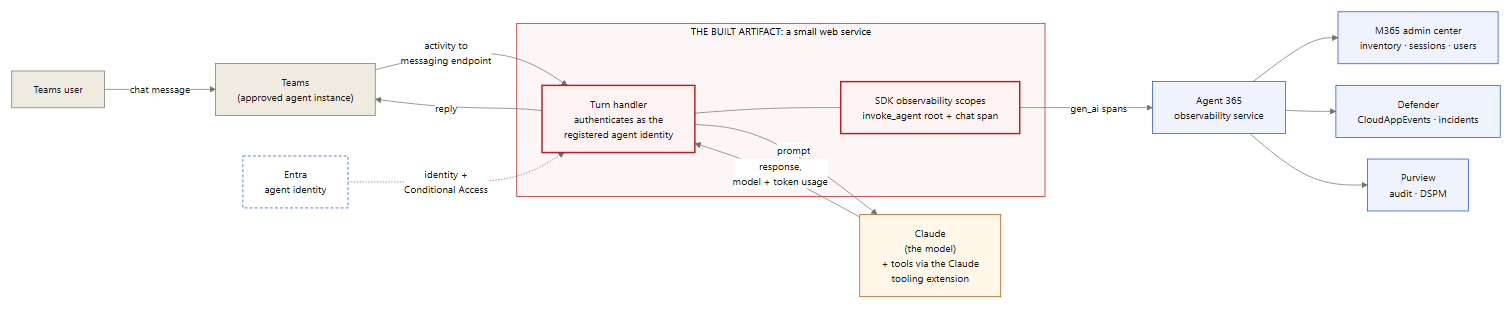
Use case 1 — a Teams user chats with the agent instance; the built web service authenticates as the registered agent identity, calls Claude, replies, and emits gen_ai spans to Agent 365.
The building blocks inside that service:
invoke_agent root per run, with a chat span carrying the actual Claude model and token usage.@microsoft/agents-a365-tooling-extensions-claude registers the agent’s tools/MCP servers with Claude (Claude Enterprise only).The service can run anywhere its endpoint is reachable; in the lab it ran on a local machine behind a dev tunnel. This is the pattern the lab verified end to end.
Use Case 2: Monitoring Claude Usage on Windows Endpoints
The same SDK pattern supports a different job: a collector agent that watches what users do in the Claude application on their Windows devices and feeds that activity into the Microsoft security stack. Here the SDK-built service has no chat surface at all — its input is the local Claude usage/audit logs, and it emits two outputs:
gen_ai spans to Agent 365
Use case 2 — the collector reads local Claude logs and emits raw events to Sentinel (alerting) and user-attributed gen_ai spans to Agent 365 (inventory, hunting, audit).
How each service uses the telemetry:
| Service | What it receives | How it’s used |
|---|---|---|
| Microsoft Sentinel | Raw Claude usage events (custom table), plus CloudAppEvents via the Defender XDR connector | Analytics rules, alerting, incident correlation |
| M365 admin center | The collector’s registration and activity | Inventory presence, session counts |
| Defender XDR | The user-attributed spans as CloudAppEvents rows | Advanced hunting, custom detections on agent ActionTypes |
| Entra ID | The collector’s agent identity | Ownership, Conditional Access, risk scoring — the collector is governed like any agent |
| Purview | The collector’s interactions via the audit pipeline | DSPM discovery, audit search |
Caveats: what the local Claude application logs (and where) depends on the edition and version deployed — confirm log availability on a reference device before building. And the general rule from Part 1 applies: validate each leg at its destination (a Sentinel query for the custom table, the CloudAppEvents query for the spans), not from send-side success.
Agent 365 SDK Telemetry Requirements
Agent 365 ingests OpenTelemetry traces only — no metrics, no logs. Every span must follow Microsoft’s gen_ai semantic convention. Spans in any other format are dropped individually, and the request still returns HTTP 200.
A trace is a tree of timed operations called spans. The gen_ai convention defines four span operation types: invoke_agent, chat, execute_tool, and output_messages. The first three cover most agent activity, and each maps to a Defender CloudAppEvents ActionType:
| Span operation | Meaning | CloudAppEvents ActionType |
|---|---|---|
| invoke_agent | One agent run. The required root span — a run without it does not appear in the admin center. | InvokeAgent |
| chat | One LLM call, carrying the model name and input/output token counts. | InferenceCall |
| execute_tool | One tool action (a file read, a command, an API call), carrying the tool name and arguments. | ExecuteToolBySDK / ByGateway / ByMCPServer |
Ingestion enforces three rules:
invoke_agent span per runA note on the obvious shortcut: some tools (Claude Code among them) can emit OpenTelemetry natively, and pointing that output directly at Agent 365 appears to work — the request returns HTTP 200. Every span is rejected individually, because the names and attributes follow the vendor’s convention, not gen_ai. The direct OpenTelemetry integration path is for code you instrument yourself to emit the convention; it does not accept other formats.
The full wire specification is in the observability concepts documentation; read it before writing any integration.
Operational Use: Validating the Custom Agent
Validate in this order — each step depends on the one before it:
CloudAppEvents shows the agent’s activity, attributed to both the agent and the invoking user (query below).CloudAppEvents
| where Timestamp > ago(1d)
| where ActionType in ("InvokeAgent", "InferenceCall",
"ExecuteToolBySDK", "ExecuteToolByGateway", "ExecuteToolByMCPServer")
| extend d = parse_json(RawEventData)
| where tostring(d.TargetAgentId) == "<your-agent-id>"
or tostring(d.AgentId) == "<your-agent-id>"
| project Timestamp, ActionType,
UserId = tostring(d.UserId),
AgentId = tostring(d.AgentId),
TargetAgentId = tostring(d.TargetAgentId),
ConversationId = tostring(d.ConversationId)Remember the field semantics from Part 1: AgentId is the caller (all-zeros for human-initiated runs); the invoked agent is in TargetAgentId; filter on both.
If the hunting query returns zero rows a day after setup, work backward: was the agent invoked; is the license assigned; is the Security-for-AI “Microsoft 365” connector connected; and is the telemetry actually in the gen_ai format.
Security Review Checklist for SDK Agents
Before an SDK-onboarded agent goes into production use, review it the way any new workload identity would be reviewed:
- ▸☐ The agent identity has a named owner and sponsor (Entra ID > Agents).
- ▸☐ The blueprint grants enumerated, least-privilege scopes — permissions granted at the blueprint are inherited by every agent created from it.
- ▸☐ The observability app role consent is reviewed and recorded like any other application permission grant.
- ▸☐ Conditional Access covers agent identities (Part 1, Entra section) — including this one.
- ▸☐ Instance requests route through the admin approval queue, with an assigned approver.
- ▸☐ The agent’s tool access is restricted to what its job requires —
execute_tooltelemetry only shows the tools the agent has, and tool access is also its attack surface.
Key Takeaways
Previous: Part 1 — the building blocks, onboarding Microsoft-native agents and SaaS AI platforms, and verifying agents in Defender.
References
- Agent 365 SDKMicrosoft Learn
- Agent 365 CLIMicrosoft Learn
- Get started with Agent 365 developmentMicrosoft Learn
- Agent 365 observability conceptsMicrosoft Learn
- Microsoft OpenTelemetry DistroMicrosoft Learn
- Direct OpenTelemetry integrationMicrosoft Learn
- Microsoft Agent 365 overviewMicrosoft Learn
- Agent 365 Tooling SDK for Claude (npm)npm
- Logs Ingestion API in Azure MonitorMicrosoft Learn
- Create custom analytics rules in Microsoft SentinelMicrosoft Learn
- Connect Microsoft Defender XDR data to Microsoft SentinelMicrosoft Learn

