With the passing of ‘Cyber Deception Day’ (appropriately held on April 1) there’s been some resurgence of interest in cyber deception tools and techniques (also known as ‘active detection‘).
My approach:
Know your enemy: Research Mitre ATT&CK to identify techniques used by your adversaries.
Deceive your enemy: Use Mitre D3FEND to learn techniques to defend against your adversaries using deception techniques.
Detect your enemy: Apply defensive tools/methods to detect and respond to the deception triggers you’ve laid out (endpoint detection, os and cloud event logging, SIEM, SOAR)
Here are some ideas for ways to add ‘deceptions’ to your network w/o having to jump into a pro solution (I’m not against $$ but I suggest that as a next step)
Note: most of these suggestions imply a “landmine” approach – i.e. don’t worry about clever deceptions, start with just triggering alarms on things people shouldn’t be touching.
If you want to get to the ‘high interaction level‘ of deception, you’ll probably need a professional product.
robots.txt – embed ‘breadcrumbs’ in common places where hackers will visit.
When you’re done with the homegrown stuff, and you’re ready to justify the need for a full-coverage and lower maintenance solution, here are some of the top product vendors for deception tools:
And I’m talking real smoking guns, not crappy anomaly alerts.
From my experience, the most effective use cases for threat detection are those which simply:
Provide a list of detections which have a high confidence of threat
Look for validations which follow the detection.
So:
Here’s an example for logic that would provide good use cases involving malicious intent:
First create a list of detections that provide very high confidence of a threat.
This is easier than you think if you’ve been using a SIEM for some time.
Just look back at both rules that have fired and those which have not.
The ‘have not fired’ rules like ‘Hafnium detected’ are likely very fined rules so when they do alert it’s likely for good reason.
The rules that have fired, are consistently a true positive, and identify as a threat, is likely a very short list.
Follow that with evidence from 1 or more additional alerts to ‘validate’ the first alert.
The ‘direction’ of the action might also be important, eg: Inbound > outbound detection with validation of sustained activity.
Here’s a couple of specific examples:
Detection: EDR callback
Relevant entities: src_ip and dest_ip
Validation1: EDR detection fires a 2nddistinct threat alert at src_ip
Validation2:Firewall traffic continues for 15 min to dest_ip
Email Malware ‘onclick=true’ (user clicked on a malicious link)
Then followed by logic from rule #1 above.
Additional thoughts:
Validations do not have to be part of the SIEM threat detection. They can be added from SOAR playbook(s) and apply ‘tags’ to the alert, which can in turn be used by other correlations or SOAR playbooks. Eg. tag: EDR_distinct_threats=2, callback_distinct_count=2
This means the correlations become VERY simple and the validation or ‘recorrelations’ steps are done by the SOAR action.
By using SOAR you can provide full automation of an action by isolating a machine, disabling a user etc.
There should be pressure put on vendors to provide a ‘metric of confidence’ on specific detections. i.e. does ‘High’ really mean High? This makes it easier to create use cases with clear malicious intent since you wouldn’t have to manually compile a list of high confidence detections.
Some thoughts on high confidence alerts:
Most Sentinel analytic rules with a value of High are high confidence.
Deception related alerts – this is a new term for many, but it’s catching on.
Callbacks – Fireeye first made these famous and they’re still a good example of a reliable alert.
Settings > data inputs > windows event logs > new windows remote event log > [you should see your windows pc so add it] > add ‘security’ > add it to an index
Monitoring an adversary’s movements as it relates to your organization.
Your SIEM likely contains a great deal of information which can be mapped by country. That’s all you need to get started with a dashboard to see at a high level how those countries – or adversaries – are affecting your organization’s security posture.
Start with creating dashboards for the following, using Russia as an example:
outside > in: top destination IPs/domains FROM Russia
inside > out: top ip/domain sources TO Russia
users associated with any Russian IPs/domains.
asset mapping by criticality associated with Russian IPs (this asset list is likely something you’d have to build, but hopefully you’re already maintaining a good asset list)
timeline graph – all activity from all sources by volume over time associated with Russian IPs/domains
Some SIEMs are better than others with mapping IPs/domains to a country. Here’s a query example for doing it in Microsoft Sentinel on WAF events using a geoip reference table:
let geoData =
materialize (externaldata(network:string,geoname_id:string,continent_code:string,continent_name:string,
country_iso_code:string,country_name:string,is_anonymous_proxy:string,is_satellite_provider:string)
[@"https://raw.githubusercontent.com/datasets/geoip2-ipv4/master/data/geoip2-ipv4.csv"] with
(ignoreFirstRecord=true, format="csv"));
let lookup = toscalar( geoData | summarize list_CIDR=make_set(network) );
AzureDiagnostics
| where Category contains "ApplicationGateway"
| where Message contains "Inbound Anomaly Score Exceeded"
|summarize by clientIp_s
| mv-apply list_CIDR=lookup to typeof(string) on
(
where ipv4_is_match (clientIp_s, list_CIDR) //== false
)
| join kind=rightouter (AzureDiagnostics | where TimeGenerated > ago(7d)) on clientIp_s
| join kind=leftouter
(
geoData
) on $left.list_CIDR == $right.network
|summarize count() by clientIp_s, country_name, hostname_s
|where clientIp_s <> ""
|order by count_ desc
| where country_name == "Russia"
| where count_ >= 10
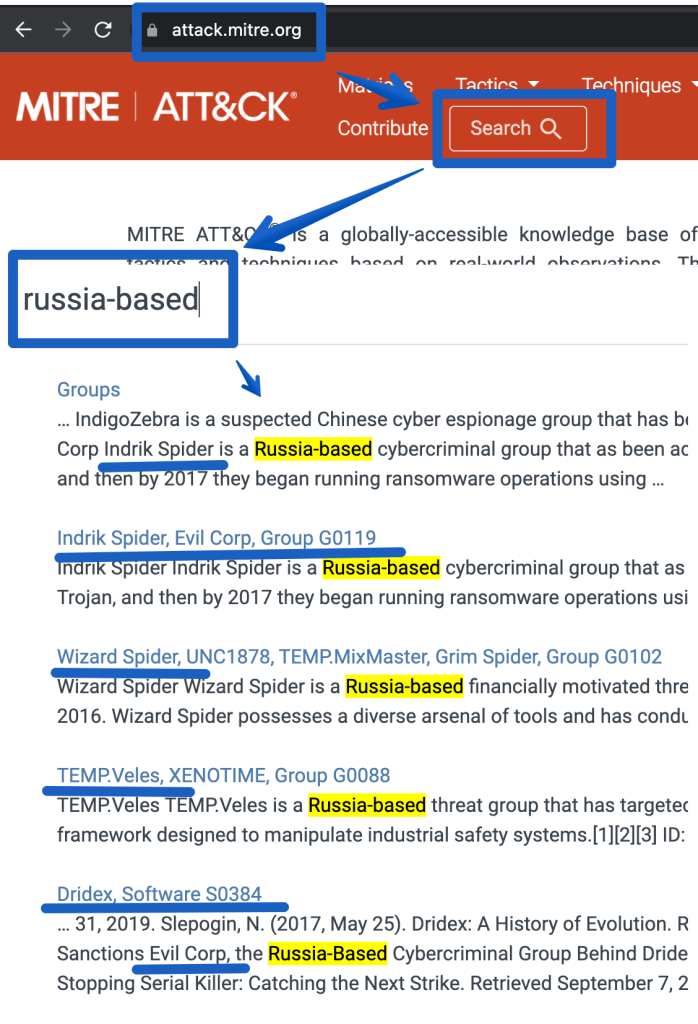
Next, research past history from attackers in that country. Go to Mitre’s ATT&CK site and search for the attack groups of interest:
The next step would be to go deeper and identify ‘entities’ that are specific to using these attacks, such as:
IP/domains from threat intel feeds
attacks/techniques that map to the above attack groups in the ATT&CK matrix. Click on the links above to see more details. (eg. T1059 – powershell scripting using Empire)
malware/endpoint (EDR) and network detections (proxy/nids/firewall) specific to the ATT&CK groups listed above. Many of these tools support ATT&CK mappings so with some luck you just have to create a list of the Mitre Technique numbers (eg. T1059) and you’re off.
Use the information above to create SIEM correlations. Add these alerts to your workbook/dashboard to show near real time detections as they are seen. Example correlations may include:
events mapping to a threat intel feed related to the adversaries in question
alerts related to 4 or more distinct Mitre Techniques in question.
EDR/IDS events mapping to the adversaries in question
malware NOT cleaned AND traffic to Russia or a known-bad-ip for the past 15 minutes.
SOAR example: create a playbook to map all alerts to APTs and TAG them as ‘MITRE APT: Russia’ use threat intel for the logic or another detection method)
Add metrics to your dashboard for management to see MTTD/MTTR (mean time to detect/respond).
If you manage a single cloud tenant with a single subscription, roles and responsibilities for security can usually be maintained by a small SecOps team.
But if your organization has dozens or hundreds of departments, the need for a much more hierarchical structure can quickly become difficult for a single security team to maintain control over.
So what can happen is departments are handed over the role of the security administrator for their own resources and users.
And before you know it, SecOps has lost control of who’s making changes to what.
Fear not, this isn’t a terrible thing, but it’s important to put checks in place to ensure simple practices are being followed.
One approach:
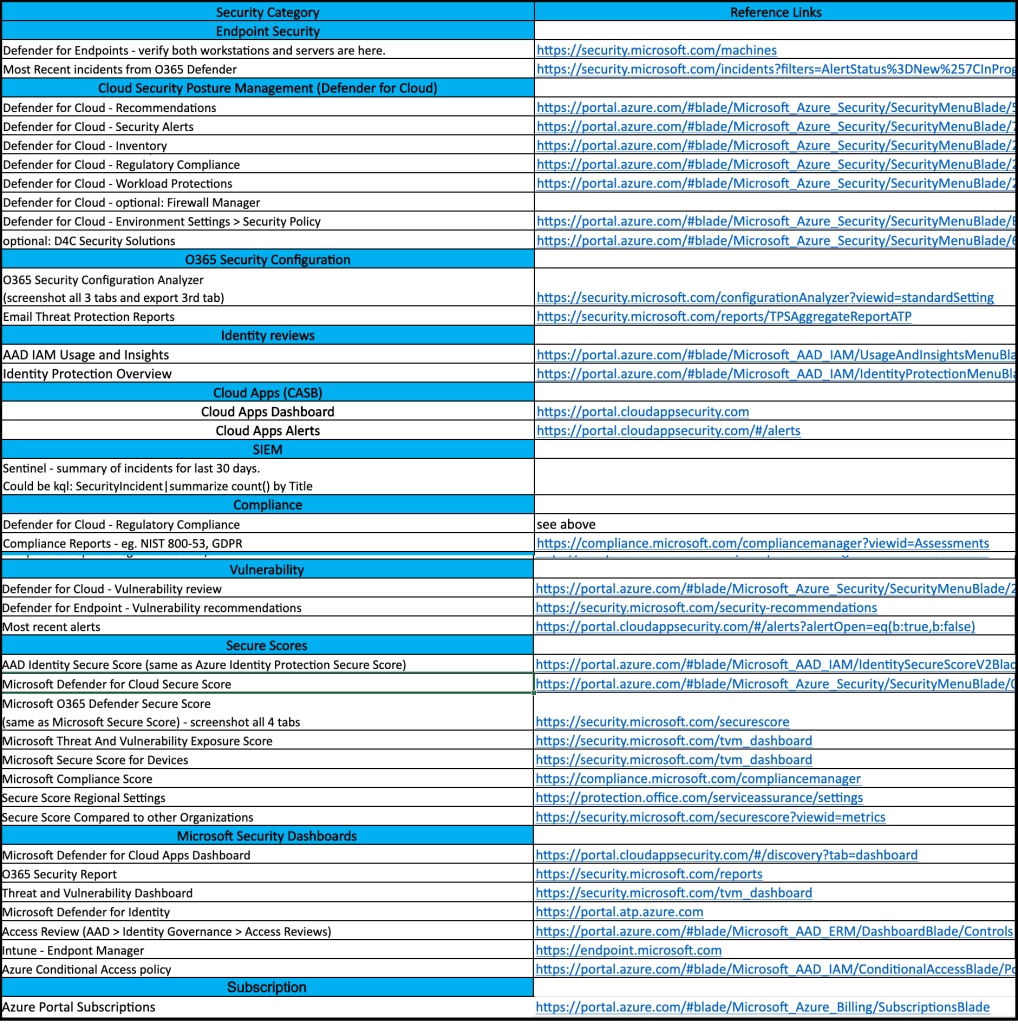
Perform a security audit that provides a list of the security categories of interest. (This audit should provide both high level and lower level topics, so you can easily end up with hundreds of checks). Example high level topics:
Identity & Access Controls
Logging, Monitoring and Reporting
Data Protection
Network Security
Endpoint Protection
Inventory Management
Configuration Management
Vulnerability Management
Create a list of relevant security checks from the above audit (this checklist is much shorter than the original security audit, since these departmental security admins have a much smaller list of security responsibilities).
Identify a security owner for each relevant department/group
Require each security owner to perform periodic checks and report back to the SecOps team.
Not only does the above approach provide clear security checks/responsibilities to the security owners, but it gives the SecOps team a way to track security in a growing organization without getting overwhelmed. It also ensures that as security owners come and go from the organization, that the new owners will be quickly identified by the SecOps team, thus avoiding gaps in maintaining security controls.