Troubleshooting CEF syslog feeding up to Microsoft Sentinel

There are some excellent tips on testing CEF logs here.

https://techcommunity.microsoft.com/t5/microsoft-sentinel-blog/ingest-sample-cef-data-into-azure-sentinel/ba-p/1064158

I’d suggest:

Run this command as a validation test:

logger -p local4.warn -t CEF “CEF:0|Microsoft|ATA|1.9.0.0|AbnormalSensitiveGroupMembershipChangeSuspiciousActivity|Abnormal modification of sensitive groups|5|start=2018-12-12T18:52:58.0000000Z app=GroupMembershipChangeEvent suser=krbtgt msg=krbtgt has uncharacteristically modified sensitive group memberships. externalId=2024 cs1Label=url cs1=https://192.168.0.220/suspiciousActivity/5c113d028ca1ec1250ca0491

Then replace the sample log with your own and see if it also gets through.

Also verify that if you remove your rsyslog CEF filter that the logs at least get to syslog. If they do, then it’s possible this is an unsupported CEF format. Which isn’t terrible because you can still parse the logs using KQL.

To check if your logs are event getting to your syslog server use tcpdump eg:
tcpdump -i any port syslog -A -s0 -nn

And note that you could be seeing your logs with the above tcpdump command but they’re still not getting to Sentinel. In that case check if the local firewall rules are blocking syslog.

If you find out it’s an unsupported CEF format it’s still possible to fix but it likely involves regex changes to the rsyslog configuration in security_events.conf or elsewhere. (see reference below).

Reference:
https://docs.microsoft.com/en-us/azure/sentinel/troubleshooting-cef-syslog?tabs=rsyslog
Super Simple SIEM Use Case Guide

Here are some very practical suggestions on the basic steps needed to develop SIEM related use cases.

Also see: part 2 and part 3

  • Create a list of all your available logs (see ‘next step’ below for a long list of suggested logs)
  • Configure your SIEM to collect those logs.
  • Create your ‘use cases’, with whatever tools you have in your SIEM.
  • Note that all logs are not created equal. The type of log will determine the options for the use cases. Generally speaking you’ll find the following types of logs in your environment.
  1. login activity
  2. configuration changes
  3. errors
  4. network traffic
  5. threats
  • Before considering correlations/alerts, create search queries to validate what information exists in the logs. Here’s a high level list of search queries to make for most log sources:
  1. AUDIT – Basic queries that present the most important fields in the log. eg: date,username, source, destination, action
  2. HUNT – More advanced queries designed to search for a specific pattern, eg. login denies, high severity intrusions
  3. INVESTIGATE – Queries to search for more details on a given ‘entity’ – eg. search all events for a given username or hostname.


Here’s a good range of detections that any SIEM should have:

Use Case Examples
  • Endpoint Detections (EDR logs – endpoint detect and response)
  • Network Intrusion Detections
  • DNS threats (eg. Cobalt Strike Beacon Detection to known IPs)
  • Firewall threats (eg. high rate of denies by source, destination)
  • Unauthorized Changes (to roles, resources, assets, etc)
  • Policy Violations (eg. detected those detected by Microsoft Defender for Cloud)
  • Suspicious/Risky User Activity (eg. Defender for Identity agent on Domain Controllers)
  • Threat Intelligence (eg. outbound traffic to known bad IP)
  • Endpoint and Identity alerts on sensitive assets (eg. maintain a list of sensitive/critical assets)
  • Alerts for sensitive users (maintain a list of sensitive/critical/privileged users)
  • Command and Control alerts (from EDR logs)
  • Lateral Movement alerts (Threat based alerts like EDR and unusual traffic across network zones – eg. port scan from workstation zone to server zone)
Next Step Suggestions
  • Apply ‘meta’ information to your use cases by creating lists of information such as:
    • Administrators
    • Privileged Users
    • Critical Assets
    • Risky users
  • Identify gaps in your log collection, based on a ‘master list’ of desired log sources, acquire these missing sources and build more use cases to improve your attack surface monitoring.

Example log source gap list:

5G Wireless WAN
App
App Gateway
Application/COTS/Custom
AV/Anti-Malware
Call Management
CASB
Cloud Audit
Cloud Infrastructure Security
Cloud Resource Management
Data Management (Labeling & Protection)
Database
Database Monitoring
DDoS
Decoy
DHCP
Diagnostics & Monitoring
DLP
DNS
DNS Security
eCommerce
EDR
Email Protection
Email Server/Mail gateway
Enterprise Risk / Data Lake
External/Internal TI Feed
Fiber Switch
File Integrity Monitor (FIM)
Firewall/IDS
Honeypot
Identity & SSO
Identity Management
Identity Protection
IoT
Key Storage
Load Balancer/VPN
MDM
NAC
NetFlow
Network Traffic
NIDS
NIDS/NIPS
Privileged Access Management (PAM)
Remote Access and VPN
Router/Switch
SaaS
SAN
Security Configuration Management
Servers
Streaming Data Storage (Revenue Accounting)
System (OS)
UBA/Threat Analytics
Virtual Machines
Vulnerability scanner
WAF
WAF/Web Proxy/Web Content Filtering
Web
WebApp Scanner
Wireless Access
WirelessLAN

Need more ideas?

Simply search for ‘siem use cases’ and you’ll likely find a lot.

Some suggestions:

blueteamblog.com/siem-use-case-writing-guide

Microsoft Sentinel Analytic Rules

2 ways to get (free) Threat Intelligence feeds into Microsoft Sentinel

Like most things in life, there’s an easy way and a hard way…

The Easy Way

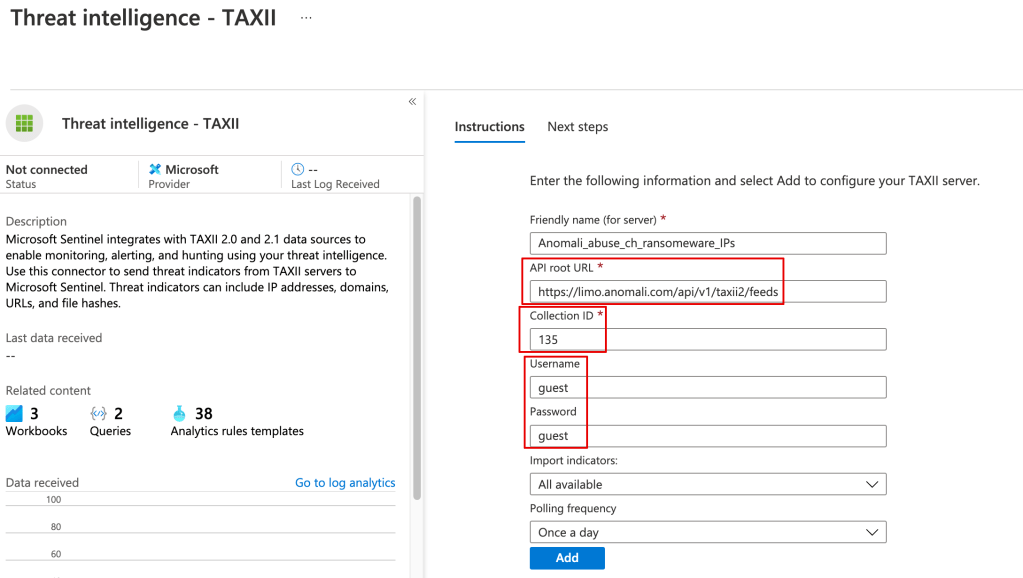
Anomali has a threat feed that supports Sentinel’s TAXII connector.

If you open a linux shell you can run this command to get the available channels:

curl -u guest https://limo.anomali.com/api/v1/taxii2/feeds/collections/

To configure one or more of the threat feeds in Sentinel, go to Connectors > Threat intelligence – TAXII. Note the API root URL will be:

https://limo.anomali.com/api/v1/taxii2/feeds

Once the threat data is loaded you can use it in your alerting and kql searches, eg:

ThreatIntelligenceIndicator| where NetworkIP != “”

The Hard(er) Way

You can pull in the TI data from Anomali or any other TAXII server using a playbook.

Although there’s a learning curve around using playbooks (Logic Apps), they’ve very powerful, and you can do things like filter out undesired data from your TI feed before it’s stored in Sentinel.

Here’s a great example:

https://techcommunity.microsoft.com/t5/microsoft-sentinel-blog/use-microsoft-azure-sentinel-and-anomali-match-for-actionable/ba-p/2080763