
Hunting across hundreds of log sources in the Sentinel data lake
Microsoft Sentinel data lake makes it affordable to keep hundreds of third-party log sources for a year or more. Hunting across them is harder. Each source names the same things differently: an IP address is SourceIP in one table, src in another, and buried inside free text in a third.
ASIM (the Advanced Security Information Model) is Microsoft’s answer to this in the analytics tier. It does not carry over to the lake as it is, for three reasons:
- ASIM parsers are stored KQL functions, and lake KQL does not run stored functions.
- Each parser is written for one product’s table and message format. A source without a parser gets no normalization.
- Parsers run at query time. Over a year of lake data, that cost is paid on every hunt.
This matters more now that hunts start from an AI agent. The Sentinel data lake MCP server lets an agent write and run KQL against the lake. An agent asked “where has this IP shown up?” needs one field name to search, not three hundred.
Normalize once, into an index
My approach is to do the normalization work once, ahead of time, and store the result in the lake. Scheduled lake jobs read every source table and write two tables:
- HuntEntity holds one row per entity, per hour, per source and role (an IP, a user, a host, a URL, a hash), with its type, its role (source, destination, actor, target, device), a lowercase join value, a count, first and last seen times, and a few sample record keys. Rolling up by the hour keeps the table small enough to search a full year cheaply.
- HuntEvent holds one row per event, with ASIM field names such as
SrcIpAddr,TargetUsernameandEventResult, for sources mapped well enough to trust.
Every HuntEvent row keeps a pointer back to the original record, and every HuntEntity row names the source table and hour. The agent searches the index, then pivots to the raw rows when it needs the full detail.
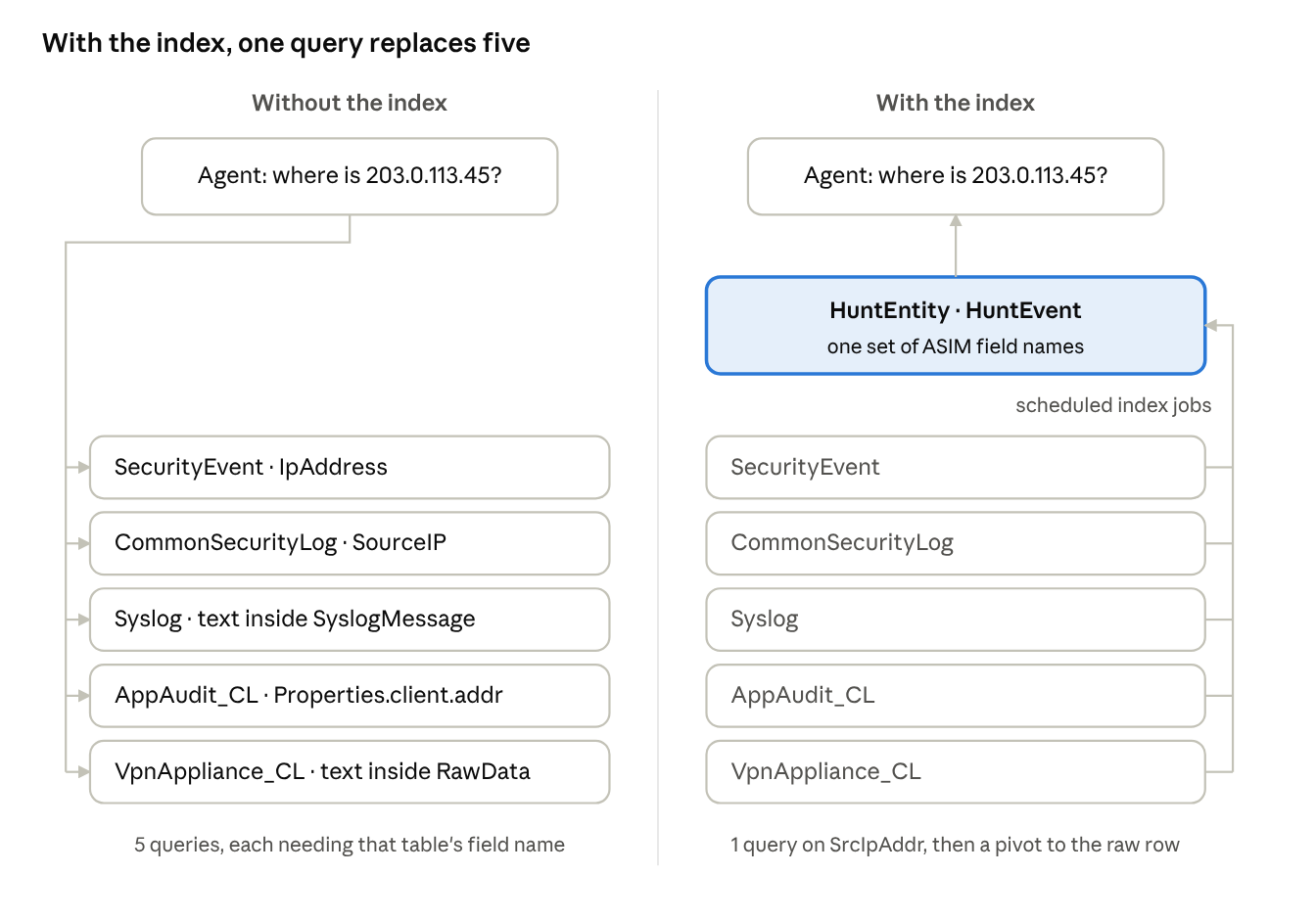
HOW TO READ IT
On the left, the agent must query each table with that table’s own field name, and two of the five hide the IP in free text. On the right, scheduled jobs (the line on the far right) feed every source into the index ahead of time, and the agent asks a single question of it.
Four ways a source gets mapped
No single method covers hundreds of sources, so the index uses four, in order of trust. Each source uses the best one available to it, and each index row records which one produced it.
<user> from <ip>”. An approved template then runs as KQL.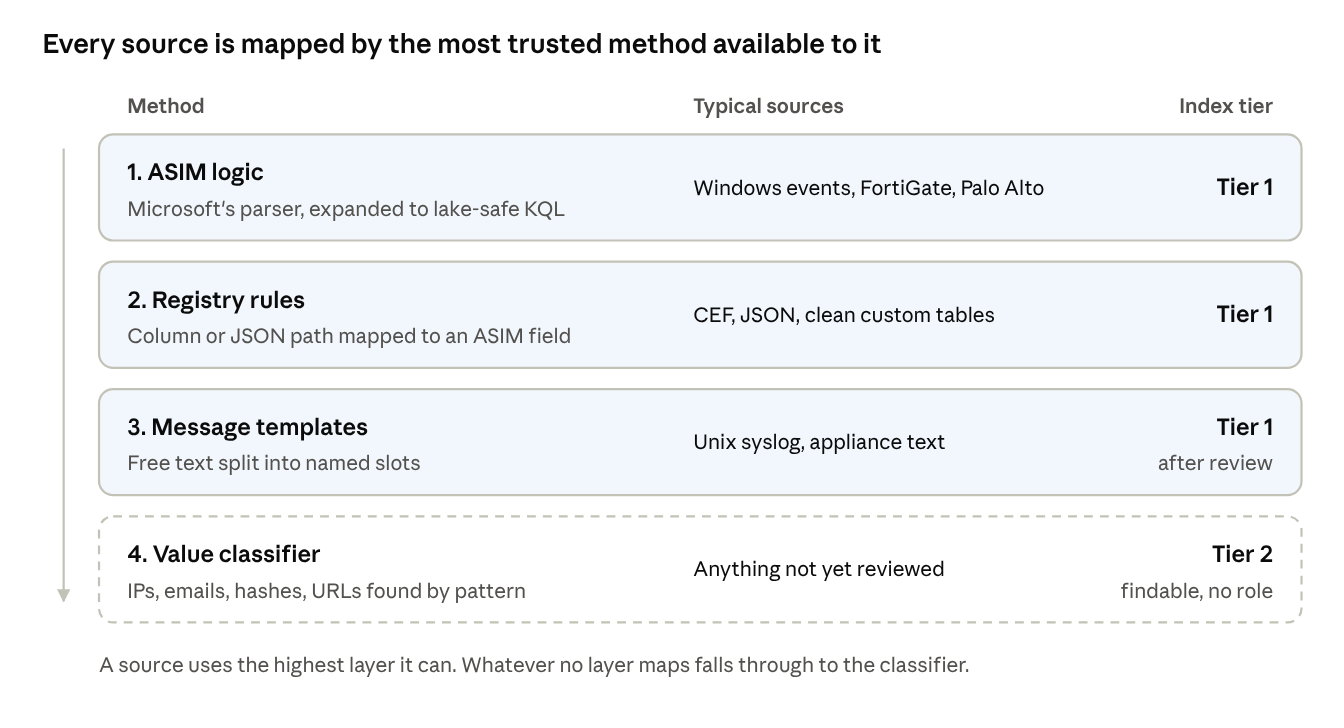
HOW TO READ IT
Top to bottom is most trusted to least. The middle column shows the kinds of sources each method suits; the right column is the tier the index records, which the agent uses to weigh a result. The dashed band catches whatever the other three miss.
The result is that every source is searchable on day one, and the mapping gets better as sources are reviewed.
The architecture
Everything runs inside the Sentinel data lake. There are no new data connectors, DCRs or ingestion changes: the index is built from data already there.
The index builders are of two kinds. KQL jobs run every approved mapping: ASIM logic, registry rules and approved message templates. A lake notebook handles the sources nobody has reviewed yet. The notebook is Python for Spark (PySpark), written as a Jupyter notebook in Visual Studio Code with the Microsoft Sentinel extension, that reads lake tables and writes its results back to the lake. KQL jobs and notebooks can both run on a schedule, so once a source is approved nobody runs anything by hand.
Three scheduled notebooks do the work that would otherwise be manual:
- Notebook 01 runs daily. It reads only new tables, changed schemas and the lines no template matched, profiles each field (how often it is filled and what its values look like) and proposes ASIM names, roles and message templates for an analyst to review. Sources with approved, high-confidence mappings are skipped.
- Notebook 02 runs hourly on sources nobody has reviewed yet. It indexes them through the value classifier into the same two tables the KQL jobs write, so they are searchable from day one. Once a source is approved, its mapping moves into a KQL job and the notebook stops reading it.
- Notebook 03 runs daily. It builds the coverage report from counts the index jobs record as they run (rows read, rows with an entity, rows matching a template) and flags any source whose extraction rate drops, which usually means the vendor changed its log format. It reads no source data.
A mapping is decided once. After approval, the only recurring work for a source is applying its mapping to each new hour of events in a KQL job; nothing already indexed is read again. Analysts approve mappings and check results. Finding new fields, building the index and catching format changes all run on a schedule.
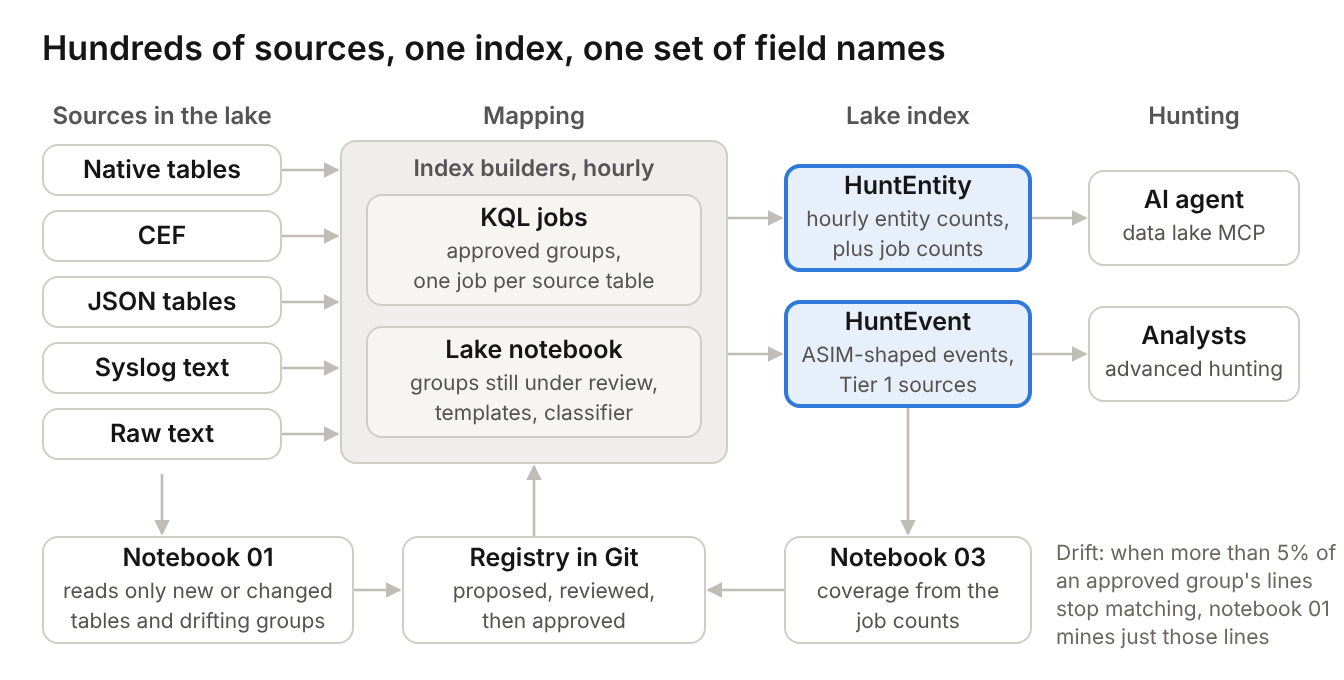
HOW TO READ IT
The top row runs left to right. Source tables of every shape feed the index builders. Approved groups run in one KQL job per source table; only groups still under review run in the lake notebook. Both write the two index tables that the agent and analysts query: HuntEntity holds hourly entity counts plus each job’s row counts, and HuntEvent holds one row per Tier 1 event. Every index row carries sample record keys, so a hit is one pivot from the raw events. The bottom row is the control loop: notebook 01 reads only new or changed tables and drifting groups and proposes mappings, analysts approve them in the registry, the registry generates the builders, and notebook 03 measures coverage from the job counts. The note on the right is the drift rule that sends an approved group back to notebook 01.
One question, five sources
The example below uses sample data from five sources with very different shapes: Windows security events, FortiGate firewall logs over CEF, Linux sshd syslog, a JSON audit table from an in-house app, and a VPN appliance that writes raw key=value text. The agent asks one question: where has 203.0.113.45 appeared?
| Source | How it was mapped | Role | Result |
|---|---|---|---|
| Windows SecurityEvent | ASIM logic | Source | Failure |
| FortiGate (CEF) | ASIM logic | Source | Failure (deny) |
| Linux sshd (Syslog) | Message templates | Source | Failure, 2 events |
| App audit (JSON) | Registry rules | Source | Failure |
| VPN appliance (raw text) | Classifier, then templates after review | Source | Failure |
One query over the index found the address in all five, each time labelled as the source, with a failed or denied result. Asked for the same user’s sign-ins, the index returns four failures from that address within about a minute, then successes from an internal address 16 minutes later. Without the index, the agent would need five different queries and would have to know each table’s field names.
Adding a new source
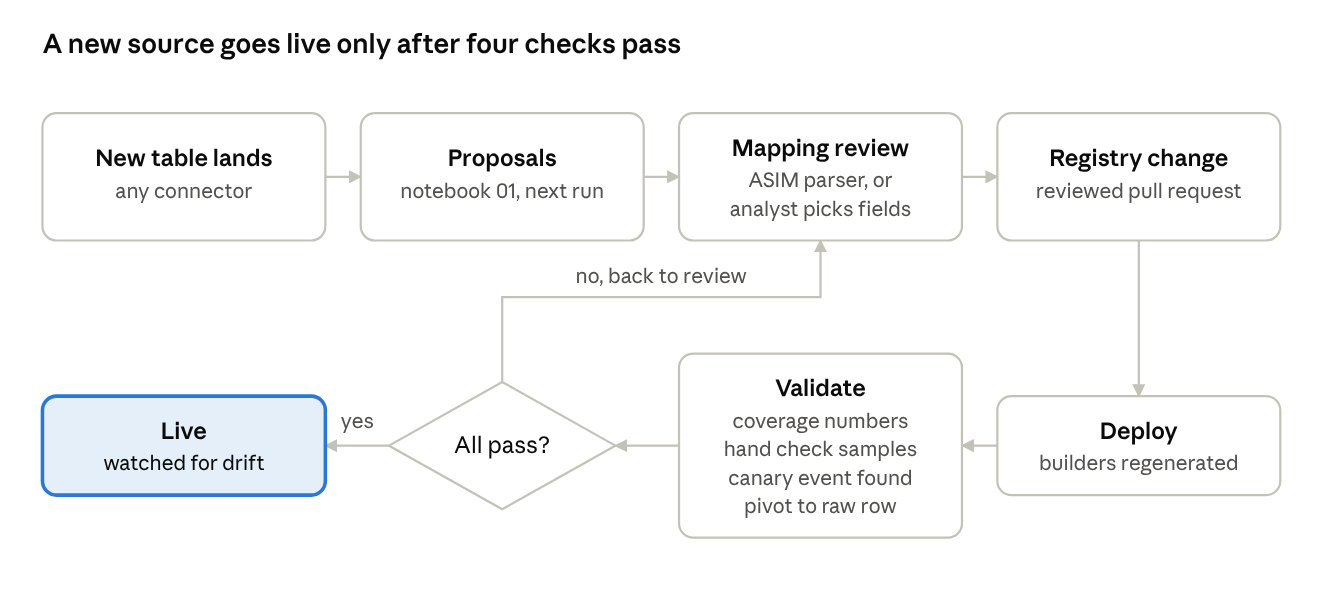
Once the index is running, a new log source needs a mapping review, not a new pipeline. The new table is searchable through the classifier from its first indexing run, before anyone has looked at it.
HOW TO READ IT
The top row runs left to right, then the flow turns down at the registry and runs right to left. Review starts from the parser if Microsoft ships one, otherwise from the fields and templates notebook 01 proposes. After deployment, four checks run: coverage numbers in the coverage table, a hand check of sample rows, a known test event found through the agent, and a pivot back to the raw row. Any failure sends the source back to review.
Walkthrough demo and video
The daily workflow can be seen in two places. Both use synthetic data only: documentation IP ranges, private 10.x addresses and contoso.com names.
- Walkthrough demo: an 18-step guided tour that runs in the browser with no server. Notebook 01 checks new and changed sources and proposes fields for a new badge reader table, an analyst reviews them, an admin approves the change, the generated lake job is deployed and passes four validation checks, a vendor format change is fixed, and a hunt for 203.0.113.45 runs across ten source groups.
- Demo video: about three minutes, recorded from the Lake Hunt app in demo mode. It covers the architecture, onboarding the badge reader, approval, validation and the same hunt.
Cost at 1 TB a day
At 1 TB a day of lake ingestion, the index costs about $830 to $890 a month. That covers the hourly KQL jobs, the three notebooks and one year of storage for both index tables. Most of it is the KQL jobs and HuntEvent storage. The notebooks cost under $150 a month because they only touch new, changed and unreviewed sources. The figures use Microsoft’s published Sentinel data lake prices in US dollars for East US. The full calculation and its assumptions are in the project’s GitHub repository, along with a walkthrough demo of the daily workflow.
Limits
- The index covers common hunting fields: IPs, users, hosts, URLs, hashes, results and event types. Fields that only matter to one product stay in the raw table, one pivot away.
- Index freshness follows the job schedule, hourly in this design. Real-time detection stays in the analytics tier.
- Lake KQL jobs have tenant limits on count and concurrency, so sources are batched into shared jobs rather than one job per source.
- The design has been deployed and run in a test tenant with the Sentinel data lake onboarded. Behaviour at production volume still needs confirming, including notebook run times and how the job limits apply at 1 TB a day.
The point of the design is that the cost of normalization is paid once per source, not once per hunt, and that an AI agent gets one consistent set of field names across every log source in the lake.
References
- Normalization and the Advanced Security Information Model (ASIM)Microsoft Learn
- Jupyter notebooks and the Microsoft Sentinel data lakeMicrosoft Learn
- Create and manage Jupyter notebook jobsMicrosoft Learn
- Plan costs and understand Microsoft Sentinel pricing and billingMicrosoft Learn
- Project repository: design, solution kit, cost model and walkthrough demoGitHub
- Lake Hunt walkthrough demoGitHub Pages
- Lake Hunt demo videoGitHub

