Mitre ATT&CK provides so many ways to quantitatively think about approaches for defending against attackers.
However it can be challenging to map the ATT&CK matrix to to real-world defense methods.
One approach is to look at the ATT&CK data sources and research detections that would map to those data sources.
This still requires some experience and a bit of guessing since there doesn’t appear to be an easy button way to map data sources to detection tools.
Endpoint Detection vendors have done a pretty good job mapping detections to ATT&CK techniques but few of them share their mappings in a simple spreadsheet – that would greatly help validate your detection gaps.
SIEM products like Microsoft Sentinel have done a good job mapping detection rules AND log sources to ATT&CK.
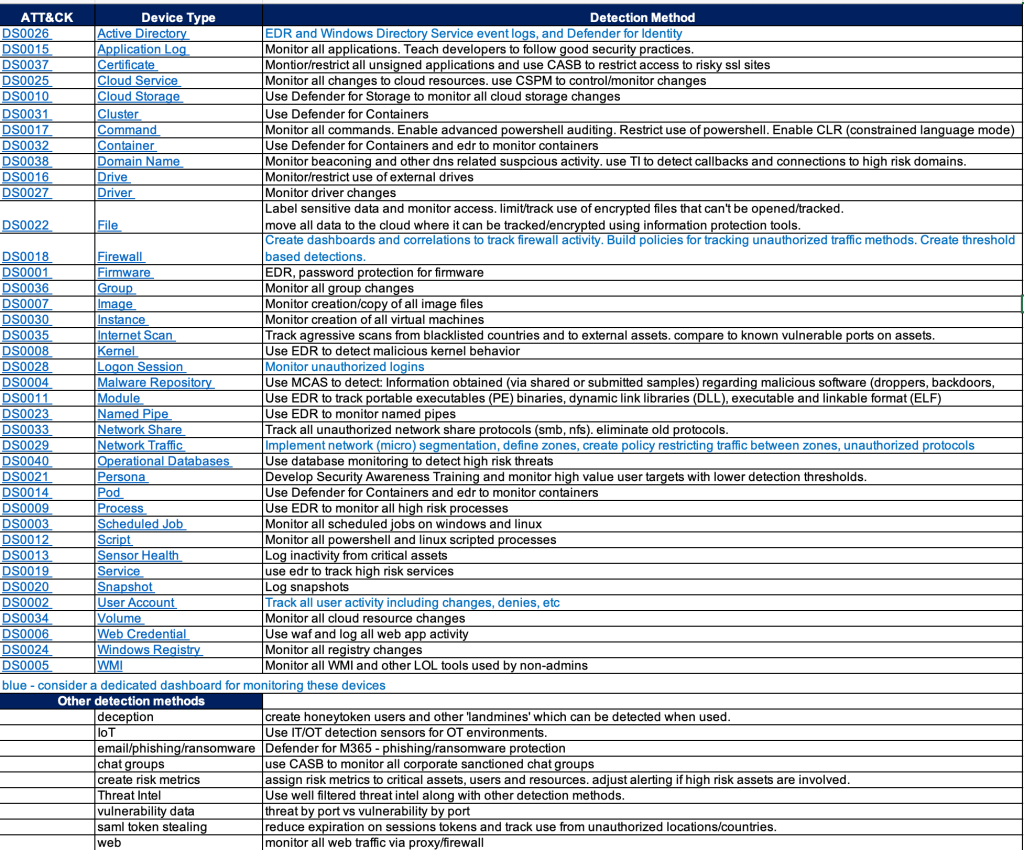
The chart below is an example of an easy way to provide a path forward on where to focus efforts for detections. It also provides a gap analysis for any obvious security tools that may be missing in your environment.
And hopefully my short detection method recommendations will give you some ideas or at least stir conversation.
Use Case Catalog Documented methodology for providing clear/concise implementation of SIEM use cases based on existing log sources and a focus on threat and compliance related detections.
SDLF – Security Data Logging Framework Documented methodology for providing clear/concise implementation of log sources into SIEM for assured value. (perhaps I need to blog about this)
Cloud Diagnostic Checklist Checklist of O365 and Azure security features to improve awareness of security features available with an E5 license.
Purple Teaming Red/Blue teaming activity with a focus on improving awareness of SOC security best practices.
Attack Surface Mapping Network and asset discovery discussions with a focus on attack surface mapping
Here are some thoughts on SIEM ‘Use Case Validation Testing’.
Most of the time I work with SIEMs that have decent out of the box rules/correlations, so you can match the available log sources to the available correlations and you’re basically done.
Occasionally I’ll be asked to validate the correlations through some sort of testing process.
This works fine for old-school detections and basic compliance rules, where it’s easy to have the customer perform some action like 3 login denies to trigger a matching correlation.
However it’s not so easy to say “perform a Teardrop and a Hafnium attack”, so specific threat based attack simulations are not practical.
So here’s an outline for how to approach SIEM rule validation:
List out the high level ‘tactics’, using MITRE or just a simpler list to get things started. Remember these tests must be associated with your available log sources eg:
Authorizations – password spray against a domain controller – using Active Directory or Azure AAD logs.
Threat – triggering a virus detection – using Microsoft Defender for endpoint
Keep adding to this list based on: <tactic> <available log source>
Try to provide at least one test for each available log source and grow from there.
Note that some log sources may not be use for correlations, but as investigative evidence for post-detection analysis.
Now that you have a list of detections, you need a ‘toolkit’ of methods for performing your attack simulations. Consider these:
Create a lab space
Many of these attack simulations should not be performed on production systems! A lab space provided the freedom to experiment more freely without the risk of doing harm.
Purple Teaming
Hire a pro and do end to end validations.
This approach helps educate your entire SOC/blue team on how the correlations work and how to tune them for appropriate detections.
It may also include a Compliance and/or MITRE APT planning session to map your correlations to appropriate controls.
Make sure you have rules in your SIEM to detect your attack simulations.
Active Defenses
Configuring ‘cyber deception‘ within your network is a good way to make your red teamers cry. Simply having some user accounts enabled (with no login privileges) is enough to trigger an alarm in your SIEM when someone tries to login with it.
Simply create some user accounts, spread around some files and start playing minesweeper with your red team (DJ I can’t get minesweeper out of my articles after you mentioned it).
So SIEM use case validation testing is an excellent task for all cybersecurity teams, but it does require some effort and coordination between all of your security teams – often more than the initial SIEM setup itself.
Attack simulations – use tools that can safely simulate specific actions of an attacker and thus trigger your security tools to generate alerts.
Here’s a getting started guide to “Atomic Red Team“, a free tool from Red Canary which does an amazing job at generating simulated attacks which map directly to Mitre ATT&CK techniques.
This topic will focus on Windows based attack simulations along with Microsoft’s Defender for Endpoint EDR, however this will apply to any EDR you may use.
If you’d like a proper backround on using Atomic Red Team, see this presentation from Red Canary – the creators of this tool. Note there are links in this presentation to a lot of other related docs, so the information available is excellent.
WARNING: This tool will attempt to make changes to your local system, so please only use this on a lab workstation. None of the changes are harmful but they may weaken the workstation’s security posture (eg. Disable logging or EDR).
Steps to install and use AtomicRedTeam on a Windows workstation/server running Microsoft Defender for Endpoints:
Configure Defender with an exception for the folder c:\AtomicRedTeam
Install the AtomicRedTeam ‘atomic’ files:
Install-AtomicRedTeam -getAtomics
That’s it! Try it out: Run these commands from your powershell window:
Invoke-AtomicTest T1003.002 – Attempt to dump SAM secrets
Invoke-AtomicTest T1548.002 – Bypass UAC
Invoke-AtomicTest T1562.001 – Attempt to disable security features
Invoke-AtomicTest T1218.011 – Attempt to disable Windows Defender Tamper
Tip: after running each of the above commands, re-run them with the -Cleanup option (eg. Invoke-AtomicTest T1003.002 -Cleanup)
Tip: after you leave your powershell window you may need to re-install AtomicRedTeam again with the commands above.
Tip: if you’re installing on linux, it is recommended to install powershell, then you can run the same commands as above. However linux supports a more limited set of test so run this command to see what’s available:
Tip: Another way to easily test your security tools is by setting up ‘Active Defenses’, also referred in part as ‘Deception’ techniques. Read my blog here.
With the passing of ‘Cyber Deception Day’ (appropriately held on April 1) there’s been some resurgence of interest in cyber deception tools and techniques (also known as ‘active detection‘).
My approach:
Know your enemy: Research Mitre ATT&CK to identify techniques used by your adversaries.
Deceive your enemy: Use Mitre D3FEND to learn techniques to defend against your adversaries using deception techniques.
Detect your enemy: Apply defensive tools/methods to detect and respond to the deception triggers you’ve laid out (endpoint detection, os and cloud event logging, SIEM, SOAR)
Here are some ideas for ways to add ‘deceptions’ to your network w/o having to jump into a pro solution (I’m not against $$ but I suggest that as a next step)
Note: most of these suggestions imply a “landmine” approach – i.e. don’t worry about clever deceptions, start with just triggering alarms on things people shouldn’t be touching.
If you want to get to the ‘high interaction level‘ of deception, you’ll probably need a professional product.
robots.txt – embed ‘breadcrumbs’ in common places where hackers will visit.
When you’re done with the homegrown stuff, and you’re ready to justify the need for a full-coverage and lower maintenance solution, here are some of the top product vendors for deception tools:

 Simple-Security