Thanks to all that showed up for this presentation.
And thanks very much for all of the post-presentation positive feedback!
As promised here’s a copy of the slides. Share as you like!

Thanks to all that showed up for this presentation.
And thanks very much for all of the post-presentation positive feedback!
As promised here’s a copy of the slides. Share as you like!
Your SIEM likely contains a great deal of information which can be mapped by country. That’s all you need to get started with a dashboard to see at a high level how those countries – or adversaries – are affecting your organization’s security posture.
Start with creating dashboards for the following, using Russia as an example:
Some SIEMs are better than others with mapping IPs/domains to a country.
Here’s a query example for doing it in Microsoft Sentinel on WAF events using a geoip reference table:
let geoData =
materialize (externaldata(network:string,geoname_id:string,continent_code:string,continent_name:string,
country_iso_code:string,country_name:string,is_anonymous_proxy:string,is_satellite_provider:string)
[@"https://raw.githubusercontent.com/datasets/geoip2-ipv4/master/data/geoip2-ipv4.csv"] with
(ignoreFirstRecord=true, format="csv"));
let lookup = toscalar( geoData | summarize list_CIDR=make_set(network) );
AzureDiagnostics
| where Category contains "ApplicationGateway"
| where Message contains "Inbound Anomaly Score Exceeded"
|summarize by clientIp_s
| mv-apply list_CIDR=lookup to typeof(string) on
(
where ipv4_is_match (clientIp_s, list_CIDR) //== false
)
| join kind=rightouter (AzureDiagnostics | where TimeGenerated > ago(7d)) on clientIp_s
| join kind=leftouter
(
geoData
) on $left.list_CIDR == $right.network
|summarize count() by clientIp_s, country_name, hostname_s
|where clientIp_s <> ""
|order by count_ desc
| where country_name == "Russia"
| where count_ >= 10
Next, research past history from attackers in that country. Go to Mitre’s ATT&CK site and search for the attack groups of interest:
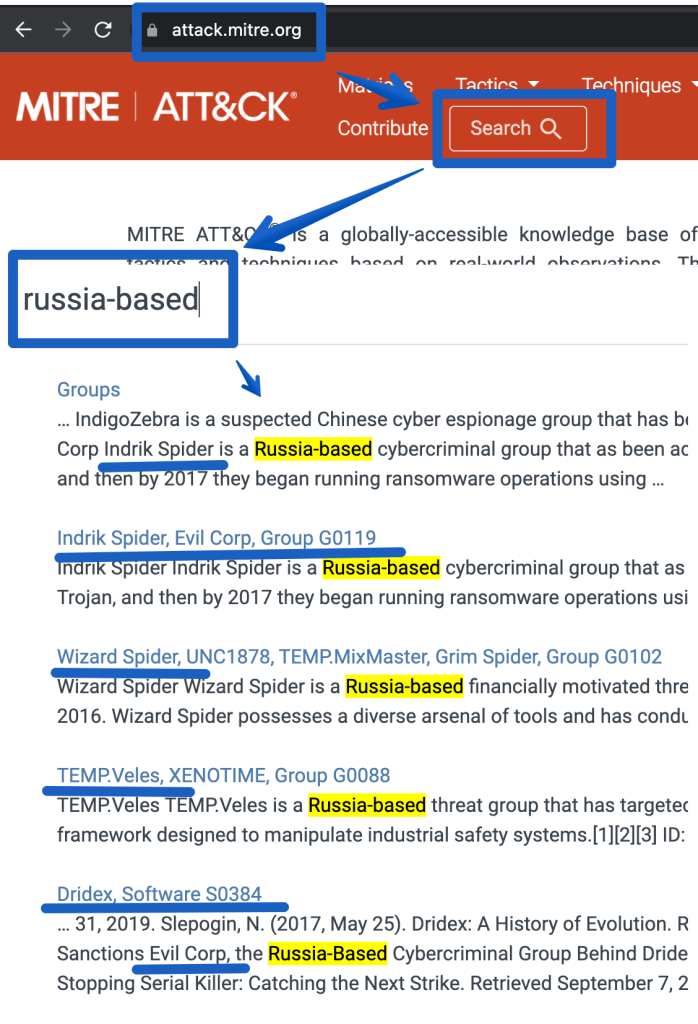
That provides the following references.
https://attack.mitre.org/groups/G0007 (APT28)
https://attack.mitre.org/groups/G0074 (Dragonfly 2.0)
https://attack.mitre.org/groups/G0016 (APT29)
https://attack.mitre.org/groups/G0119 (Indrik Spider, Evil Corp)
https://attack.mitre.org/groups/G0133 (Nomadic Octopus)
https://attack.mitre.org/groups/G0034 (Sandworm)
https://attack.mitre.org/groups/G0088 (Temp.veles)
https://attack.mitre.org/groups/G0010 (Turla)
https://attack.mitre.org/groups/G0053 (FIN5)
https://attack.mitre.org/groups/G0102 (Wizard Spider)
The next step would be to go deeper and identify ‘entities’ that are specific to using these attacks, such as:
Peace to all.
More Ukraine related information intelligence:
https://github.com/Orange-Cyberdefense/russia-ukraine_IOCs
https://github.com/curated-intel/Ukraine-Cyber-Operations
https://www.mandiant.com/resources/apt-groups
https://www.mandiant.com/resources/insights/ukraine-crisis-resource-center
Alerts by IP:
-----------
let IP_Data = external_data(network:string,geoname_id:long,continent_code:string,continent_name:string ,country_iso_code:string,    country_name:string,is_anonymous_proxy:bool,is_satellite_provider:bool)
    ['https://raw.githubusercontent.com/datasets/geoip2-ipv4/master/data/geoip2-ipv4.csv']
    with (ignoreFirstRecord=true, format="csv");
SecurityAlert
| where TimeGenerated > ago(120h)
| extend AlertEntities = parse_json(Entities)
| mv-expand AlertEntities
| extend IPAddress = tostring(AlertEntities.Address)
| summarize count() by IPAddress
| where isnotempty(IPAddress)
| evaluate ipv4_lookup(IP_Data, IPAddress, network)
//| where country_name != "United States"
| where country_name == "Russia"
|project IPAddress, count_
|order by count_ desc
|render columnchart
------------
Alerts timeline:
let IP_Data = external_data(network:string,geoname_id:long,continent_code:string,continent_name:string ,country_iso_code:string,    country_name:string,is_anonymous_proxy:bool,is_satellite_provider:bool)
    ['https://raw.githubusercontent.com/datasets/geoip2-ipv4/master/data/geoip2-ipv4.csv']
    with (ignoreFirstRecord=true, format="csv");
SecurityAlert
| where TimeGenerated > ago(120h)
| extend AlertEntities = parse_json(Entities)
| mv-expand AlertEntities
| extend IPAddress = tostring(AlertEntities.Address)
| summarize count() by IPAddress, DisplayName, ProviderName, bin(TimeGenerated, 1h)
| where isnotempty(IPAddress)
| evaluate ipv4_lookup(IP_Data, IPAddress, network)
| where country_name != "United States"
//|project TimeGenerated, country_name, IPAddress, ProviderName, DisplayName
| where country_name == "Russia"
//|project IPAddress, DisplayName,ProviderName, count_
//|order by count_ desc
|render timechart
--------------
Malicious traffic: Malicious domain and port (syslog data)
CommonSecurityLog
| extend  Country=MaliciousIPCountry
|where TimeGenerated >ago(7d)
|where Country == "Russia"
|where DestinationIP == ""
//|extend HostPort = strcat(DestinationHostName, "-port-", DestinationPort)
|summarize count() by DestinationHostName, DestinationPort
|order by count_ desc
-------------
Top Malicious IPs (syslog data)
CommonSecurityLog
| extend  Country=MaliciousIPCountry
|where TimeGenerated >ago(7d)
|where Country == "Russia"
|where DestinationIP == ""
|summarize count() by MaliciousIP
|order by count_ desc
|limit 10
-------------
Destination IPs by Count (CommonSecurityLog)
let IP_Data = external_data(network:string,geoname_id:long,continent_code:string,continent_name:string ,country_iso_code:string,    country_name:string,is_anonymous_proxy:bool,is_satellite_provider:bool)
    ['https://raw.githubusercontent.com/datasets/geoip2-ipv4/master/data/geoip2-ipv4.csv']
    with (ignoreFirstRecord=true, format="csv");
CommonSecurityLog
| where TimeGenerated > ago(1h)
| where DestinationIP !startswith "192."
| where DestinationIP !startswith "10."
| where DestinationIP !startswith "127."
| where DestinationIP !startswith "171."
| summarize count() by SourceIP, DestinationIP, DestinationPort, SimplifiedDeviceAction, DeviceVendor, bin(TimeGenerated, 1h)
| where isnotempty(SourceIP)
| evaluate ipv4_lookup(IP_Data, SourceIP, network)
| where country_name != "United States"
//|project TimeGenerated, country_name, IPAddress, ProviderName, DisplayName
| where country_name == "Russia"
|summarize count() by SourceIP
|render columnchart
-----------
Palo Alto - Threat events by country
let IP_Data =
    external_data(network:string,geoname_id:long,continent_code:string,continent_name:string ,country_iso_code:string,    country_name:string,is_anonymous_proxy:bool,is_satellite_provider:bool)
    ['https://raw.githubusercontent.com/datasets/geoip2-ipv4/master/data/geoip2-ipv4.csv']
    with (ignoreFirstRecord=true, format="csv");
CommonSecurityLog
| where TimeGenerated > ago(1d)
| where DestinationIP !startswith "192."
| where DestinationIP !startswith "10."
| where DestinationIP !startswith "127."
| where DestinationIP !startswith "171."
| where DeviceVendor == "Palo Alto Networks"
| where Activity == "THREAT"
//| summarize count() by SourceIP, DestinationIP, DestinationPort, ApplicationProtocol, Activity, SimplifiedDeviceAction, DeviceVendor, Message, RequestURL,FlexString2,bin(TimeGenerated, 1h)
//| where isnotempty(SourceIP)
| evaluate ipv4_lookup(IP_Data, DestinationIP, network)
| where country_name != "United States"
//|project TimeGenerated, country_name, IPAddress, ProviderName, DisplayName
|summarize count() by country_name
|order by count_ desc
|render columnchart
-----------------let attack=_GetWatchlist(‘attack’);
SecurityAlert
|extend Severity = “T1040”
|join attack on $left.Severity == $right.Tactic
|distinct Defense
Event
| where Source == “Microsoft-Windows-Sysmon”
|where EventID <> 255
| where TimeGenerated >= ago(180d)
| summarize count() by bin(TimeGenerated, 1d)
|render columnchart
SecurityAlert
| extend Entities = iff(isempty(Entities), todynamic(‘[{“dummy” : “”}]’), todynamic(Entities))
|mv-expand Entities
|extend HostName_ = tostring(Entities.HostName)
|where HostName_ <> “”
|where HostName_ contains “{Hostname}”
|project HostName_
“let IP_Data = external_data(network:string,geoname_id:long,continent_code:string,continent_name:string ,country_iso_code:string,country_name:string,is_anonymous_proxy:bool,is_satellite_provider:bool)
[‘https://raw.githubusercontent.com/datasets/geoip2-ipv4/master/data/geoip2-ipv4.csv’%5D;
let IPs =
CommonSecurityLog
|where DeviceVendor == “”Fortinet””
//filter out private networks
|where not(ipv4_is_private(SourceIP)) and not(ipv4_is_private(DestinationIP))
|summarize by SourceIP
;
IPs
| evaluate ipv4_lookup(IP_Data, SourceIP, network, return_unmatched = true)”
One of the first skills to acquire when learning a SIEM is it’s query language.
Microsoft Sentinel (and many of Microsoft’s tools) use KQL – Kusto Query Language.
If you want to learn more about what KQL is, go here.
This blog is simply a super quick reference for getting started.
Azure Sentinel webinar: Learn the KQL you need for Azure Sentinel (Part 1 of 3)
Azure Sentinel webinar: KQL part 2 of 3 – KQL hands-on lab exercises
Azure Sentinel webinar: KQL part 3 of 3 – Optimizing Azure Sentinel KQL queries performance
Challenge #1; Create a query that uses a watchlist
Challenge #2: Create a timechart based query
Challenge #3: use mv-expand to view the entities fields
Bonus challenge: use GeoIP to map to country
There are some excellent tips on testing CEF logs here.
I’d suggest:
Run this command as a validation test:
logger -p local4.warn -t CEF “CEF:0|Microsoft|ATA|1.9.0.0|AbnormalSensitiveGroupMembershipChangeSuspiciousActivity|Abnormal modification of sensitive groups|5|start=2018-12-12T18:52:58.0000000Z app=GroupMembershipChangeEvent suser=krbtgt msg=krbtgt has uncharacteristically modified sensitive group memberships. externalId=2024 cs1Label=url cs1=https://192.168.0.220/suspiciousActivity/5c113d028ca1ec1250ca0491“
Then replace the sample log with your own and see if it also gets through.
Also verify that if you remove your rsyslog CEF filter that the logs at least get to syslog. If they do, then it’s possible this is an unsupported CEF format. Which isn’t terrible because you can still parse the logs using KQL.
To check if your logs are event getting to your syslog server use tcpdump eg:
tcpdump -i any port syslog -A -s0 -nn
And note that you could be seeing your logs with the above tcpdump command but they’re still not getting to Sentinel. In that case check if the local firewall rules are blocking syslog.
If you find out it’s an unsupported CEF format it’s still possible to fix but it likely involves regex changes to the rsyslog configuration in security_events.conf or elsewhere. (see reference below).
Reference:
https://docs.microsoft.com/en-us/azure/sentinel/troubleshooting-cef-syslog?tabs=rsyslog
Like most things in life, there’s an easy way and a hard way…
Anomali has a threat feed that supports Sentinel’s TAXII connector.
If you open a linux shell you can run this command to get the available channels:
curl -u guest https://limo.anomali.com/api/v1/taxii2/feeds/collections/
To configure one or more of the threat feeds in Sentinel, go to Connectors > Threat intelligence – TAXII. Note the API root URL will be:
https://limo.anomali.com/api/v1/taxii2/feeds
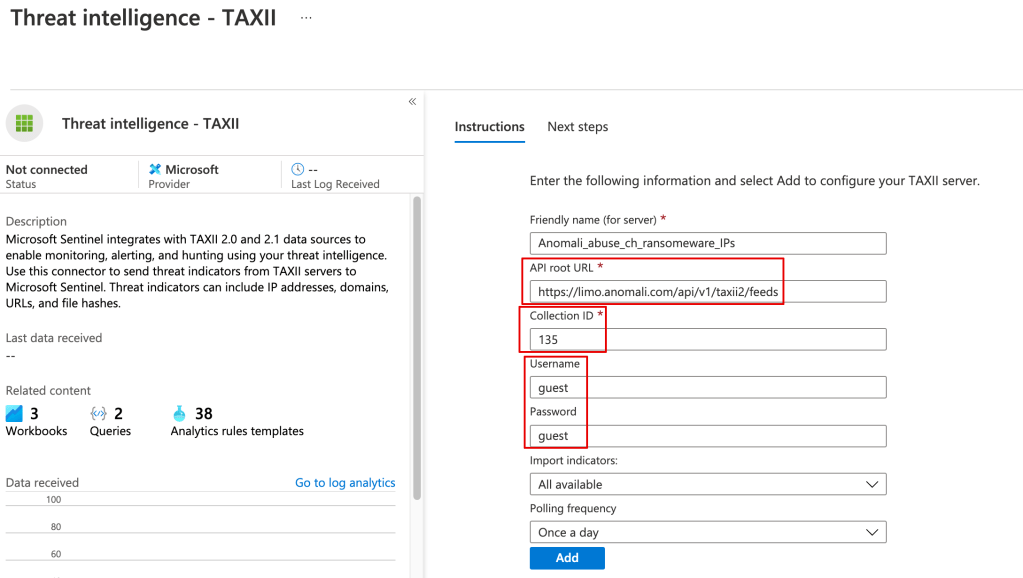
Once the threat data is loaded you can use it in your alerting and kql searches, eg:
ThreatIntelligenceIndicator| where NetworkIP != “”
You can pull in the TI data from Anomali or any other TAXII server using a playbook.
Although there’s a learning curve around using playbooks (Logic Apps), they’ve very powerful, and you can do things like filter out undesired data from your TI feed before it’s stored in Sentinel.
Here’s a great example:
(note: you need to be a vendor to get to some of these sites)
https://aka.ms/SecurityWorkshop
 Simple-Security