US National Cybersecurity Strategy

Based on the recent publication of the US National Cybersecurity Strategy, here are some practical suggestions for implementing cybersecurity solutions that loosely map to its guidelines:

  1. Defend Critical Infrastructure by:
  • Expanding the use of minimum cybersecurity requirements in critical sectors to ensure national security and public safety and harmonizing regulations to reduce the burden of compliance

Recommendation: Perform a gap analysis on your cybersecurity defenses. Start with a ‘master list of all recommended defenses and compare that to your organization’s tools’ Prioritize the implementation of any required defenses. Consider consolidation of security solutions under a single vendor’s licence agreement to save on costs. Create good architecture diagrams to describe your infrastructure from a cybersecurity perspective.

  • Enabling public-private collaboration at the speed and scale necessary to defend critical infrastructure and essential services

Recommendation: Create an inventory of all critical assets. If you’re a small org then a manual inventory is fine, otherwise consider a mature asset collection tool to help with this (google ‘asset inventory cybersecurity’ and you’ll get plenty of hits). Use your asset inventory to categorize critical assets and use this information in your SIEM to help with better correlations.

  • Defending and modernizing Federal networks and updating Federal incident response policy.

Recommendation: Review/create incident response policies and procedures. Consider creating specific response procedures that map to your SIEM incidents to improve clarity and incident response times.

  1. Disrupt and Dismantle Threat Actors by:
  • Using all instruments of national power, making malicious cyber actors incapable of threatening the national security or public safety of the United States
  • Strategically employing all tools of national power to disrupt adversaries
  • Engaging the private sector in disruption activities through scalable mechanisms
  • Addressing the ransomware threat through a comprehensive Federal approach and in lockstep with international partners.

Recommendation: Have a clear understanding of the ‘kill chains‘ that may affect your organization. Use Mitre ATT&CK  and your favorite security sites to help research threat actor groups. Identify security tools needed to detect/block attackers. Test/validate the effectiveness of those tools using Red/Blue/Purple team events.

  1. Shape Market Forces to Drive Security and Resilience by:
  • Placing responsibility on those within the digital ecosystem that are best positioned to reduce risk and shift the consequences of poor cybersecurity away from the most vulnerable in order to make the digital ecosystem more trustworthy
  • Promoting privacy and the security of personal data

Recommendation: Move data to the cloud and implement a data protection solution that not only tags and categorizes your data but locks out access if it’s stolen.

  • Shifting liability for software products and services to promote secure development practices
  • Ensuring that Federal grant programs promote investments in new infrastructure that are secure and resilient.
  1. Invest in a Resilient Future by: 
  • Reducing systemic technical vulnerabilities in the foundation of the Internet and across the digital ecosystem while making it more resilient against transnational digital repression

Recommendation: Implement a robust vulnerability assessment solution. Note that moving all your assets to the cloud can make this far easier to manage and can greatly benefit the effectiveness of your CSPM and SIEM.

  • Prioritizing cybersecurity R&D for next-generation technologies such as postquantum encryption, digital identity solutions, and clean energy infrastructure and developing a diverse and robust national cyber workforce.
  1. Forge International Partnerships to Pursue Shared Goals by:
  • Leveraging international coalitions and partnerships among like-minded nations to counter threats to the digital ecosystem through joint preparedness, response, and cost imposition
  • Increasing the capacity of partners to defend themselves against cyber threats, both in peacetime and in crisis; and working with allies and partners to make secure, reliable, and trustworthy global supply chains for information and communications technology and operational technology products and services.

Recommendation: Although many are reluctant to go back to the IBM days of putting all your security solutions into a single basket, cloud vendors and MSSPs have made great progress in the past 5+ years to provide a long list of services under one roof. When looking for one security product it’s very important to think broader and understand the interconnected values between all of your other security tools (XDR!). Security decision makers will often find that re-shuffling several of their security solutions makes more sense than just adding them one brick at a time.
Performing a Security Audit on Logic Apps

As DevOps move toward no-code apps in the cloud, there becomes a need for security reviews and controls to prevent risky

This is nothing new, but the need for better security reviews is becoming clear as more people try to rush to get their apps done in the easiest way possible.

Here’s a simple approach to identifying security risks in your logic apps:

  1. Create an architecture diagram of your logic app. This can be a simplified version that just shows the high level logic.
  2. Break down the logic app by it’s components:
  • The individual logic app components – you likely won’t find too many security problems here.
  • all the parameters – don’t hardcode passwords into parameters!
  • connectors – Often the culprit of weak security in logic apps. Really understand what these connectors are communicating with. Don’t allow public access. Limit the roles/permissions.
  • app registrations – another culprit of weak security. If app registrations are needed for your logic apps, be sure permissions are set to their most restrictive settings. avoid read.all readwrite.all settings.
  • managed identities – if possible, use managed identities instead of user accounts for your connectors. Many logic apps don’t yet support managed identities, so those apps will require additional monitor and possibly frequent password/secret changes.

3. Use Resource Locks to prevent changes. If someone tries to turn off resource logs be sure it’s logged and alerted on.

4. Restrict user/admin access to your logic apps. Some apps can have really powerful permissions/access, so you don’t want users to ever have the ability to change logic apps unless they’ve been given specific short-term permissions to do so.

5. LOG EVERYTHING – wherever possible, enable logging within logic apps and connectors. Store logs in a Log Analytics Workspace. Use Azure Monitor alerts ore Microsoft Sentinel to monitor/report/alert on all activities.

6. Perform ‘attack simulations‘. Run your logic apps through test conditions which will trigger your alerts. Validate your alerts work as expected.

7. Build a ‘logic app security audit’ spreadsheet. Use this as a template for repeated audits for future logic app security testing. Use the above ideas as the initial framework for your spreadsheet.

Zero Trust – A simple Approach for Azure Enterprises

Zero Trust sounds very enticing, but feels overwhelming as much as any other standards based framework.

However there are some quick wins in the Azure world, and all you need is:

  • A good checklist (The Microsoft Zero Trust Assessment Quiz)
  • A Microsoft Sentinel workbook (see below)

In addition, Microsoft has a ton of direction around Zero Trust like:

If you prefer to save some reading time, I’ve taken Microsoft Zero Trust Assessment Quiz results and compressed it into a clean list of questions here:

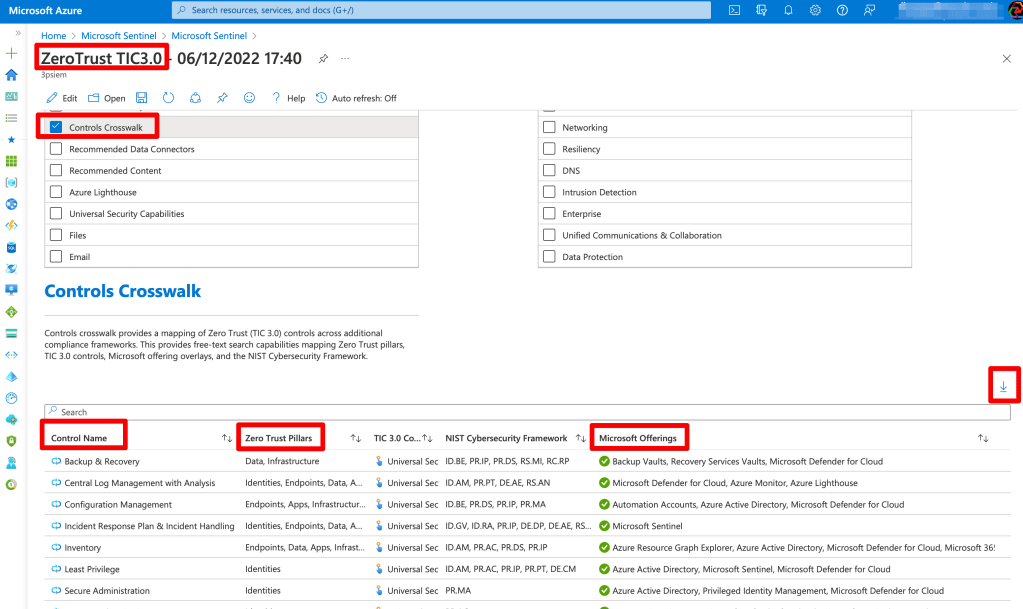
Microsoft has also added a Zero Trust workbook to Azure Sentinel, so if you’re using their SIEM, there’s an excellent report that you can export and have a full list of security tool recommendations that you likely already own (depending if you have an E3 or E5 license)

If you’re familiar with the resources under ‘Microsoft Offerings’ then you can begin planning your Zero Trust controls around these features. If you’re not familiar then now it the time to begin learning and proposing a Zero Trust approach around these tools.

Enjoy!

Cloud Security – Who’s Responsible?

If you manage a single cloud tenant with a single subscription, roles and responsibilities for security can usually be maintained by a small SecOps team.

But if your organization has dozens or hundreds of departments, the need for a much more hierarchical structure can quickly become difficult for a single security team to maintain control over.

So what can happen is departments are handed over the role of the security administrator for their own resources and users.

And before you know it, SecOps has lost control of who’s making changes to what.

Fear not, this isn’t a terrible thing, but it’s important to put checks in place to ensure simple practices are being followed.

One approach:

  • Perform a security audit that provides a list of the security categories of interest. (This audit should provide both high level and lower level topics, so you can easily end up with hundreds of checks). Example high level topics:
    • Identity & Access Controls
    • Logging, Monitoring and Reporting
    • Data Protection
    • Network Security
    • Endpoint Protection
    • Inventory Management
    • Configuration Management
    • Vulnerability Management
  • Create a list of relevant security checks from the above audit (this checklist is much shorter than the original security audit, since these departmental security admins have a much smaller list of security responsibilities).
  • Identify a security owner for each relevant department/group
  • Require each security owner to perform periodic checks and report back to the SecOps team.

Not only does the above approach provide clear security checks/responsibilities to the security owners, but it gives the SecOps team a way to track security in a growing organization without getting overwhelmed. It also ensures that as security owners come and go from the organization, that the new owners will be quickly identified by the SecOps team, thus avoiding gaps in maintaining security controls.

Simple Guide to Cyber Resiliency in Azure/O365

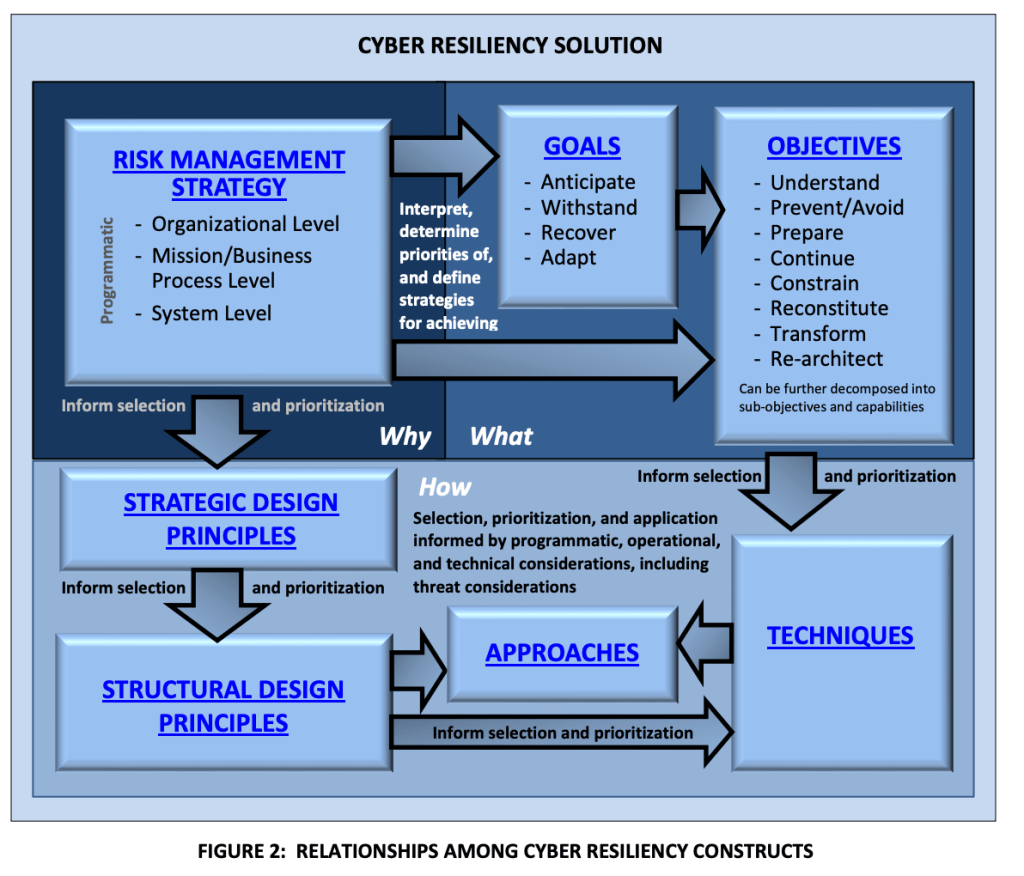
So I skimmed NIST 800-160 V2 – it’s all about ‘Cyber Resiliency’.

What is cyber resiliency?

“The ability to deliver an intended outcome, despite adverse cyber events”

My thoughts on NIST 800-160 vol 2:

Once you understand the basics you might consider these points as a starting approach:

Perform a ‘cyber resilience maturity audit’

Using 800-160 V2 create a checklist to discuss and better understand your organization’s maturity around cyber resiliency.

Identify security tools to enable and improve on your cyber resiliency, eg:

Microsoft Defender for Cloud – Use the built in NIST regulatory standsards to enforce configuration of resources with resilience – eg. don’t allow VMs without backups enabled and redundancy features configured.

O365 Compliance Manager – Create assessments using the NIST templates to identify misconfigurations.

Microsoft Secure Scores – use the several available Secure Scores in O365 and Azure to improve security posture.

Sentinel – Configure alerts to monitor resiliency related issues.

Some more references

High level objectives:

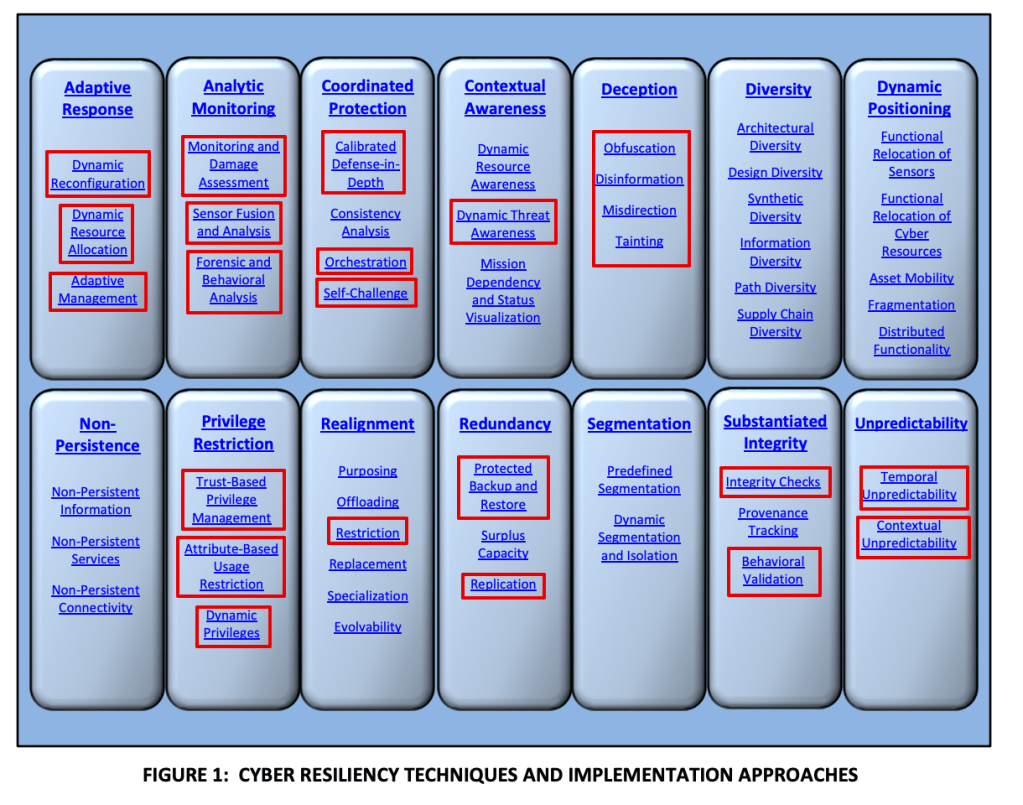
Areas in red can be monitored using Sentinel and Defender for Cloud (and possibly more, just what I know about):

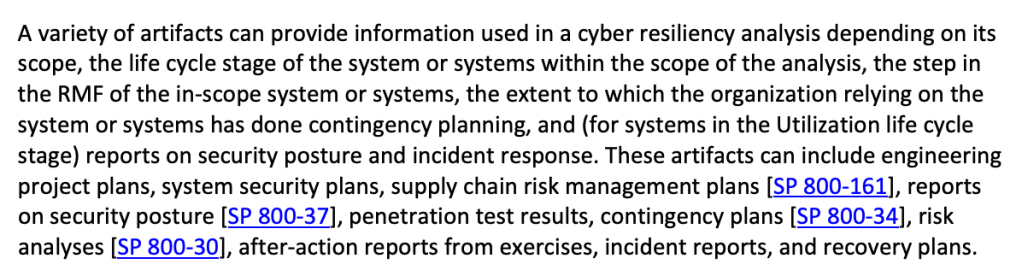
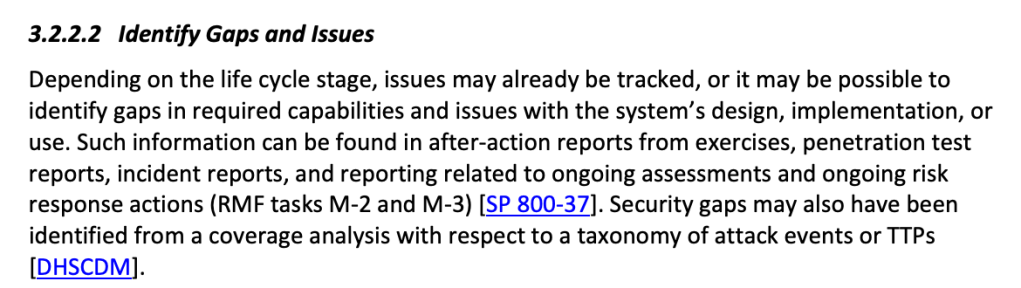
Here is where 800-160 refers to other NIST controls, some of which are templates within Defender for cloud and O365 Compliance Manager (800-70 and 800-37 are premium templates so extra $$):

References

CSF – general cyber security framework

https://www.nist.gov/cyberframework/framework

800-53 – Security and Privacy Controls for Federal Information Systems and Organizations

800-171 – information protection

800-160 – Cyber Resiliency

Getting Started with Azure/O365 Auditing

Read this:

https://cloudblogs.microsoft.com/industry-blog/en-gb/government/2021/04/14/updated-office-365-security-and-compliance-guidance-for-the-uk-public-sector/

Create your own audit based on MS500 and AZ500 training guide primary topics.

https://www.skylinesacademy.com/resources

Expand on your audit by learning each security feature in depth and adding tips/references to your audit sheet.

Good luck!