Thanks to all that showed up for this presentation.
And thanks very much for all of the post-presentation positive feedback!
As promised here’s a copy of the slides. Share as you like!

Thanks to all that showed up for this presentation.
And thanks very much for all of the post-presentation positive feedback!
As promised here’s a copy of the slides. Share as you like!
And I’m talking real smoking guns, not crappy anomaly alerts.
From my experience, the most effective use cases for threat detection are those which simply:
So:
Here’s an example for logic that would provide good use cases involving malicious intent:
The ‘direction’ of the action might also be important, eg:
Inbound > outbound detection with validation of sustained activity.
Here’s a couple of specific examples:
Additional thoughts:
Validations do not have to be part of the SIEM threat detection. They can be added from SOAR playbook(s) and apply ‘tags’ to the alert, which can in turn be used by other correlations or SOAR playbooks. Eg. tag: EDR_distinct_threats=2, callback_distinct_count=2
This means the correlations become VERY simple and the validation or ‘recorrelations’ steps are done by the SOAR action.
By using SOAR you can provide full automation of an action by isolating a machine, disabling a user etc.
There should be pressure put on vendors to provide a ‘metric of confidence’ on specific detections. i.e. does ‘High’ really mean High? This makes it easier to create use cases with clear malicious intent since you wouldn’t have to manually compile a list of high confidence detections.
Some thoughts on high confidence alerts:
(Including installing a windows agent so you have data to play with)
Done!
Your SIEM likely contains a great deal of information which can be mapped by country. That’s all you need to get started with a dashboard to see at a high level how those countries – or adversaries – are affecting your organization’s security posture.
Start with creating dashboards for the following, using Russia as an example:
Some SIEMs are better than others with mapping IPs/domains to a country.
Here’s a query example for doing it in Microsoft Sentinel on WAF events using a geoip reference table:
let geoData =
materialize (externaldata(network:string,geoname_id:string,continent_code:string,continent_name:string,
country_iso_code:string,country_name:string,is_anonymous_proxy:string,is_satellite_provider:string)
[@"https://raw.githubusercontent.com/datasets/geoip2-ipv4/master/data/geoip2-ipv4.csv"] with
(ignoreFirstRecord=true, format="csv"));
let lookup = toscalar( geoData | summarize list_CIDR=make_set(network) );
AzureDiagnostics
| where Category contains "ApplicationGateway"
| where Message contains "Inbound Anomaly Score Exceeded"
|summarize by clientIp_s
| mv-apply list_CIDR=lookup to typeof(string) on
(
where ipv4_is_match (clientIp_s, list_CIDR) //== false
)
| join kind=rightouter (AzureDiagnostics | where TimeGenerated > ago(7d)) on clientIp_s
| join kind=leftouter
(
geoData
) on $left.list_CIDR == $right.network
|summarize count() by clientIp_s, country_name, hostname_s
|where clientIp_s <> ""
|order by count_ desc
| where country_name == "Russia"
| where count_ >= 10
Next, research past history from attackers in that country. Go to Mitre’s ATT&CK site and search for the attack groups of interest:
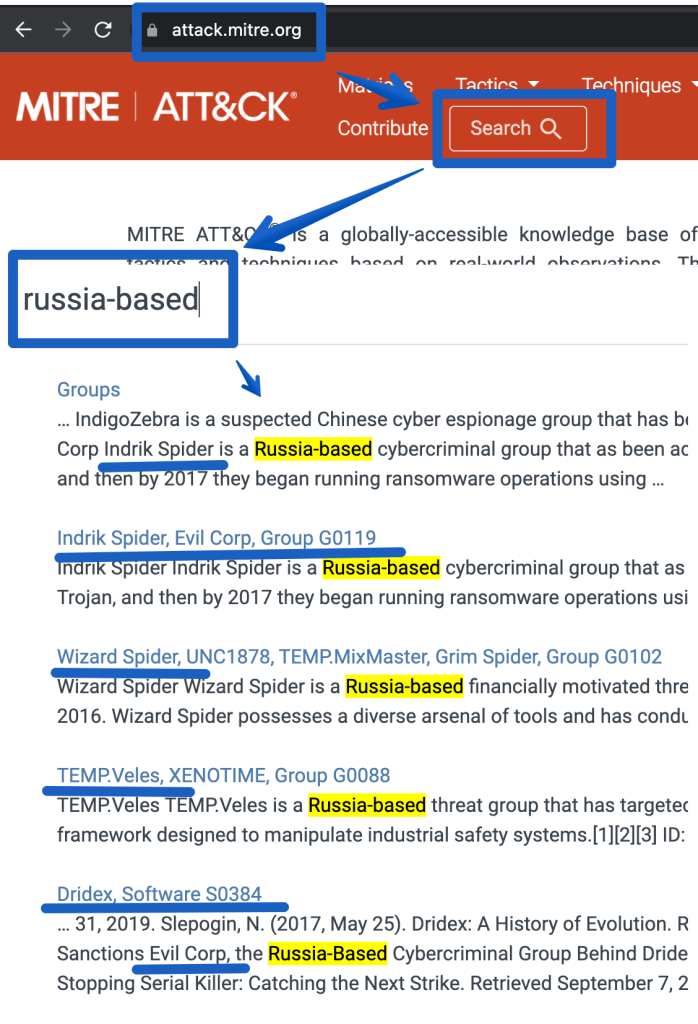
That provides the following references.
https://attack.mitre.org/groups/G0007 (APT28)
https://attack.mitre.org/groups/G0074 (Dragonfly 2.0)
https://attack.mitre.org/groups/G0016 (APT29)
https://attack.mitre.org/groups/G0119 (Indrik Spider, Evil Corp)
https://attack.mitre.org/groups/G0133 (Nomadic Octopus)
https://attack.mitre.org/groups/G0034 (Sandworm)
https://attack.mitre.org/groups/G0088 (Temp.veles)
https://attack.mitre.org/groups/G0010 (Turla)
https://attack.mitre.org/groups/G0053 (FIN5)
https://attack.mitre.org/groups/G0102 (Wizard Spider)
The next step would be to go deeper and identify ‘entities’ that are specific to using these attacks, such as:
Peace to all.
More Ukraine related information intelligence:
https://github.com/Orange-Cyberdefense/russia-ukraine_IOCs
https://github.com/curated-intel/Ukraine-Cyber-Operations
https://www.mandiant.com/resources/apt-groups
https://www.mandiant.com/resources/insights/ukraine-crisis-resource-center
Alerts by IP:
-----------
let IP_Data = external_data(network:string,geoname_id:long,continent_code:string,continent_name:string ,country_iso_code:string,    country_name:string,is_anonymous_proxy:bool,is_satellite_provider:bool)
    ['https://raw.githubusercontent.com/datasets/geoip2-ipv4/master/data/geoip2-ipv4.csv']
    with (ignoreFirstRecord=true, format="csv");
SecurityAlert
| where TimeGenerated > ago(120h)
| extend AlertEntities = parse_json(Entities)
| mv-expand AlertEntities
| extend IPAddress = tostring(AlertEntities.Address)
| summarize count() by IPAddress
| where isnotempty(IPAddress)
| evaluate ipv4_lookup(IP_Data, IPAddress, network)
//| where country_name != "United States"
| where country_name == "Russia"
|project IPAddress, count_
|order by count_ desc
|render columnchart
------------
Alerts timeline:
let IP_Data = external_data(network:string,geoname_id:long,continent_code:string,continent_name:string ,country_iso_code:string,    country_name:string,is_anonymous_proxy:bool,is_satellite_provider:bool)
    ['https://raw.githubusercontent.com/datasets/geoip2-ipv4/master/data/geoip2-ipv4.csv']
    with (ignoreFirstRecord=true, format="csv");
SecurityAlert
| where TimeGenerated > ago(120h)
| extend AlertEntities = parse_json(Entities)
| mv-expand AlertEntities
| extend IPAddress = tostring(AlertEntities.Address)
| summarize count() by IPAddress, DisplayName, ProviderName, bin(TimeGenerated, 1h)
| where isnotempty(IPAddress)
| evaluate ipv4_lookup(IP_Data, IPAddress, network)
| where country_name != "United States"
//|project TimeGenerated, country_name, IPAddress, ProviderName, DisplayName
| where country_name == "Russia"
//|project IPAddress, DisplayName,ProviderName, count_
//|order by count_ desc
|render timechart
--------------
Malicious traffic: Malicious domain and port (syslog data)
CommonSecurityLog
| extend  Country=MaliciousIPCountry
|where TimeGenerated >ago(7d)
|where Country == "Russia"
|where DestinationIP == ""
//|extend HostPort = strcat(DestinationHostName, "-port-", DestinationPort)
|summarize count() by DestinationHostName, DestinationPort
|order by count_ desc
-------------
Top Malicious IPs (syslog data)
CommonSecurityLog
| extend  Country=MaliciousIPCountry
|where TimeGenerated >ago(7d)
|where Country == "Russia"
|where DestinationIP == ""
|summarize count() by MaliciousIP
|order by count_ desc
|limit 10
-------------
Destination IPs by Count (CommonSecurityLog)
let IP_Data = external_data(network:string,geoname_id:long,continent_code:string,continent_name:string ,country_iso_code:string,    country_name:string,is_anonymous_proxy:bool,is_satellite_provider:bool)
    ['https://raw.githubusercontent.com/datasets/geoip2-ipv4/master/data/geoip2-ipv4.csv']
    with (ignoreFirstRecord=true, format="csv");
CommonSecurityLog
| where TimeGenerated > ago(1h)
| where DestinationIP !startswith "192."
| where DestinationIP !startswith "10."
| where DestinationIP !startswith "127."
| where DestinationIP !startswith "171."
| summarize count() by SourceIP, DestinationIP, DestinationPort, SimplifiedDeviceAction, DeviceVendor, bin(TimeGenerated, 1h)
| where isnotempty(SourceIP)
| evaluate ipv4_lookup(IP_Data, SourceIP, network)
| where country_name != "United States"
//|project TimeGenerated, country_name, IPAddress, ProviderName, DisplayName
| where country_name == "Russia"
|summarize count() by SourceIP
|render columnchart
-----------
Palo Alto - Threat events by country
let IP_Data =
    external_data(network:string,geoname_id:long,continent_code:string,continent_name:string ,country_iso_code:string,    country_name:string,is_anonymous_proxy:bool,is_satellite_provider:bool)
    ['https://raw.githubusercontent.com/datasets/geoip2-ipv4/master/data/geoip2-ipv4.csv']
    with (ignoreFirstRecord=true, format="csv");
CommonSecurityLog
| where TimeGenerated > ago(1d)
| where DestinationIP !startswith "192."
| where DestinationIP !startswith "10."
| where DestinationIP !startswith "127."
| where DestinationIP !startswith "171."
| where DeviceVendor == "Palo Alto Networks"
| where Activity == "THREAT"
//| summarize count() by SourceIP, DestinationIP, DestinationPort, ApplicationProtocol, Activity, SimplifiedDeviceAction, DeviceVendor, Message, RequestURL,FlexString2,bin(TimeGenerated, 1h)
//| where isnotempty(SourceIP)
| evaluate ipv4_lookup(IP_Data, DestinationIP, network)
| where country_name != "United States"
//|project TimeGenerated, country_name, IPAddress, ProviderName, DisplayName
|summarize count() by country_name
|order by count_ desc
|render columnchart
-----------------Let’s hope this ends quickly and people/countries come to reason.
If you’re frequently involved with Microsoft security, it may be useful to maintain a list of the most common links.
If you’re a SOC analyst, some of these links will make good dashboards for your wall of 4k monitors.
If you’re a security engineer, this can be one of your checklists for walking around all things security related in the Microsoft cloud.
Since I don’t have any spreadsheet formatting plugins, the web links in the screenshot are listed below.
(This isn’t a comprehensive list of security related links, but something to grow on)
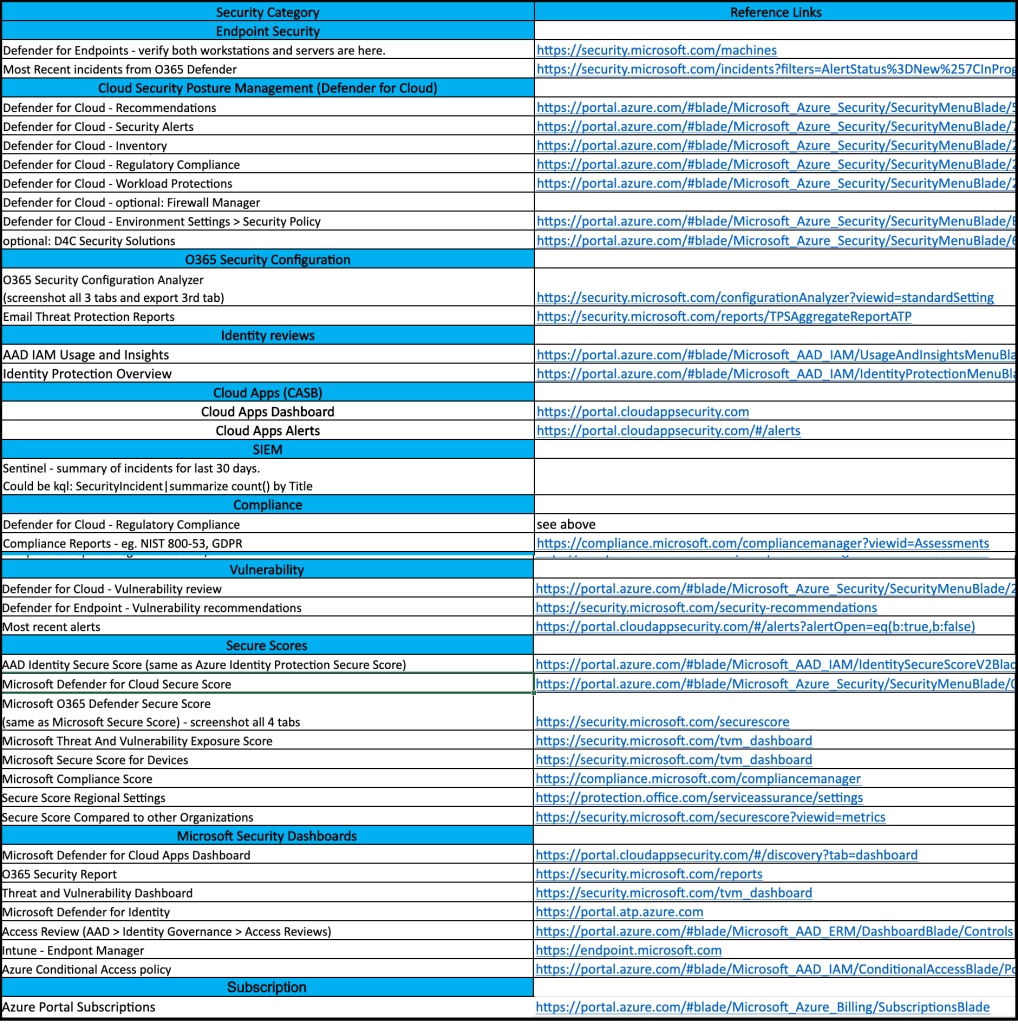
Reference Links
https://security.microsoft.com/machines https://security.microsoft.com/incidents?filters=AlertStatus%3DNew%257CInProgress https://portal.azure.com/#blade/Microsoft_Azure_Security/SecurityMenuBlade/5 https://portal.azure.com/#blade/Microsoft_Azure_Security/SecurityMenuBlade/7 https://portal.azure.com/#blade/Microsoft_Azure_Security/SecurityMenuBlade/25 https://portal.azure.com/#blade/Microsoft_Azure_Security/SecurityMenuBlade/22 https://portal.azure.com/#blade/Microsoft_Azure_Security/SecurityMenuBlade/26 https://portal.azure.com/#blade/Microsoft_Azure_Security/SecurityMenuBlade/EnvironmentSettings https://portal.azure.com/#blade/Microsoft_Azure_Security/SecurityMenuBlade/6 https://security.microsoft.com/configurationAnalyzer?viewid=standardSetting https://security.microsoft.com/reports/TPSAggregateReportATP https://portal.azure.com/#blade/Microsoft_AAD_IAM/UsageAndInsightsMenuBlade/Azure%20AD%20application%20activity https://portal.azure.com/#blade/Microsoft_AAD_IAM/IdentityProtectionMenuBlade/Overview https://portal.cloudappsecurity.com https://portal.cloudappsecurity.com/#/alerts https://compliance.microsoft.com/compliancemanager?viewid=Assessments https://portal.azure.com/#blade/Microsoft_Azure_Security/SecurityMenuBlade/26 https://security.microsoft.com/security-recommendations https://portal.cloudappsecurity.com/#/alerts?alertOpen=eq(b:true,b:false) https://portal.azure.com/#blade/Microsoft_AAD_IAM/IdentitySecureScoreV2Blade https://portal.azure.com/#blade/Microsoft_Azure_Security/SecurityMenuBlade/0 https://security.microsoft.com/securescore https://security.microsoft.com/tvm_dashboard https://compliance.microsoft.com/compliancemanager https://protection.office.com/serviceassurance/settings https://security.microsoft.com/securescore?viewid=metrics https://portal.cloudappsecurity.com/#/discovery?tab=dashboard https://security.microsoft.com/reports https://security.microsoft.com/tvm_dashboard https://portal.atp.azure.com https://portal.azure.com/#blade/Microsoft_AAD_ERM/DashboardBlade/Controls https://endpoint.microsoft.com https://portal.azure.com/#blade/Microsoft_AAD_IAM/ConditionalAccessBlade/Policies https://portal.azure.com/#blade/Microsoft_Azure_Billing/SubscriptionsBlade
If you manage a single cloud tenant with a single subscription, roles and responsibilities for security can usually be maintained by a small SecOps team.
But if your organization has dozens or hundreds of departments, the need for a much more hierarchical structure can quickly become difficult for a single security team to maintain control over.
So what can happen is departments are handed over the role of the security administrator for their own resources and users.
And before you know it, SecOps has lost control of who’s making changes to what.
Fear not, this isn’t a terrible thing, but it’s important to put checks in place to ensure simple practices are being followed.
One approach:
Not only does the above approach provide clear security checks/responsibilities to the security owners, but it gives the SecOps team a way to track security in a growing organization without getting overwhelmed. It also ensures that as security owners come and go from the organization, that the new owners will be quickly identified by the SecOps team, thus avoiding gaps in maintaining security controls.
Excellent intro by John Cartrett on what a purple team engagment is all about. More to come from John…
let attack=_GetWatchlist(‘attack’);
SecurityAlert
|extend Severity = “T1040”
|join attack on $left.Severity == $right.Tactic
|distinct Defense
Event
| where Source == “Microsoft-Windows-Sysmon”
|where EventID <> 255
| where TimeGenerated >= ago(180d)
| summarize count() by bin(TimeGenerated, 1d)
|render columnchart
SecurityAlert
| extend Entities = iff(isempty(Entities), todynamic(‘[{“dummy” : “”}]’), todynamic(Entities))
|mv-expand Entities
|extend HostName_ = tostring(Entities.HostName)
|where HostName_ <> “”
|where HostName_ contains “{Hostname}”
|project HostName_
“let IP_Data = external_data(network:string,geoname_id:long,continent_code:string,continent_name:string ,country_iso_code:string,country_name:string,is_anonymous_proxy:bool,is_satellite_provider:bool)
[‘https://raw.githubusercontent.com/datasets/geoip2-ipv4/master/data/geoip2-ipv4.csv’%5D;
let IPs =
CommonSecurityLog
|where DeviceVendor == “”Fortinet””
//filter out private networks
|where not(ipv4_is_private(SourceIP)) and not(ipv4_is_private(DestinationIP))
|summarize by SourceIP
;
IPs
| evaluate ipv4_lookup(IP_Data, SourceIP, network, return_unmatched = true)”
One of the first skills to acquire when learning a SIEM is it’s query language.
Microsoft Sentinel (and many of Microsoft’s tools) use KQL – Kusto Query Language.
If you want to learn more about what KQL is, go here.
This blog is simply a super quick reference for getting started.
Azure Sentinel webinar: Learn the KQL you need for Azure Sentinel (Part 1 of 3)
Azure Sentinel webinar: KQL part 2 of 3 – KQL hands-on lab exercises
Azure Sentinel webinar: KQL part 3 of 3 – Optimizing Azure Sentinel KQL queries performance
Challenge #1; Create a query that uses a watchlist
Challenge #2: Create a timechart based query
Challenge #3: use mv-expand to view the entities fields
Bonus challenge: use GeoIP to map to country

