Create A Powerful Threat Hunter for Microsoft 365 Defender

If you’re a user of Microsoft Sentinel, you’re likely familiar with it’s Threat Hunting feature which lets you run hundreds of KQL queries in a matter of seconds.

Unfortunately the Threat Hunting in the M365 Defender portal doesn’t have this feature, so you’re stuck running your hunting queries one at a time.

So I’ve created a proof of concept script that provides some threat hunting automation by taking the 400+ threat hunting queries in the Microsoft Sentinel Github repository and feeding them into the M365 Defender ThreatHunting api.

Requirements
  • a unix shell from which you can run python and git commands
  • python3, git command, and the python modules you see at the top of the scripts attached below
  • admin access to Azure to set up an app registration
  • operational use of the M365 Defender portal (https://security.microsoft.com)
Caveats

There are some known performance limitations to using Defender advanced threat hunting, so although the script may seem to be working, there could be timeouts happening in the background if Defender decides you’re using too many resources. This script doesn’t have any built in error checking so re-running the script or validating the queries within the Defender portal may be required.

The Setup Procedure:
  1. Create an app registration in Azure. Configuring an app registration is out of the scope of this article, but there are plenty of examples on how to do this. What’s important are the permissions you’ll need to allow:
    • ThreatHunting.Read.All
    • APIConnectors.ReadWrite.All
  2. From the app registration created in step #1, copy the tenantID, clientID and the secret key, and paste them into the script I’ve provided below.
  3. Create a directory named ‘queries’. This will be used to store the .yaml files from Github. These files contain the hunting queries.
  4. In the same directory, download the Github repository using this command:
  5. Now it’s time to create and run the first of 2 scripts. This first script should require no changes. Its purpose is to scan the Azure-Sentinel subdirectories (that you downloaded in step #4) for .yaml files and copy them all to the ‘queries’ directory.
    • Here’s the script, name it something like get_yaml.py and then run it like: “python3 get_yaml.py
# python script name: "get_yaml.py"
import os
import shutil

# Set the directory paths
source_dir = 'Azure-Sentinel/Hunting Queries/Microsoft 365 Defender/'
target_dir = 'queries'

# Recursively search the source directory for YAML files
for root, dirs, files in os.walk(source_dir):
    for file in files:
        if file.endswith('.yaml'):
            # Create the target directory if it doesn't already exist
            os.makedirs(target_dir, exist_ok=True)

            # Copy the file to the target directory
            source_file = os.path.join(root, file)
            target_file = os.path.join(target_dir, file)
            shutil.copy2(source_file, target_file)

            # Print a message to indicate that the file has been copied
            print(f'Copied {source_file} to {target_file}')

6. Edit this next script (below) and insert the tenantID, clientID and secret from the Azure app registration, as mentioned above in step #1. Name the script something like threathunt.py and run it with the python (or python3) command: “python3 threathunt.py”.

  • Note that the script below expects the .yaml files to be in a folder named “queries” (from when you ran the first script above).
  • After running the script below, look in the queries folder for any new files with a .json extension.
  • If the query ran successfully and generated results, a .json file will be created with the same filename as the matching .yaml file (eg. test.yaml > test.json)
import requests
import os
import yaml
import json
from azure.identity import ClientSecretCredential

# Replace the values below with your Azure AD tenant ID, client ID, and client secret
client_id = "YOUR APP REGISTRATION CLIENT ID"
client_secret = "YOUR APP REGISTRATION SECRET KEY"
tenant_id = "YOUR TENANT ID"
scope = "https://graph.microsoft.com/.default"

authority = f"https://login.microsoftonline.com/"

# Create a credential object using the client ID and client secret
credential = ClientSecretCredential(
    authority=authority,
    tenant_id=tenant_id,
    client_id=client_id,
    client_secret=client_secret
)

# Use the credential object to obtain an access token
access_token = credential.get_token("https://graph.microsoft.com/.default").token

# Print the access token
print(access_token)

# Define the headers for the API call
headers = {
    "Authorization": f"Bearer {access_token}",
    "Content-Type": "application/json",
    "Accept": "application/json"
}

# Define the API endpoint
url = "https://graph.microsoft.com/v1.0/security/microsoft.graph.security/runHuntingQuery"

# Define the path to the queries directory
directory_path = "queries"

# Loop through all YAML files in the queries directory
for file_name in os.listdir(directory_path):
    if file_name.endswith(".yaml") or file_name.endswith(".yml"):
        # Read the YAML file
        with open(os.path.join(directory_path, file_name)) as file:
            query_data = yaml.load(file, Loader=yaml.FullLoader)
            # Extract the query field from the YAML data
            query = query_data.get("query")
            if query:
                print(query)
                # Define the request body
                body = {
                    "query": query
                }
                # Send the API request
                response = requests.post(url, headers=headers, json=body)
                # Parse the response as JSON
                json_response = response.json()

                if json_response.get('results') and len(json_response['results']) > 0:
                  #print(json.dumps(json_response, indent=4))
                  output_file_name = os.path.splitext(file_name)[0] + ".json"
                    # Write the JSON response to the output file
                  with open(os.path.join(directory_path, output_file_name), "w") as output_file:
                      output_file.write(json.dumps(json_response, indent=4))

Once you have the results from your threat hunt you could:

  • Log into the M365 Defender portal and re-run the hunting queries that generated data. All of these YAML queries from github should be in the Threat Hunting > Queries bookmarks. If not you can manually copy/paste the query from inside the YAML file directly into Query Editor and play around with it.
  • Import the data into Excel or Power BI and play around with the results.
  • Create another python script that does something with the resulting .json files like aggregate the fields and look for commonalities/anomalies.

Happy Hunting!

Use ChatGPT to Search Mitre ATT&CK More Effectively

My python fu has never been above beginner, so writing scripts to use Mitre’s ATT&CK json files was always a hit and miss effort.

So I asked chatgpt to write it for me and after several back and forth tweaks and coding errors ‘we’ came up with these 2 which I find pretty useful.

To use the scripts, simply run “python <script>” and it will dump the results to a csv file (the first script requires you the first download the json file but the 2nd one doesn’t – see comments).

If you don’t like them exactly the way they are, paste them into chatgpt and simply ask it to make some modifications, eg:

  • Add a header row
  • Sort by the first column
  • Only include these fields: technique_id,technique_name,tactic_name,platforms
  • Use a comma as the field separator
  • rather than reading from a local json file, read from the web version of enterprise-attack.json
ATT&CK_Tactic_Technique_LogSource.py
import json

# Load the MITRE ATT&CK Enterprise Matrix from the JSON file
# https://raw.githubusercontent.com/mitre/cti/master/enterprise-attack/enterprise-attack.json

with open('enterprise-attack.json', 'r') as f:
    data = json.load(f)

# Open a file to write the output to
with open('output.csv', 'w') as f:
    # Print the header row
    f.write("technique_id,technique_name,tactic_name,platforms,permissions_required\n")

    # Loop through each technique in the JSON file and print its fields
    for technique in data['objects']:
        # Extract the technique ID and name
        if 'external_references' in technique and len(technique['external_references']) > 0:
            technique_id = technique['external_references'][0].get('external_id', '')
        else:
            technique_id = ''
        technique_name = technique.get('name', '')

        # Extract the required platforms, if any
        platforms = ",".join(technique.get('x_mitre_platforms', []))

        # Extract the required permissions, if any
        permissions_required = ",".join(technique.get('x_mitre_permissions_required', []))

        # Extract the tactic name, if any
        tactic_name = ""
        if 'kill_chain_phases' in technique and len(technique['kill_chain_phases']) > 0:
            tactic_name = technique['kill_chain_phases'][0].get('phase_name', '')

        # Write the technique fields to the output file in CSV format
        if technique_id and technique_name:
            f.write(f"{technique_id},{technique_name},{tactic_name},{platforms},{permissions_required}\n")

# Read the contents of the output file into a list of lines
with open('output.csv', 'r') as f:
    lines = f.readlines()

# Sort the lines based on the technique_id column
lines_sorted = sorted(lines[1:], key=lambda x: x.split(',')[0])

# Write the sorted lines back to the output file
with open('output.csv', 'w') as f:
    f.write(lines[0])
    f.writelines(lines_sorted)
ATT&CK_All_Raw_Fields.py
import json
import urllib.request

# Load the JSON file from the URL
url = "https://raw.githubusercontent.com/mitre/cti/master/enterprise-attack/enterprise-attack.json"
response = urllib.request.urlopen(url)
data = json.loads(response.read())

# Create a list of all the field names
field_names = []
for technique in data["objects"]:
    for field in technique:
        if field not in field_names:
            field_names.append(field)

# Add a header column to the field names
field_names_with_header = ["Header"] + field_names

# Write the data to a file with ";" as the delimiter
with open("enterprise-attack.txt", "w") as txt_file:
    # Write the header row
    header_row = ";".join(field_names_with_header) + "\n"
    txt_file.write(header_row)

    # Write the data rows
    for i, technique in enumerate(data["objects"]):
        values = [str(technique.get(field, "")).replace("\n", "") for field in field_names]
        row = f";T{i+1}" + ";" + ";".join(values) + "\n"
        txt_file.write(row)

Configuring Sentinel to Collect CEF Syslog with the AMA agent

(NOTE: I suggest you read my new blog post on this topic here. Some of the suggestions below may be outdated)

Here’s a quick guide to installing the AMA agent for collecting syslog data into Microsoft Sentinel.

Note: the ‘legacy’ method involved installing the old OMS agent and a separate step for the CEF collection script. The new procedure only requires a single python script, but it also requires the Azure Arc agent.
(which arguably is an added benefit for many reasons we won’t get into here).

Note: the AMA agent relies on the Azure Arc agent, unless your syslog server is in the Azure cloud.

This procedure is using Ubuntu 20.04, but it will be almost identical for most other linux platforms:

  1. Install Python3 and other tools:
    • sudo apt-get update;sudo apt-get install python3;sudo apt-get install net-tools;sudo ln -s /usr/bin/python3 /usr/bin/python
  2. Install ARC agent. 
    • (if you haven’t done this before, go to the Azure portal and search for Arc.)
    • Verify: In the Azure portal, verify the server shows up in the list of Arc servers.
  3. In Sentinel, enable the CEF AMA connector and Create a DCR (data collection rule).
    • Enable these syslog Facilities: LOG_AUTH, LOG_AUTHPRIV and all of the LOG_LOCAL*. Use the log level of LOG_DEBUG.
    • WAIT 5 MINUTES for the Arc agent heartbeats to get up to Sentinel.
    • Verify: In the Sentinel log analytics workspace, query the ‘Heartbeat’ table – verify your arc server is here. 
  4. Install CEF AMA for syslog:

In Sentinel, verify the CEF logs are parsing by querying the CommonSecurityLog table:

References:

https://learn.microsoft.com/en-us/azure/sentinel/connect-cef-ama

https://learn.microsoft.com/en-us/azure/sentinel/forward-syslog-monitor-agent#configure-linux-syslog-daemon

https://learn.microsoft.com/en-us/azure/sentinel/data-connectors/common-event-format-cef-via-ama

I Need an MDR Service. What Should I Know?

Not all EDRs (endpoint detection and response) are created equal. And the same goes for the ‘Managed’ services provided by 3rd parties (the MDRs)!

This article will provide a simple summary of some things to look for when choosing an MDR vendor.

It will focus around Microsoft’s Defender for Endpoint EDR, but you can extract what you need from these suggestions and use most of it for any EDR.

Although most vendors will present an MDR service that focusus on simply an EDR solution, it could involve additional ‘XDR’ (cross platform detection and response) features (such as email, CASB, NIDS, firewall, TI, EASM, VA and CSPM), which is out of the scope of this article.

EDR Licenses

Expect to require either the Defender for Endpoint P2 license or an E5 Enterprise Security license. Many 3rd party MDR vendors will ask for this because it provides important features that are not available with the P1 license, such as bidirectional API communications (for better control of the endpoint and the incident).

Distinct Characteristics of the EDR

Each EDR vendor will have 1 or more features that they say makes their EDR better. For example, Microsoft Defender for Endpoints has AIR – automated investigation and response – so many of the detections will be auto evaluated and closed if Defender succeeded in blocking the activity.)

And you may know that Microsoft will soon release ‘Security Copilot’ which is supposed to add GPT4 capabilities for incident response. A good MDR service should be able to advise you on how to build effective queries to take advantage of that new feature when it’s available.

Distinctions between MDRs

Like the EDR software itself, the MDR vendor will likely have some differences in what they offer for supporting your security needs.

Some things to look for:

  • Ask if the vendor will work with you to tune your EDR configuration – based on both their best practices and any specific needs that you have (like only managing a subset of your sensors).
  • Which of your EDR capabilities will your vendor take advantage of? For example, in the Defender settings you can share EDR data with MCAS (Defender for Cloud), Microsoft Compliance,  Intune and O365.
  • Make sure you enable key features such as blocking mode, ASR rules, tamper protection, O365 Threat Intelligence, and device discovery.
  • Perform a quarterly review of all of your features in security.microsoft.com to ensure you’re getting the most from your EDR/XDR. A good MDR vendor will do this with you for a nominal fee.

More suggestions

  • Create attack simulations to test your EDR under conditions relative to your environment and industry (think Mitre ATT&CK).
  • Use ‘deception techniques’ to supercharge your EDR by simply creating fake user accounts and ‘desktop litter files’ with which you can use like landmines to detect unauthorized activity.
  • (for Microsoft Defender only) Consider purchasing the built-in Vulnerability Management service (look under the Devices menu). This will provide some great features like application blocking for unsigned apps.

Final Words

Don’t put too much weight into which EDR is on top with evaluation scores. Spend some time really understanding the EDRs features and the effort needed to deploy/manage your EDR/MDR.

Microsoft Cloud Licensing and Cost Summary

Here’s a simple high level guide to navigating Microsoft licensing from a security perspective.

This guide won’t go into the details of ‘why’ you need these licenses, and it won’t discuss the operational costs of implementing these security solutions.

Your main reference for Microsoft enterprise licensing is here!
(don’t worry if you’re not in the US, it will ask you to switch)

On the left hand side of this page is a pdf you should download and really get to know:

Budgeting for security in any organization can be a challenge. Let’s assume you’re taking the leap with Microsoft but you want to work it into your budget.

Consider E5 licenses for a subset of users and E3 for the rest.

This will allow you to optimize the use of the security related features for your critical infrastructure and then grow out to the larger cost of protecting everything.

P1 vs P2

Next look at the P1 vs P2 features. If you have that E5 license then you’re mostly set with the P2 features since they’re included with E5.
If you have E3 then consider adding all of the P2 features until it makes more sense cost-wise to switch to E5. The order in which you add the P2 features will depend on your security priorities.

Don’t shrug off the importance of many of these P2 features. Here are some links to look at for more information:

Additional cost considerations:
  • DDoS protection
  • WAF
  • SIEM – Microsoft Sentinel
  • EASM – External Attack Surface Management

See the link for the Pricing Calculator below to dig into the cost of these additional services.

References:

M365 Licensing (includes everything related to E3, E5, P1, P2, etc.)
Defender for Cloud Pricing
Pricing Calculator – select the ‘Security’ side menu and go from there

US National Cybersecurity Strategy

Based on the recent publication of the US National Cybersecurity Strategy, here are some practical suggestions for implementing cybersecurity solutions that loosely map to its guidelines:

  1. Defend Critical Infrastructure by:
  • Expanding the use of minimum cybersecurity requirements in critical sectors to ensure national security and public safety and harmonizing regulations to reduce the burden of compliance

Recommendation: Perform a gap analysis on your cybersecurity defenses. Start with a ‘master list of all recommended defenses and compare that to your organization’s tools’ Prioritize the implementation of any required defenses. Consider consolidation of security solutions under a single vendor’s licence agreement to save on costs. Create good architecture diagrams to describe your infrastructure from a cybersecurity perspective.

  • Enabling public-private collaboration at the speed and scale necessary to defend critical infrastructure and essential services

Recommendation: Create an inventory of all critical assets. If you’re a small org then a manual inventory is fine, otherwise consider a mature asset collection tool to help with this (google ‘asset inventory cybersecurity’ and you’ll get plenty of hits). Use your asset inventory to categorize critical assets and use this information in your SIEM to help with better correlations.

  • Defending and modernizing Federal networks and updating Federal incident response policy.

Recommendation: Review/create incident response policies and procedures. Consider creating specific response procedures that map to your SIEM incidents to improve clarity and incident response times.

  1. Disrupt and Dismantle Threat Actors by:
  • Using all instruments of national power, making malicious cyber actors incapable of threatening the national security or public safety of the United States
  • Strategically employing all tools of national power to disrupt adversaries
  • Engaging the private sector in disruption activities through scalable mechanisms
  • Addressing the ransomware threat through a comprehensive Federal approach and in lockstep with international partners.

Recommendation: Have a clear understanding of the ‘kill chains‘ that may affect your organization. Use Mitre ATT&CK  and your favorite security sites to help research threat actor groups. Identify security tools needed to detect/block attackers. Test/validate the effectiveness of those tools using Red/Blue/Purple team events.

  1. Shape Market Forces to Drive Security and Resilience by:
  • Placing responsibility on those within the digital ecosystem that are best positioned to reduce risk and shift the consequences of poor cybersecurity away from the most vulnerable in order to make the digital ecosystem more trustworthy
  • Promoting privacy and the security of personal data

Recommendation: Move data to the cloud and implement a data protection solution that not only tags and categorizes your data but locks out access if it’s stolen.

  • Shifting liability for software products and services to promote secure development practices
  • Ensuring that Federal grant programs promote investments in new infrastructure that are secure and resilient.
  1. Invest in a Resilient Future by: 
  • Reducing systemic technical vulnerabilities in the foundation of the Internet and across the digital ecosystem while making it more resilient against transnational digital repression

Recommendation: Implement a robust vulnerability assessment solution. Note that moving all your assets to the cloud can make this far easier to manage and can greatly benefit the effectiveness of your CSPM and SIEM.

  • Prioritizing cybersecurity R&D for next-generation technologies such as postquantum encryption, digital identity solutions, and clean energy infrastructure and developing a diverse and robust national cyber workforce.
  1. Forge International Partnerships to Pursue Shared Goals by:
  • Leveraging international coalitions and partnerships among like-minded nations to counter threats to the digital ecosystem through joint preparedness, response, and cost imposition
  • Increasing the capacity of partners to defend themselves against cyber threats, both in peacetime and in crisis; and working with allies and partners to make secure, reliable, and trustworthy global supply chains for information and communications technology and operational technology products and services.

Recommendation: Although many are reluctant to go back to the IBM days of putting all your security solutions into a single basket, cloud vendors and MSSPs have made great progress in the past 5+ years to provide a long list of services under one roof. When looking for one security product it’s very important to think broader and understand the interconnected values between all of your other security tools (XDR!). Security decision makers will often find that re-shuffling several of their security solutions makes more sense than just adding them one brick at a time.

Do you really need an NIDS anymore?

I had a client the other day asking for my recommendations on a NIDS platform.

Back in the day, NIDS was the ONLY security tool many corporations depends on to detect malicious activity. Many of the top MSSPs would build service contracts just around firewall and NIDS.

It’s worth questioning the value of NIDS in today’s day as EDR and XDR gets better and better.

For example Defender for Endpoint provides network threat intel and works with Defender for Cloud Apps to identify and block malicious web traffic.

And if you think of XDR as also including ‘smart’ firewalls like Palo Alto, and with proper network segmentation, you have to consider if NIDS is a worthy expenditure.

And if your DMZ has moved to or integrated with the cloud there are different ways to monitor/protect your sensitive assets than NIDS.

Just a few things to consider when trying to balance security value with your budget.

More references on this topic (Thanks Kevin!!!)

https://www.pratum.com/blog/262-why-intrusion-detection-and-prevention-systems-are-still-important

SIEM Use Case Guide – Part 3

Real World Examples

In this section let’s take the real world example of Bloodhound and discuss defensive measures for that use case.

Bloodhound

Step 1: Know thy Enemy.

Have a good list of threat intelligence sites (eg Mitre) that you can use to learn about an attack group or a specific exploit. Bloodhound uses ‘ingestors’ like Sharphound to collect information which it then uses to map out an attack path. So when looking for defenses you may need to look at the ingestors, not Bloodhound itself (although Sharphound may run as a sub-command within Bloodhound).

Step 2: Plan your defenses and build a Blue Team toolkit.

There are many ways to detect and block an exploit, depending on the conditions. But don’t take too much time thinking about the best way to do it when there are some easy wins that you can do right away, for example:

  • Ensure an EDR (and AntiMalware) is installed on all endpoints, and run reports to ensure their rules/signatures are all kept updated.
  • If the EDR vendor provides advanced features, make sure they’re enabled for optimal defenses – eg. enable blocking mode, enable advanced configurations such as Microsoft Defender ASR (Attack Surface Reduction)
  • Configuration Policies – Use tools like Microsoft Endpoint Manager (with Intune) to configure policies on your endpoints to provide a base ‘hardening’ for your devices. Ensure logging is enabled on all servers, including advanced logging for Powershell. If you’re using 1 or more cloud platforms you should be managing your infrastructure’s security policies with a CSPM (cloud security posture management) like Microsoft Defender for Cloud – this can also add additional defenses like FIM – File Integrity Management.

Step 3: Build Process For Faster Response

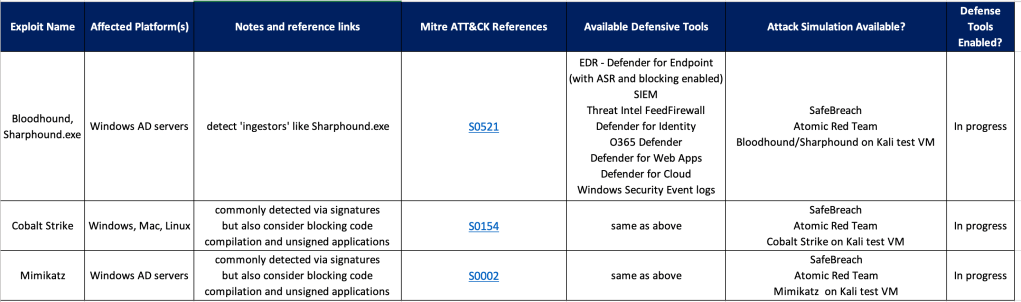
Once you have a list of tools/methods for building defenses, create a checklist and start filling it out. You’ll find that after adding a few rows a common pattern will arise for similar exploits, so your ‘Defender’ job should get a bit easier over time.

Example Defender Framework/Checklist

See also:

Microsoft Ignite 2022 – START HERE

https://news.microsoft.com/ignite-2022-book-of-news/

https://ignite.microsoft.com/en-US/home

The list of Ignite presentation topics is HUGE!!!

Fortunately, Microsoft provides MVPs with an quick reference sheet so we can share our top picks with you.

So here are my top picks for security topics from Microsoft Ignite (and a few other non-security topics):

Rob Lefferts, CVP of PM, Modern Protection and SOC

https://ignite.microsoft.com/en-US/speakers/66804f79-fa68-4762-8f82-45798387e70e?source=/speakers

Shawn Bice, CVP, Cloud Security

https://ignite.microsoft.com/en-US/speakers/0e6b8553-7111-4422-94e0-04a8dddbd678?source=/speakers

What’s new in SIEM and XDR: Attack disruption and SOC empowerment

https://ignite.microsoft.com/en-US/sessions/e1f4b983-55d3-4048-8e90-9c22c4362e6b

Zero Trust as Business Driver: 3 Discrete Scenarios

https://ignite.microsoft.com/en-US/sessions/9974d5a2-b241-4ede-ab2d-c2cd1b7a83be

From Code to Cloud: A new Approach to Integrating Multicloud Security

https://ignite.microsoft.com/en-US/sessions/28f61a40-f1e6-43d8-9fd0-e3c8c6267bac

Secure access and improve efficiency with Microsoft Entra

https://ignite.microsoft.com/en-US/sessions/538bf946-a7bf-46dc-809f-9fbda241f918

Protect Everything, Everywhere With Comprehensive Security

https://ignite.microsoft.com/en-US/sessions/17bbd01d-4e26-4e2e-9eec-3a060b477eda?source=sessions

Azure Arc

https://ignite.microsoft.com/en-US/sessions/50f1092f-6209-4349-b02e-9ad2872ad136?source=sessions

https://azure.microsoft.com/en-us/products/azure-arc/hybrid-data-services/#overview

https://techcommunity.microsoft.com/t5/azure-stack-blog/what-s-new-for-azure-arc-and-azure-stack-hci-at-microsoft-ignite/ba-p/3650949

Azure Monitor

https://techcommunity.microsoft.com/t5/azure-observability-blog/bg-p/AzureObservabilityBlog

Azure – Postman integrations

https://techcommunity.microsoft.com/t5/apps-on-azure-blog/enhanced-api-developer-experience-with-the-microsoft-postman/ba-p/3650304

Supply Chain Management Certification

https://techcommunity.microsoft.com/t5/microsoft-learn-blog/announcing-a-new-dynamics-365-supply-chain-management-functional/ba-p/3250813

Microsoft Cloud for Sustainability

https://cloudblogs.microsoft.com/industry-blog/sustainability/2022/10/12/driving-innovation-for-esg-progress-with-microsoft-cloud-for-sustainability/

Power Automate

https://powerautomate.microsoft.com/en-us/blog/new-ways-to-innovate-with-ai-and-microsoft-power-automate/

Top 5 Cybersecurity Capabilities

5 cybersecurity capabilities announced at Microsoft Ignite 2022

Microsoft Entra

https://ignite.microsoft.com/en-US/sessions/538bf946-a7bf-46dc-809f-9fbda241f918?source=sessions

https://www.microsoft.com/en-us/security/business/microsoft-entra

Microsoft Sentinel

https://techcommunity.microsoft.com/t5/microsoft-sentinel-blog/microsoft-sentinel-what-s-new-at-microsoft-ignite/ba-p/3649968

Microsoft Purview

https://techcommunity.microsoft.com/t5/security-compliance-and-identity/microsoft-purview-information-protection-showcase-of-new/ba-p/3647934

Making Security Fun with Microsoft Cloud Games

This is a really fun way to learns some practical skills with Microsoft Cloud security tools.

I would recommend this for anyone who has a Microsoft E5 license or anyone using Microsoft cloud based products who is ready to get serious about securing their cloud and on-prem environment with Microsoft security tools.

This is not for beginners.

It’s expected you have at least a basic understanding of what these security tools are shown in this screenshot from the game:

Expect to spend at least a couple of hours playing the game.

Have fun!