

Now is a good time to review your Microsoft Defender AV and EDR tools
With all the attacks happening lately, it’s a good time to understand how Microsoft Defender works and which features are relevant to protecting your enterprise against these attacks. I’ll show some recent attacks and how Defender helps, then we’ll see what’s on by default and what you need to think about turning on yourself.
Recent attacks and the Defender features that apply
| Attack | Date | What happened | Defender features that apply |
|---|---|---|---|
| ConnectWise ScreenConnect partner accounts | Disclosed Nov 11, 2026 | Unauthorized access to partner accounts and unauthorized remote access software in customer environments. ConnectWise disabled five third-party extensions linked to the activity | Defender for Endpoint advanced hunting for remote access tools; certificate indicators to block unapproved ones; automatic attack disruption |
| Warlock ransomware through SharePoint | Oct 2, 2026 | On-premises SharePoint exploited at a water utility, a telecom provider, a government body and a university. Web shells, credential theft and remote access used; security protections disabled on at least 40 hosts | Defender Vulnerability Management to find unpatched SharePoint; ASR (attack surface reduction) rules for web shell creation on servers and LSASS credential theft; tamper protection |
| The Gentlemen ransomware | Mid-2025 to 2026 | Ransomware-as-a-service with over 320 claimed victims; enters through exposed VPNs, remote access gateways and firewall management portals (Check Point Research) | Defender Vulnerability Management for internet-facing devices; tamper protection; controlled folder access; automatic attack disruption |
| YAM Store phishing kits (Storm-3119) | Reported Oct 14, 2026 | Underground market selling phishing kits used in credential theft campaigns | Defender for Office 365 Safe Links and preset security policies |
| ClickFix fake CAPTCHA campaigns | June 2025 to June 2026 | Users told to paste and run a command; 12.8% of intrusions observed by Defender | Defender Antivirus clipboard monitor, AMSI (Antimalware Scan Interface) script scanning, ASR rule for obfuscated scripts, network protection |
| Storm-2949 | Reported May 18, 2026 | One compromised identity led to data theft from Microsoft 365, file-hosting services and Azure | Defender for Identity, Defender for Cloud Apps, automatic attack disruption |
NEW: The ClickFix clipboard monitor
At Ignite, Microsoft announced a clipboard monitor (DefenderSessionHelper.exe) that detects malicious commands copied from web pages and clears them before they reach the Run dialog, a terminal or Explorer. Remediation is rolling out to all devices running Defender Antivirus, to complete by the end of 2026. That is Defender Antivirus, not Defender for Endpoint, and the difference decides which devices are covered.
Defender Antivirus is more than a file scanner
Defender Antivirus (MsMpEng.exe) is built into Windows and does most of the blocking at the moment something runs. Besides file scanning, it runs:
- Behaviour monitoring, which can stop fileless malware after execution starts.
- AMSI script scanning of PowerShell, VBScript, JScript and macros in memory.
- Cloud protection, for verdicts on files it has not seen before.
- Network protection, ASR rules and controlled folder access, which are configured separately but enforced by this engine.
- From this rollout, the clipboard monitor.
Active mode, passive mode and coverage
When a third-party antivirus is installed alongside Defender for Endpoint, Defender Antivirus runs in passive mode: it scans and reports but does not remediate. Network protection, ASR rules and controlled folder access need it in active mode. For the clipboard monitor that means:
- Active and onboarded to Defender for Endpoint: covered, with alerts in the Defender portal.
- Active, not onboarded: covered, visible only in the local event log.
- Passive behind a third-party AV: not stated by Microsoft; assume not covered.
- macOS and Linux: not mentioned in the announcement.
To check a device, run Get-MpComputerStatus | Select-Object AMRunningMode, AMProductVersion and look for DefenderSessionHelper.exe in the running processes.
Defender Antivirus settings and their defaults
Defaults are as stated on each linked Microsoft Learn page. Where Learn does not state one, check the device with Get-MpPreference.
| Use case | Setting | Where | Default |
|---|---|---|---|
| Cloud verdicts on new files | Cloud protection* | Intune Antivirus | On |
| Stop Defender being turned off | Tamper protection* | Defender portal or Intune | On for enterprise customers (Windows); audit on macOS |
| Block adware and bundled installers | PUA protection (potentially unwanted applications)* | Intune Antivirus | Audit or block, depending on OS and intelligence version |
| Block bad domains in any browser | Network protection* | Intune Antivirus | Not stated; enabled per device |
| Block obfuscated scripts, web shells and LSASS credential theft | ASR rules* | Intune ASR | Audit: rules that are not configured do not block, but a sample of audit events is collected |
| Block ransomware writes | Controlled folder access* | Intune ASR | Off |
| Block post-breach activity that the primary antivirus missed | EDR in block mode** | Defender portal, Advanced features | Audit: detections on passive-mode devices raise alerts but are not remediated until this is turned on |
| User clicks a link in an email | Safe Links*** (Defender for Office 365) | Defender portal, Threat policies | On for licensed users through Built-in protection; Standard and Strict presets off |
| Clear ClickFix commands from the clipboard | Clipboard monitor* | No setting | Rolling out by end of 2026 |
* Included with Defender Antivirus on Windows 10 and 11 Pro and Enterprise; no Defender for Endpoint licence is needed. Alerts and reporting in the Defender portal need the device onboarded to Defender for Endpoint (Plan 1, Plan 2 or Defender for Business). For ASR rules, Microsoft recommends E5 for monitoring and reporting in the portal; without it the events are in Windows Event Viewer.
** Defender for Endpoint Plan 2, included in Microsoft 365 E5.
*** Defender for Office 365 Plan 1 or Plan 2. Plan 2 is included in Microsoft 365 E5.
Run ASR rules and network protection in audit mode first and review the results in the Defender portal before switching to block.
Where each Defender layer fits
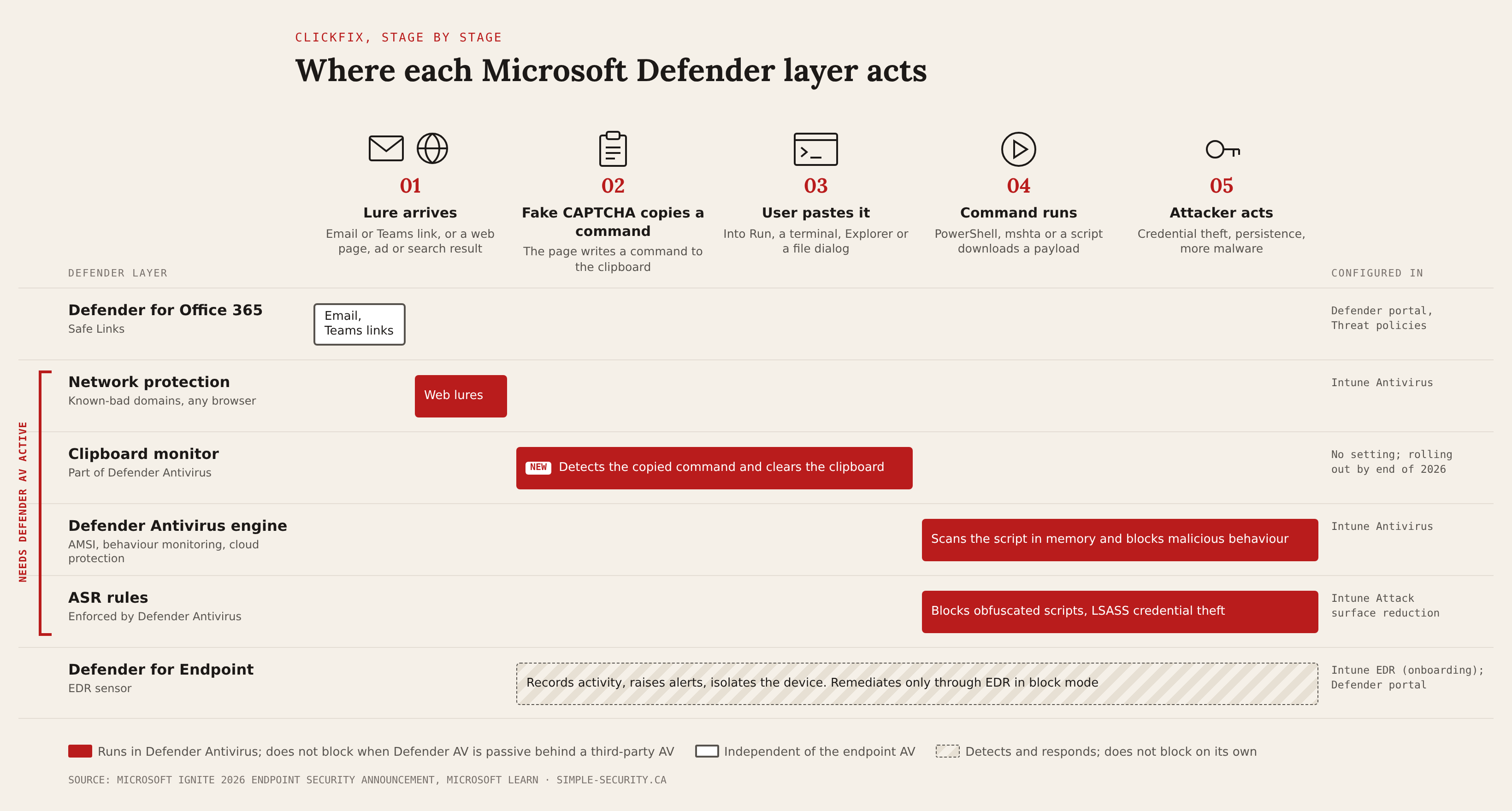
HOW TO READ IT
The columns are the five stages of a ClickFix attack, left to right. Each row is a Defender layer, and its bar spans the stages where that layer acts. Red bars run inside Defender Antivirus and do not block when it is passive behind a third-party AV; the bracket on the left marks them. The outlined bar, Defender for Office 365 Safe Links, covers only lures that arrive in email, Teams or Office apps. The hatched bar, Defender for Endpoint, records and alerts across the attack but does not block on its own. The right column shows where each layer is configured.
Summary
Most of the protections against the attacks in section 01 run inside Defender Antivirus and need it in active mode. On devices where a third-party antivirus is primary, they do not block, and EDR in block mode is the only Defender setting that remediates there.
- On by default: cloud protection, tamper protection for enterprise customers, and Safe Links through Built-in protection.
- Clipboard monitor: Microsoft says it is rolling out to all devices running Defender Antivirus by the end of 2026. It has no setting, and Microsoft has not said whether it can be turned off or whether it works in passive mode.
- Audit by default: ASR rules and EDR in block mode. They report but do not block until you turn them on.
- Off or not set until you configure them: network protection and controlled folder access. PUA (potentially unwanted applications) protection is in audit or block mode depending on the OS and intelligence version.
- To check a device, run Get-MpComputerStatus and Get-MpPreference, then move ASR rules and network protection from audit to block after reviewing the results in the Defender portal.
References
- Ignite 2026: What’s new in endpoint securityMicrosoft Defender Blog
- Storm-2949 turned compromised identity into cloud-wide breachMicrosoft Security Blog
- The hidden network inside the phishing infrastructure ecosystemMicrosoft Security Blog
- The Gentlemen: a new ransomware threat climbing the charts fastCheck Point
- Biggest cyber attacks, data breaches, ransomware attacks: October 2026Cyber Management Alliance
- Recent cyber attacks 2026: a month-by-month timelineStingrai
- Microsoft Defender Antivirus compatibility with other security productsMicrosoft Learn

