I had a client the other day asking for my recommendations on a NIDS platform.
Back in the day, NIDS was the ONLY security tool many corporations depends on to detect malicious activity. Many of the top MSSPs would build service contracts just around firewall and NIDS.
It’s worth questioning the value of NIDS in today’s day as EDR and XDR gets better and better.
And if you think of XDR as also including ‘smart’ firewalls like Palo Alto, and with proper network segmentation, you have to consider if NIDS is a worthy expenditure.
And if your DMZ has moved to or integrated with the cloud there are different ways to monitor/protect your sensitive assets than NIDS.
Just a few things to consider when trying to balance security value with your budget.
In this section let’s take the real world example of Bloodhound and discuss defensive measures for that use case.
Bloodhound
Step 1: Know thy Enemy.
Have a good list of threat intelligence sites (eg Mitre) that you can use to learn about an attack group or a specific exploit. Bloodhound uses ‘ingestors’ like Sharphound to collect information which it then uses to map out an attack path. So when looking for defenses you may need to look at the ingestors, not Bloodhound itself (although Sharphound may run as a sub-command within Bloodhound).
Step 2: Plan your defenses and build a Blue Team toolkit.
There are many ways to detect and block an exploit, depending on the conditions. But don’t take too much time thinking about the best way to do it when there are some easy wins that you can do right away, for example:
Ensure an EDR (and AntiMalware) is installed on all endpoints, and run reports to ensure their rules/signatures are all kept updated.
If the EDR vendor provides advanced features, make sure they’re enabled for optimal defenses – eg. enable blocking mode, enable advanced configurations such as Microsoft Defender ASR (Attack Surface Reduction)
Configuration Policies – Use tools like Microsoft Endpoint Manager (with Intune) to configure policies on your endpoints to provide a base ‘hardening’ for your devices. Ensure logging is enabled on all servers, including advanced logging for Powershell. If you’re using 1 or more cloud platforms you should be managing your infrastructure’s security policies with a CSPM (cloud security posture management) like Microsoft Defender for Cloud – this can also add additional defenses like FIM – File Integrity Management.
Step 3: Build Process For Faster Response
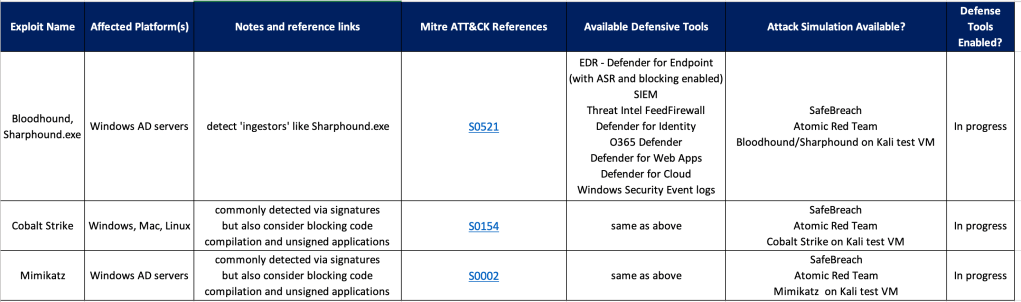
Once you have a list of tools/methods for building defenses, create a checklist and start filling it out. You’ll find that after adding a few rows a common pattern will arise for similar exploits, so your ‘Defender’ job should get a bit easier over time.

 Simple-Security