Zero Trust – A simple Approach for Azure Enterprises

Zero Trust sounds very enticing, but feels overwhelming as much as any other standards based framework.

However there are some quick wins in the Azure world, and all you need is:

  • A good checklist (The Microsoft Zero Trust Assessment Quiz)
  • A Microsoft Sentinel workbook (see below)

In addition, Microsoft has a ton of direction around Zero Trust like:

If you prefer to save some reading time, I’ve taken Microsoft Zero Trust Assessment Quiz results and compressed it into a clean list of questions here:

Microsoft has also added a Zero Trust workbook to Azure Sentinel, so if you’re using their SIEM, there’s an excellent report that you can export and have a full list of security tool recommendations that you likely already own (depending if you have an E3 or E5 license)
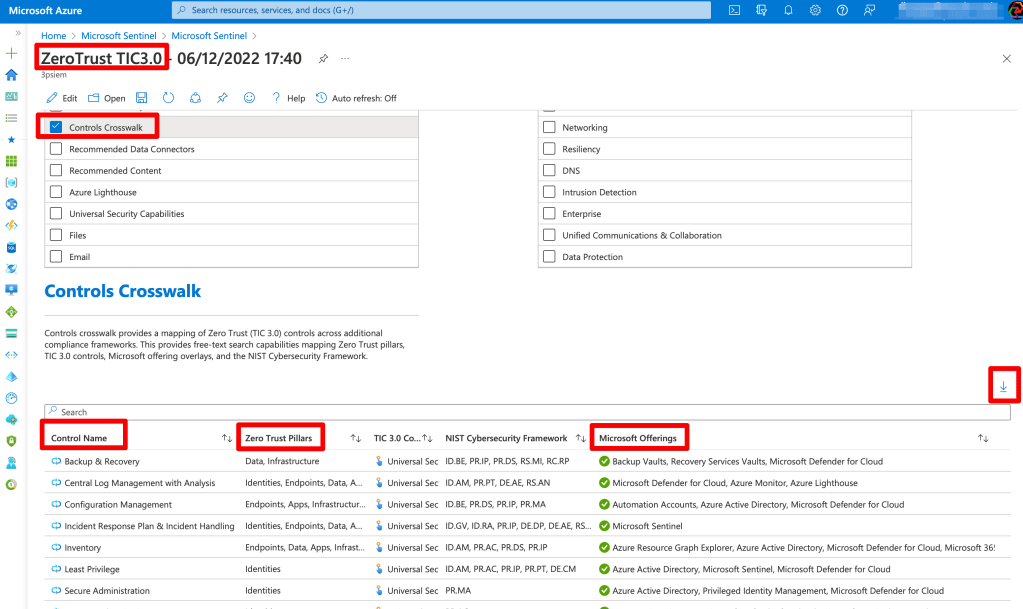
If you’re familiar with the resources under ‘Microsoft Offerings’ then you can begin planning your Zero Trust controls around these features. If you’re not familiar then now it the time to begin learning and proposing a Zero Trust approach around these tools.

Enjoy!
Mapping Cyber Defense Use Cases to Mitre ATT&CK Data Sources

Mitre ATT&CK provides so many ways to quantitatively think about approaches for defending against attackers.

However it can be challenging to map the ATT&CK matrix to to real-world defense methods.

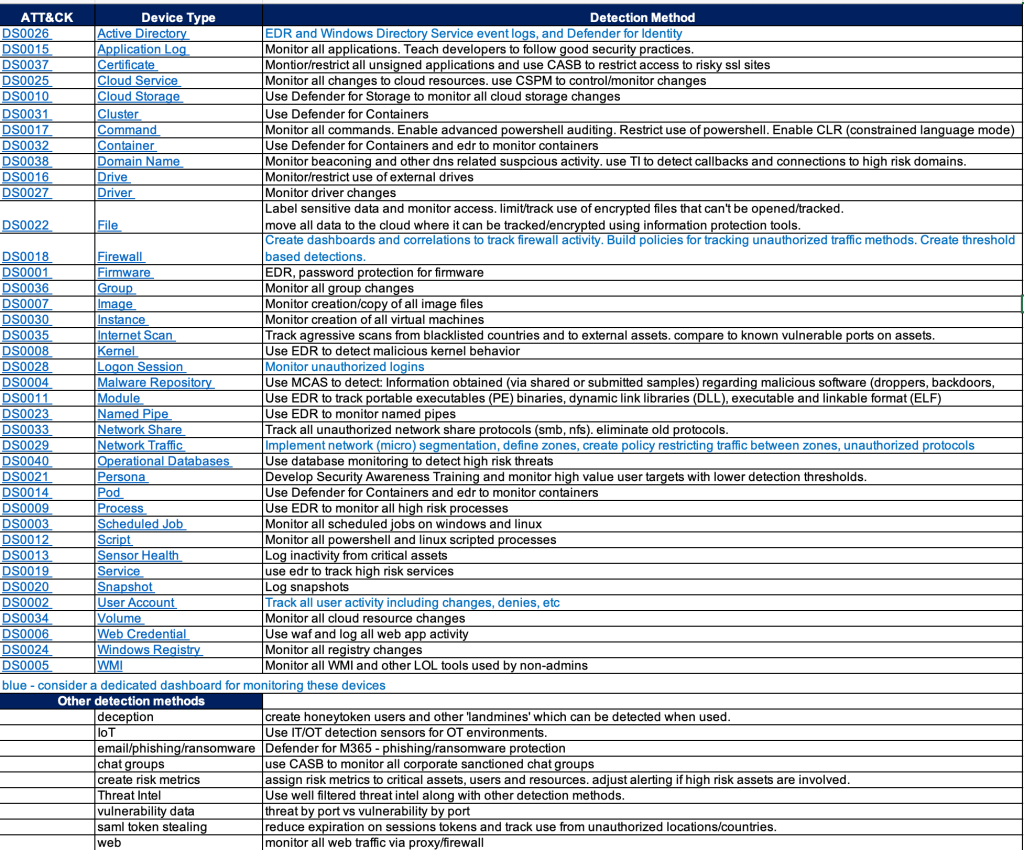
One approach is to look at the ATT&CK data sources and research detections that would map to those data sources.

This still requires some experience and a bit of guessing since there doesn’t appear to be an easy button way to map data sources to detection tools.

Endpoint Detection vendors have done a pretty good job mapping detections to ATT&CK techniques but few of them share their mappings in a simple spreadsheet – that would greatly help validate your detection gaps.

SIEM products like Microsoft Sentinel have done a good job mapping detection rules AND log sources to ATT&CK.

The chart below is an example of an easy way to provide a path forward on where to focus efforts for detections. It also provides a gap analysis for any obvious security tools that may be missing in your environment.

And hopefully my short detection method recommendations will give you some ideas or at least stir conversation.

I’m a Microsoft Recognized Community Hero!

I’m very excited to have been recognized by Microsoft as an Azure Community Hero!

Having worked with (not employed by..) Microsoft for several years as a Security Solutions Advisor/Developer, in 2021/22 I began taking on more of a volunteer role finding ways to give back to the community in any ways I could find.

After several months of contributing on the Microsoft Q&A sites I was very surprised to receive this badge(r) of recognition which they title ‘Microsoft Azure Community Hero’.

So I hope you don’t mind me sharing in my happiness for this honor.

Isn’t it cute?

https://jumpnet.enjinx.io/eth/asset/68c0000000000065/183?source=EnjinWallet-1.15.1