
Like most things in life, there’s an easy way and a hard way…
The Easy Way
Anomali has a threat feed that supports Sentinel’s TAXII connector.
If you open a linux shell you can run this command to get the available channels:
curl -u guest https://limo.anomali.com/api/v1/taxii2/feeds/collections/
To configure one or more of the threat feeds in Sentinel, go to Connectors > Threat intelligence – TAXII. Note the API root URL will be:
https://limo.anomali.com/api/v1/taxii2/feeds
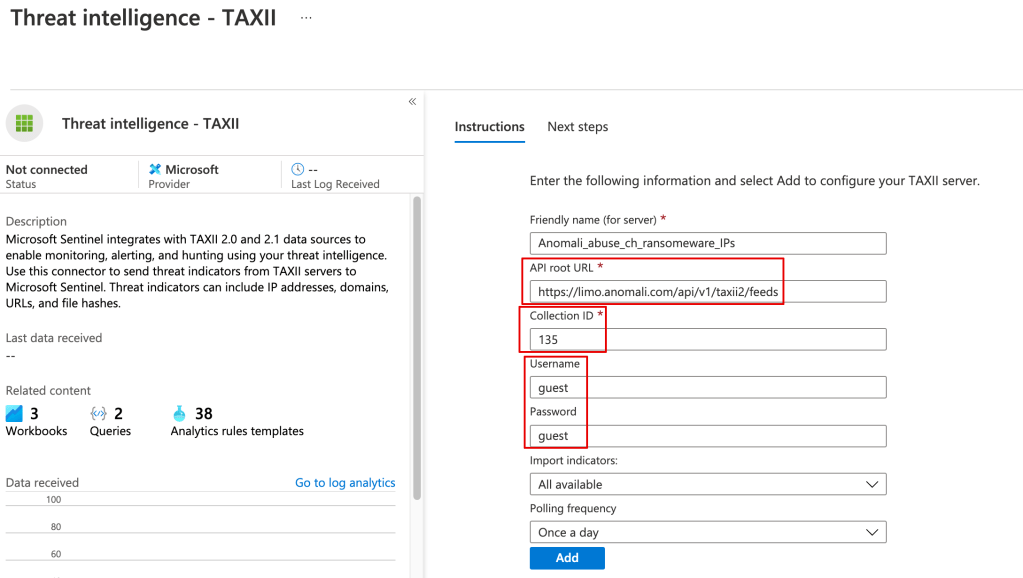
Once the threat data is loaded you can use it in your alerting and kql searches, eg:
ThreatIntelligenceIndicator| where NetworkIP != “”
The Hard(er) Way
You can pull in the TI data from Anomali or any other TAXII server using a playbook.
Although there’s a learning curve around using playbooks (Logic Apps), they’ve very powerful, and you can do things like filter out undesired data from your TI feed before it’s stored in Sentinel.
Here’s a great example:
 Simple-Security