Russia/Ukraine: Creating a ‘Situational Awareness’ Dashboard

Monitoring an adversary’s movements as it relates to your organization.

Your SIEM likely contains a great deal of information which can be mapped by country. That’s all you need to get started with a dashboard to see at a high level how those countries – or adversaries – are affecting your organization’s security posture.

Start with creating dashboards for the following, using Russia as an example:

  • outside > in: top destination IPs/domains FROM Russia
  • inside > out: top ip/domain sources TO Russia
  • users associated with any Russian IPs/domains.
  • asset mapping by criticality associated with Russian IPs (this asset list is likely something you’d have to build, but hopefully you’re already maintaining a good asset list)
  • timeline graph – all activity from all sources by volume over time associated with Russian IPs/domains

Some SIEMs are better than others with mapping IPs/domains to a country.
Here’s a query example for doing it in Microsoft Sentinel on WAF events using a geoip reference table:

let geoData =
materialize (externaldata(network:string,geoname_id:string,continent_code:string,continent_name:string,
country_iso_code:string,country_name:string,is_anonymous_proxy:string,is_satellite_provider:string)
[@"https://raw.githubusercontent.com/datasets/geoip2-ipv4/master/data/geoip2-ipv4.csv"] with
(ignoreFirstRecord=true, format="csv"));
let lookup = toscalar( geoData | summarize list_CIDR=make_set(network) );
AzureDiagnostics
| where Category contains "ApplicationGateway"
| where Message contains "Inbound Anomaly Score Exceeded"
|summarize by clientIp_s
| mv-apply list_CIDR=lookup to typeof(string) on
(
where ipv4_is_match (clientIp_s, list_CIDR) //== false
)
| join kind=rightouter (AzureDiagnostics | where TimeGenerated > ago(7d)) on clientIp_s
| join kind=leftouter
(
geoData
) on $left.list_CIDR == $right.network
|summarize count() by clientIp_s, country_name, hostname_s
|where clientIp_s <> ""
|order by count_ desc
| where country_name == "Russia"
| where count_ >= 10

Next, research past history from attackers in that country. Go to Mitre’s ATT&CK site and search for the attack groups of interest:
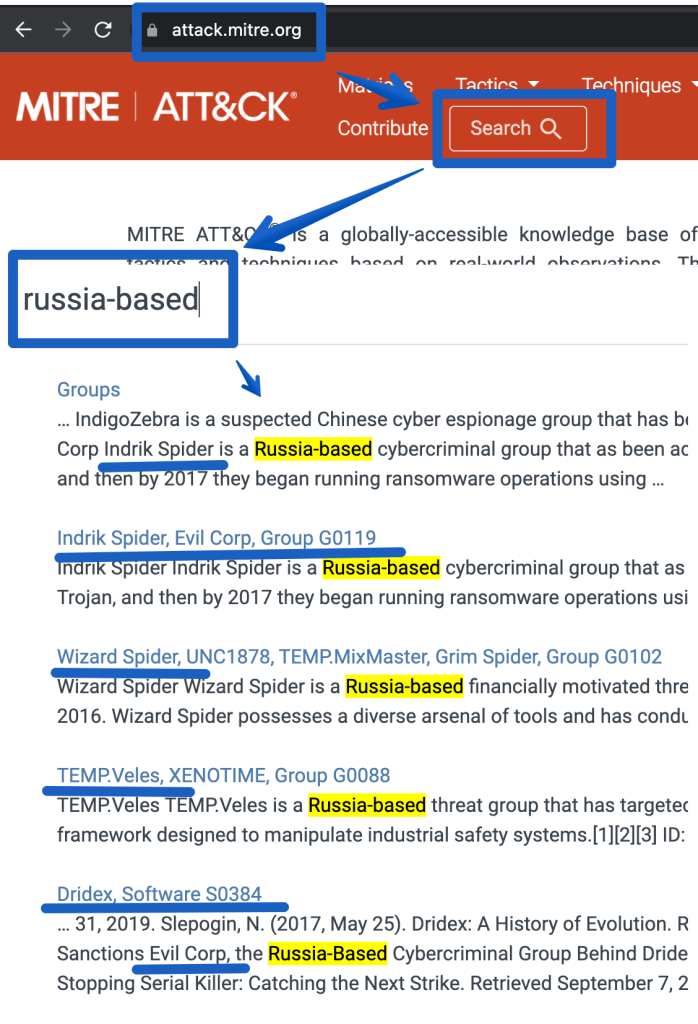
That provides the following references.

https://attack.mitre.org/groups/G0007 (APT28)
https://attack.mitre.org/groups/G0074 (Dragonfly 2.0)
https://attack.mitre.org/groups/G0016 (APT29)
https://attack.mitre.org/groups/G0119 (Indrik Spider, Evil Corp)
https://attack.mitre.org/groups/G0133 (Nomadic Octopus)
https://attack.mitre.org/groups/G0034 (Sandworm)
https://attack.mitre.org/groups/G0088 (Temp.veles)
https://attack.mitre.org/groups/G0010 (Turla)
https://attack.mitre.org/groups/G0053 (FIN5)
https://attack.mitre.org/groups/G0102 (Wizard Spider)

The next step would be to go deeper and identify ‘entities’ that are specific to using these attacks, such as:

  • IP/domains from threat intel feeds
  • attacks/techniques that map to the above attack groups in the ATT&CK matrix. Click on the links above to see more details.
    (eg. T1059 – powershell scripting using Empire)
  • malware/endpoint (EDR) and network detections (proxy/nids/firewall) specific to the ATT&CK groups listed above. Many of these tools support ATT&CK mappings so with some luck you just have to create a list of the Mitre Technique numbers (eg. T1059) and you’re off.
  • Use the information above to create SIEM correlations. Add these alerts to your workbook/dashboard to show near real time detections as they are seen. Example correlations may include:
    • events mapping to a threat intel feed related to the adversaries in question
    • alerts related to 4 or more distinct Mitre Techniques in question.
    • EDR/IDS events mapping to the adversaries in question
    • malware NOT cleaned AND traffic to Russia or a known-bad-ip for the past 15 minutes.
    • SOAR example: create a playbook to map all alerts to APTs and TAG them as ‘MITRE APT: Russia’ use threat intel for the logic or another detection method)
  • Add metrics to your dashboard for management to see MTTD/MTTR (mean time to detect/respond).

Peace to all.

More Ukraine related information intelligence:

https://github.com/Orange-Cyberdefense/russia-ukraine_IOCs
https://github.com/curated-intel/Ukraine-Cyber-Operations

https://www.mandiant.com/resources/apt-groups

https://www.mandiant.com/resources/insights/ukraine-crisis-resource-center

Some more KQL queries to try:

Alerts by IP:
-----------
let IP_Data = external_data(network:string,geoname_id:long,continent_code:string,continent_name:string ,country_iso_code:string,    country_name:string,is_anonymous_proxy:bool,is_satellite_provider:bool)
    ['https://raw.githubusercontent.com/datasets/geoip2-ipv4/master/data/geoip2-ipv4.csv']
    with (ignoreFirstRecord=true, format="csv");
SecurityAlert
| where TimeGenerated > ago(120h)
| extend AlertEntities = parse_json(Entities)
| mv-expand AlertEntities
| extend IPAddress = tostring(AlertEntities.Address)
| summarize count() by IPAddress
| where isnotempty(IPAddress)
| evaluate ipv4_lookup(IP_Data, IPAddress, network)
//| where country_name != "United States"
| where country_name == "Russia"
|project IPAddress, count_
|order by count_ desc
|render columnchart 
------------
Alerts timeline:
let IP_Data = external_data(network:string,geoname_id:long,continent_code:string,continent_name:string ,country_iso_code:string,    country_name:string,is_anonymous_proxy:bool,is_satellite_provider:bool)
    ['https://raw.githubusercontent.com/datasets/geoip2-ipv4/master/data/geoip2-ipv4.csv']
    with (ignoreFirstRecord=true, format="csv");
SecurityAlert
| where TimeGenerated > ago(120h)
| extend AlertEntities = parse_json(Entities)
| mv-expand AlertEntities
| extend IPAddress = tostring(AlertEntities.Address)
| summarize count() by IPAddress, DisplayName, ProviderName, bin(TimeGenerated, 1h)
| where isnotempty(IPAddress)
| evaluate ipv4_lookup(IP_Data, IPAddress, network)
| where country_name != "United States"
//|project TimeGenerated, country_name, IPAddress, ProviderName, DisplayName
| where country_name == "Russia"
//|project IPAddress, DisplayName,ProviderName, count_
//|order by count_ desc
|render timechart 
--------------
Malicious traffic: Malicious domain and port (syslog data)
CommonSecurityLog
| extend  Country=MaliciousIPCountry
|where TimeGenerated >ago(7d)
|where Country == "Russia"
|where DestinationIP == ""
//|extend HostPort = strcat(DestinationHostName, "-port-", DestinationPort)
|summarize count() by DestinationHostName, DestinationPort
|order by count_ desc 
-------------
Top Malicious IPs (syslog data)
CommonSecurityLog
| extend  Country=MaliciousIPCountry
|where TimeGenerated >ago(7d)
|where Country == "Russia"
|where DestinationIP == ""
|summarize count() by MaliciousIP
|order by count_ desc
|limit 10
-------------
Destination IPs by Count (CommonSecurityLog)
let IP_Data = external_data(network:string,geoname_id:long,continent_code:string,continent_name:string ,country_iso_code:string,    country_name:string,is_anonymous_proxy:bool,is_satellite_provider:bool)
    ['https://raw.githubusercontent.com/datasets/geoip2-ipv4/master/data/geoip2-ipv4.csv']
    with (ignoreFirstRecord=true, format="csv");
CommonSecurityLog
| where TimeGenerated > ago(1h)
| where DestinationIP !startswith "192."
| where DestinationIP !startswith "10."
| where DestinationIP !startswith "127."
| where DestinationIP !startswith "171."
| summarize count() by SourceIP, DestinationIP, DestinationPort, SimplifiedDeviceAction, DeviceVendor, bin(TimeGenerated, 1h)
| where isnotempty(SourceIP)
| evaluate ipv4_lookup(IP_Data, SourceIP, network)
| where country_name != "United States"
//|project TimeGenerated, country_name, IPAddress, ProviderName, DisplayName
| where country_name == "Russia"
|summarize count() by SourceIP
|render columnchart 
-----------
Palo Alto - Threat events by country
let IP_Data = 
    external_data(network:string,geoname_id:long,continent_code:string,continent_name:string ,country_iso_code:string,    country_name:string,is_anonymous_proxy:bool,is_satellite_provider:bool)
    ['https://raw.githubusercontent.com/datasets/geoip2-ipv4/master/data/geoip2-ipv4.csv']
    with (ignoreFirstRecord=true, format="csv");
CommonSecurityLog
| where TimeGenerated > ago(1d)
| where DestinationIP !startswith "192."
| where DestinationIP !startswith "10."
| where DestinationIP !startswith "127."
| where DestinationIP !startswith "171."
| where DeviceVendor == "Palo Alto Networks"
| where Activity == "THREAT"
//| summarize count() by SourceIP, DestinationIP, DestinationPort, ApplicationProtocol, Activity, SimplifiedDeviceAction, DeviceVendor, Message, RequestURL,FlexString2,bin(TimeGenerated, 1h)
//| where isnotempty(SourceIP)
| evaluate ipv4_lookup(IP_Data, DestinationIP, network)
| where country_name != "United States"
//|project TimeGenerated, country_name, IPAddress, ProviderName, DisplayName
|summarize count() by country_name
|order by count_ desc 
|render columnchart 
-----------------
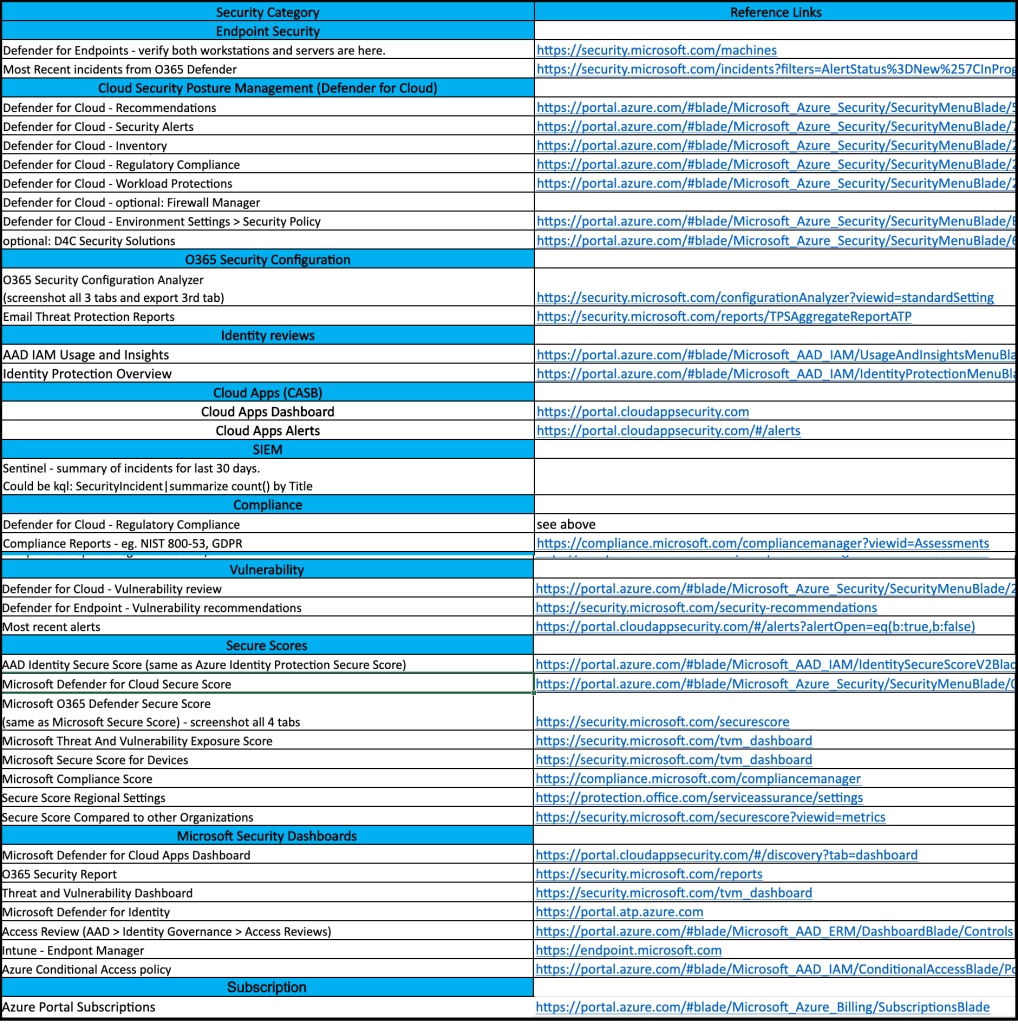
O365 and Azure Security Portal Reference Links

If you’re frequently involved with Microsoft security, it may be useful to maintain a list of the most common links.

If you’re a SOC analyst, some of these links will make good dashboards for your wall of 4k monitors.

If you’re a security engineer, this can be one of your checklists for walking around all things security related in the Microsoft cloud.

Since I don’t have any spreadsheet formatting plugins, the web links in the screenshot are listed below.

(This isn’t a comprehensive list of security related links, but something to grow on)

Reference Links

https://security.microsoft.com/machines https://security.microsoft.com/incidents?filters=AlertStatus%3DNew%257CInProgress https://portal.azure.com/#blade/Microsoft_Azure_Security/SecurityMenuBlade/5 https://portal.azure.com/#blade/Microsoft_Azure_Security/SecurityMenuBlade/7 https://portal.azure.com/#blade/Microsoft_Azure_Security/SecurityMenuBlade/25 https://portal.azure.com/#blade/Microsoft_Azure_Security/SecurityMenuBlade/22 https://portal.azure.com/#blade/Microsoft_Azure_Security/SecurityMenuBlade/26 https://portal.azure.com/#blade/Microsoft_Azure_Security/SecurityMenuBlade/EnvironmentSettings https://portal.azure.com/#blade/Microsoft_Azure_Security/SecurityMenuBlade/6 https://security.microsoft.com/configurationAnalyzer?viewid=standardSetting https://security.microsoft.com/reports/TPSAggregateReportATP https://portal.azure.com/#blade/Microsoft_AAD_IAM/UsageAndInsightsMenuBlade/Azure%20AD%20application%20activity https://portal.azure.com/#blade/Microsoft_AAD_IAM/IdentityProtectionMenuBlade/Overview https://portal.cloudappsecurity.com https://portal.cloudappsecurity.com/#/alerts https://compliance.microsoft.com/compliancemanager?viewid=Assessments https://portal.azure.com/#blade/Microsoft_Azure_Security/SecurityMenuBlade/26 https://security.microsoft.com/security-recommendations https://portal.cloudappsecurity.com/#/alerts?alertOpen=eq(b:true,b:false) https://portal.azure.com/#blade/Microsoft_AAD_IAM/IdentitySecureScoreV2Blade https://portal.azure.com/#blade/Microsoft_Azure_Security/SecurityMenuBlade/0 https://security.microsoft.com/securescore https://security.microsoft.com/tvm_dashboard https://compliance.microsoft.com/compliancemanager https://protection.office.com/serviceassurance/settings https://security.microsoft.com/securescore?viewid=metrics https://portal.cloudappsecurity.com/#/discovery?tab=dashboard https://security.microsoft.com/reports https://security.microsoft.com/tvm_dashboard https://portal.atp.azure.com https://portal.azure.com/#blade/Microsoft_AAD_ERM/DashboardBlade/Controls https://endpoint.microsoft.com https://portal.azure.com/#blade/Microsoft_AAD_IAM/ConditionalAccessBlade/Policies https://portal.azure.com/#blade/Microsoft_Azure_Billing/SubscriptionsBlade

Cloud Security – Who’s Responsible?

If you manage a single cloud tenant with a single subscription, roles and responsibilities for security can usually be maintained by a small SecOps team.

But if your organization has dozens or hundreds of departments, the need for a much more hierarchical structure can quickly become difficult for a single security team to maintain control over.

So what can happen is departments are handed over the role of the security administrator for their own resources and users.

And before you know it, SecOps has lost control of who’s making changes to what.

Fear not, this isn’t a terrible thing, but it’s important to put checks in place to ensure simple practices are being followed.

One approach:

  • Perform a security audit that provides a list of the security categories of interest. (This audit should provide both high level and lower level topics, so you can easily end up with hundreds of checks). Example high level topics:
    • Identity & Access Controls
    • Logging, Monitoring and Reporting
    • Data Protection
    • Network Security
    • Endpoint Protection
    • Inventory Management
    • Configuration Management
    • Vulnerability Management
  • Create a list of relevant security checks from the above audit (this checklist is much shorter than the original security audit, since these departmental security admins have a much smaller list of security responsibilities).
  • Identify a security owner for each relevant department/group
  • Require each security owner to perform periodic checks and report back to the SecOps team.

Not only does the above approach provide clear security checks/responsibilities to the security owners, but it gives the SecOps team a way to track security in a growing organization without getting overwhelmed. It also ensures that as security owners come and go from the organization, that the new owners will be quickly identified by the SecOps team, thus avoiding gaps in maintaining security controls.

KQL Challenge Solutions

Challenge #1; Create a query that uses a watchlist

let attack=_GetWatchlist(‘attack’);
SecurityAlert
|extend Severity = “T1040”
|join attack on $left.Severity == $right.Tactic
|distinct Defense

Challenge #2: Create a timechart based query

Event
| where Source == “Microsoft-Windows-Sysmon”
|where EventID <> 255
| where TimeGenerated >= ago(180d)
| summarize count() by bin(TimeGenerated, 1d)
|render columnchart

Chalenge #3: use mv-expand to view the entities fields

SecurityAlert
| extend Entities = iff(isempty(Entities), todynamic(‘[{“dummy” : “”}]’), todynamic(Entities))
|mv-expand Entities
|extend HostName_ = tostring(Entities.HostName)
|where HostName_ <> “”
|where HostName_ contains “{Hostname}”
|project HostName_

Bonus challenge: use GeoIP to map to country

“let IP_Data = external_data(network:string,geoname_id:long,continent_code:string,continent_name:string ,country_iso_code:string,country_name:string,is_anonymous_proxy:bool,is_satellite_provider:bool)
[‘https://raw.githubusercontent.com/datasets/geoip2-ipv4/master/data/geoip2-ipv4.csv’%5D;
let IPs =
CommonSecurityLog
|where DeviceVendor == “”Fortinet””
//filter out private networks
|where not(ipv4_is_private(SourceIP)) and not(ipv4_is_private(DestinationIP))
|summarize by SourceIP
;
IPs
| evaluate ipv4_lookup(IP_Data, SourceIP, network, return_unmatched = true)”

Learning KQL for Azure Sentinel

One of the first skills to acquire when learning a SIEM is it’s query language.

Microsoft Sentinel (and many of Microsoft’s tools) use KQL – Kusto Query Language.

If you want to learn more about what KQL is, go here.

This blog is simply a super quick reference for getting started.

  • Step #1: Open the lab link below
  • Step #2: Watch the 3 tutorials listed below
  • Step #3: Practice! 3 kql challenges are provided. One possible solution to these challenges will be provided on another blog page.

https://aka.ms/lademo

Azure Sentinel webinar: Learn the KQL you need for Azure Sentinel (Part 1 of 3)

Azure Sentinel webinar: KQL part 2 of 3 – KQL hands-on lab exercises

Azure Sentinel webinar: KQL part 3 of 3 – Optimizing Azure Sentinel KQL queries performance

KQL Query Challenges

Challenge #1; Create a query that uses a watchlist

Challenge #2: Create a timechart based query

Challenge #3: use mv-expand to view the entities fields

Bonus challenge: use GeoIP to map to country

Solutions are here

Simple Guide to Cyber Resiliency in Azure/O365

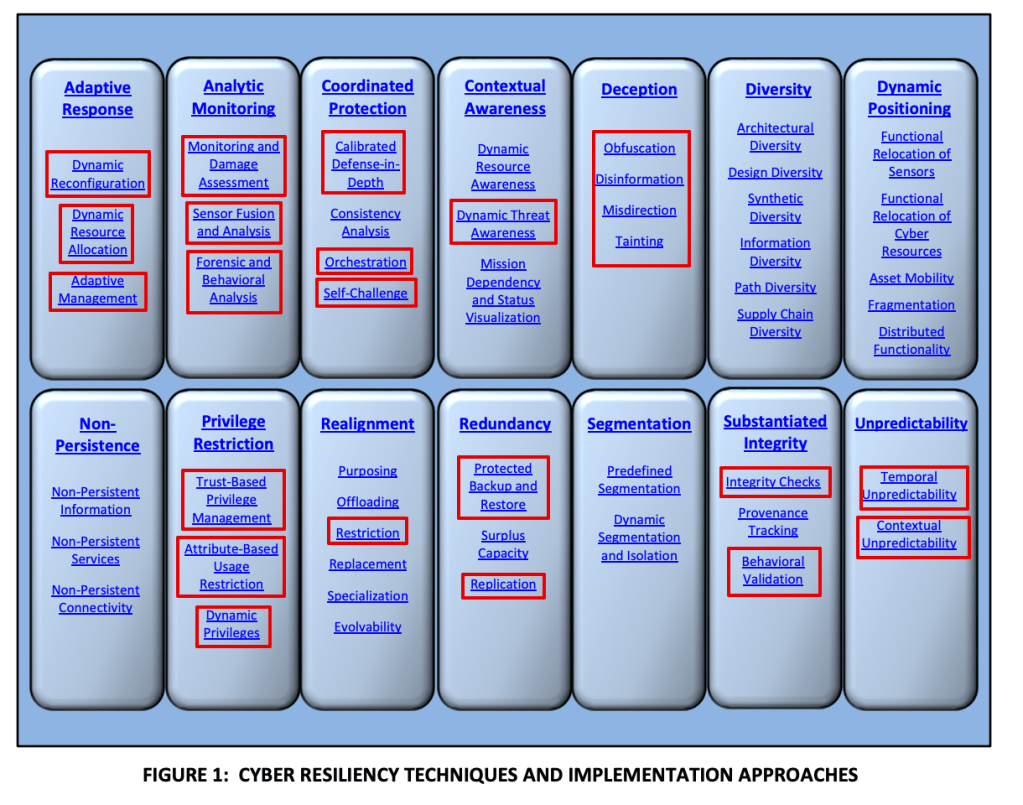
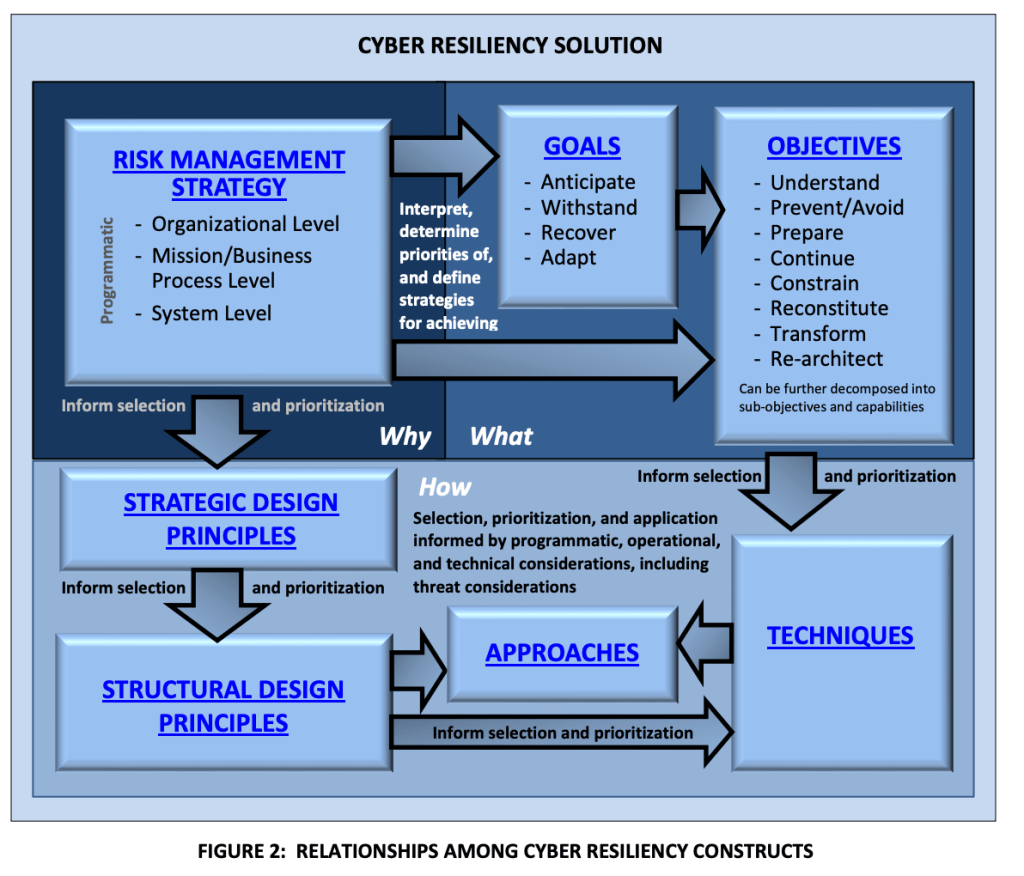
So I skimmed NIST 800-160 V2 – it’s all about ‘Cyber Resiliency’.

What is cyber resiliency?

“The ability to deliver an intended outcome, despite adverse cyber events”

My thoughts on NIST 800-160 vol 2:

Once you understand the basics you might consider these points as a starting approach:

Perform a ‘cyber resilience maturity audit’

Using 800-160 V2 create a checklist to discuss and better understand your organization’s maturity around cyber resiliency.

Identify security tools to enable and improve on your cyber resiliency, eg:

Microsoft Defender for Cloud – Use the built in NIST regulatory standsards to enforce configuration of resources with resilience – eg. don’t allow VMs without backups enabled and redundancy features configured.

O365 Compliance Manager – Create assessments using the NIST templates to identify misconfigurations.

Microsoft Secure Scores – use the several available Secure Scores in O365 and Azure to improve security posture.

Sentinel – Configure alerts to monitor resiliency related issues.

Some more references

High level objectives:

Areas in red can be monitored using Sentinel and Defender for Cloud (and possibly more, just what I know about):

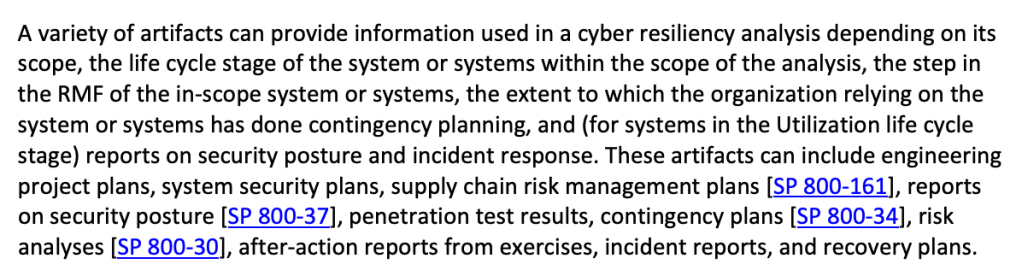
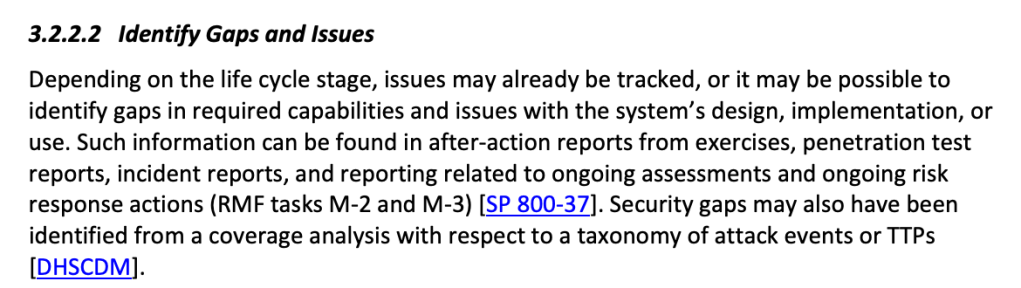
Here is where 800-160 refers to other NIST controls, some of which are templates within Defender for cloud and O365 Compliance Manager (800-70 and 800-37 are premium templates so extra $$):

References

CSF – general cyber security framework

https://www.nist.gov/cyberframework/framework

800-53 – Security and Privacy Controls for Federal Information Systems and Organizations

800-171 – information protection

800-160 – Cyber Resiliency

Troubleshooting CEF syslog feeding up to Microsoft Sentinel

There are some excellent tips on testing CEF logs here.

https://techcommunity.microsoft.com/t5/microsoft-sentinel-blog/ingest-sample-cef-data-into-azure-sentinel/ba-p/1064158

I’d suggest:

Run this command as a validation test:

logger -p local4.warn -t CEF “CEF:0|Microsoft|ATA|1.9.0.0|AbnormalSensitiveGroupMembershipChangeSuspiciousActivity|Abnormal modification of sensitive groups|5|start=2018-12-12T18:52:58.0000000Z app=GroupMembershipChangeEvent suser=krbtgt msg=krbtgt has uncharacteristically modified sensitive group memberships. externalId=2024 cs1Label=url cs1=https://192.168.0.220/suspiciousActivity/5c113d028ca1ec1250ca0491

Then replace the sample log with your own and see if it also gets through.

Also verify that if you remove your rsyslog CEF filter that the logs at least get to syslog. If they do, then it’s possible this is an unsupported CEF format. Which isn’t terrible because you can still parse the logs using KQL.

To check if your logs are event getting to your syslog server use tcpdump eg:
tcpdump -i any port syslog -A -s0 -nn

And note that you could be seeing your logs with the above tcpdump command but they’re still not getting to Sentinel. In that case check if the local firewall rules are blocking syslog.

If you find out it’s an unsupported CEF format it’s still possible to fix but it likely involves regex changes to the rsyslog configuration in security_events.conf or elsewhere. (see reference below).

Reference:
https://docs.microsoft.com/en-us/azure/sentinel/troubleshooting-cef-syslog?tabs=rsyslog

Super Simple SIEM Use Case Guide

Here are some very practical suggestions on the basic steps needed to develop SIEM related use cases.

Also see: part 2 and part 3

  • Create a list of all your available logs (see ‘next step’ below for a long list of suggested logs)
  • Configure your SIEM to collect those logs.
  • Create your ‘use cases’, with whatever tools you have in your SIEM.
  • Note that all logs are not created equal. The type of log will determine the options for the use cases. Generally speaking you’ll find the following types of logs in your environment.
  1. login activity
  2. configuration changes
  3. errors
  4. network traffic
  5. threats
  • Before considering correlations/alerts, create search queries to validate what information exists in the logs. Here’s a high level list of search queries to make for most log sources:
  1. AUDIT – Basic queries that present the most important fields in the log. eg: date,username, source, destination, action
  2. HUNT – More advanced queries designed to search for a specific pattern, eg. login denies, high severity intrusions
  3. INVESTIGATE – Queries to search for more details on a given ‘entity’ – eg. search all events for a given username or hostname.


Here’s a good range of detections that any SIEM should have:

Use Case Examples
  • Endpoint Detections (EDR logs – endpoint detect and response)
  • Network Intrusion Detections
  • DNS threats (eg. Cobalt Strike Beacon Detection to known IPs)
  • Firewall threats (eg. high rate of denies by source, destination)
  • Unauthorized Changes (to roles, resources, assets, etc)
  • Policy Violations (eg. detected those detected by Microsoft Defender for Cloud)
  • Suspicious/Risky User Activity (eg. Defender for Identity agent on Domain Controllers)
  • Threat Intelligence (eg. outbound traffic to known bad IP)
  • Endpoint and Identity alerts on sensitive assets (eg. maintain a list of sensitive/critical assets)
  • Alerts for sensitive users (maintain a list of sensitive/critical/privileged users)
  • Command and Control alerts (from EDR logs)
  • Lateral Movement alerts (Threat based alerts like EDR and unusual traffic across network zones – eg. port scan from workstation zone to server zone)
Next Step Suggestions
  • Apply ‘meta’ information to your use cases by creating lists of information such as:
    • Administrators
    • Privileged Users
    • Critical Assets
    • Risky users
  • Identify gaps in your log collection, based on a ‘master list’ of desired log sources, acquire these missing sources and build more use cases to improve your attack surface monitoring.

Example log source gap list:

5G Wireless WAN
App
App Gateway
Application/COTS/Custom
AV/Anti-Malware
Call Management
CASB
Cloud Audit
Cloud Infrastructure Security
Cloud Resource Management
Data Management (Labeling & Protection)
Database
Database Monitoring
DDoS
Decoy
DHCP
Diagnostics & Monitoring
DLP
DNS
DNS Security
eCommerce
EDR
Email Protection
Email Server/Mail gateway
Enterprise Risk / Data Lake
External/Internal TI Feed
Fiber Switch
File Integrity Monitor (FIM)
Firewall/IDS
Honeypot
Identity & SSO
Identity Management
Identity Protection
IoT
Key Storage
Load Balancer/VPN
MDM
NAC
NetFlow
Network Traffic
NIDS
NIDS/NIPS
Privileged Access Management (PAM)
Remote Access and VPN
Router/Switch
SaaS
SAN
Security Configuration Management
Servers
Streaming Data Storage (Revenue Accounting)
System (OS)
UBA/Threat Analytics
Virtual Machines
Vulnerability scanner
WAF
WAF/Web Proxy/Web Content Filtering
Web
WebApp Scanner
Wireless Access
WirelessLAN

Need more ideas?

Simply search for ‘siem use cases’ and you’ll likely find a lot.

Some suggestions:

blueteamblog.com/siem-use-case-writing-guide

Microsoft Sentinel Analytic Rules